Smartdown 
Smartdown is an external DSL for representing a series of questions and logical rules which determine the order in which the questions are asked, according to user input.
The language is designed to look like Markdown, with some extensions to allow expression of logical rules, questions and conditional blocks of text.
It's a work-in-progress so some of the features described in this readme haven't been implemented yet. These are indicated with (tbd).
Overview
A single smartdown flow has a cover sheet, a set of questions, a set of outcomes and a set of test scenarios. Cover sheets, questions and outcomes are all types of node. A node represents a single user interaction (normally a web page, but in other media may be presented differently).
Each question and outcome is held in a separate file. The name of the files are used to identify each question. Here's an example of the check-uk-visa flow:
-- check-uk-visa
|-- outcomes
| |-- general_y.txt
| |-- joining_family_m.txt
| |-- joining_family_y.txt
| |-- marriage.txt
| |-- medical_n.txt
| |-- medical_y.txt
| `-- ...
|-- scenarios
| |-- 1.test
| |-- 2.test
| `-- 3.test
|-- questions
| |-- planning_to_leave_airport.txt
| |-- purpose_of_visit.txt
| |-- .txt
| |-- what_passport_do_you_have.txt
`-- check-uk-visa.txt
General node file syntax
Each file has three parts: front-matter, a model definition, rules/logic. Only the model definition is required.
- front-matter defines metadata in the form
property: value. Note: this does not support full YAML syntax. - the *model definition is a markdown-like block which defines a flow, question or outcome.
- rules/logic defines 'next node' transition rules or other logic/predicate definitions
Cover sheet node
The cover sheet starts the flow off, its filename should match the flow name, e.g. 'check-uk-visa.txt'.
It has initial 'front matter' which defines metadata for the flow. It then defines the copy for the cover sheet in markdown format. The h1 title is compulsory and used as the title for the smart answer.
A start button determines which question node is presented first.
meta_description: You may need a visa to come to the UK to visit, study or work.
satisfies_need: 100982

# Check if you need a UK visa

You may need a visa to come to the UK to visit, study or work.

[start_button: what_passport_do_you_have]
Question nodes
Question nodes follow the same standard structure outlined above.
Smartdown currently allows multiple questions to be defined per node, but this feature has only recently been introduced and may still change.
The next sections define the various question types available.
Note that at present only the 'choice' question type has been implemented. Unimplemented question types are marked with (tbd) in the heading. For these question types, consider this documentation to be a proposal of how they might work.
"Choice" questions (aka. radio buttons)
A choice question allows the user to select a single option from a list of choices.
## Will you pass through UK Border Control?

You might pass through UK Border Control even if you don't leave the airport -
eg your bags aren't checked through and you need to collect them before transferring
to your outbound flight.

[choice: uk_border_control]
* yes: Yes
* no: No
Country (tbd)
## What passport do you have?

[country: passport_country]
Presents a drop-down list of countries from the built-in list.
Use front matter to exclude/include countries
---
passport_country:
  exclude_countries: country1, country2
  include_countries: {country3: "Country 3", country4: "Country 4"}
---

## What passport do you have?

[country: passport_country]
Date
## What is the baby’s due date?

[date: baby_due_date]
Value (tbd)
[value]
Asks for an arbitrary text input.
Money (tbd)
[money]
Asks for a numerical input which can have decimals and optional thousand-separating commas.
Salary
[salary: salary_value]
Checkbox (tbd)
## Will you pass through UK Border Control?

[checkbox: uk_border_control]
* [ ] yes: Yes
* [ ] no: No
Next steps
Markdown to be displayed as part of an outcome to direct the users to other information of potential interest to them.
[next_steps]
* Any kind of markdown
[A link](https://gov.uk/somewhere)
[end_next_steps]
Next node rules
Logical rules for transitioning to the next node are defined in 'Next node' section. This is declared using a markdown h1 'Next node'.
There are two constructs for defining rules:
# Next node

* predicate => outcome
defines a conditional transition
# Next node

* reddish?
  * yellowish? => orange
  * blueish? => purple
defines nested rules.
In the example above the node orange would be selected if both reddish? and yellowish? were true.
Predicates
As well as 'named' predicates which might be defined by a plugin or other mechanism, there's also a basic expression language for predicates.
The currently supported operations are:
variable_name is 'string'
variable_name in {this that the-other}
Date comparison predicates (tbd)
date_variable_name >= '14/07/2014'
date_variable_name < '14/07/2014'
Processing model
Each response to a question is assigned to a variable which corresponds to the question name (as determined by the filename).
Conditional blocks in outcomes
The syntax is:
$IF pred?

Text if true

more text if you like

$ENDIF
You can also have an else clause:
$IF pred?

Text if true

$ELSE

Text if false

$ENDIF
It's required to have a blank line between each if statement and the next paragraph of text, in other words this would be invalid:
$IF pred?
Text if true
$ENDIF
Interpolation
It's possible to interpolate values from calculations, responses to questions, plugins etc.
Interpolations are currently supported into headings and paragraphs using the following syntax:
# State pension age calculation for %{name}

Your state pension age is %{state_pension_age}.
Named predicates (tbd)
Named predicates
Plugin API (tbd)
A plugin API will be provided to allow more complex calculations to be defined in an external ruby class.
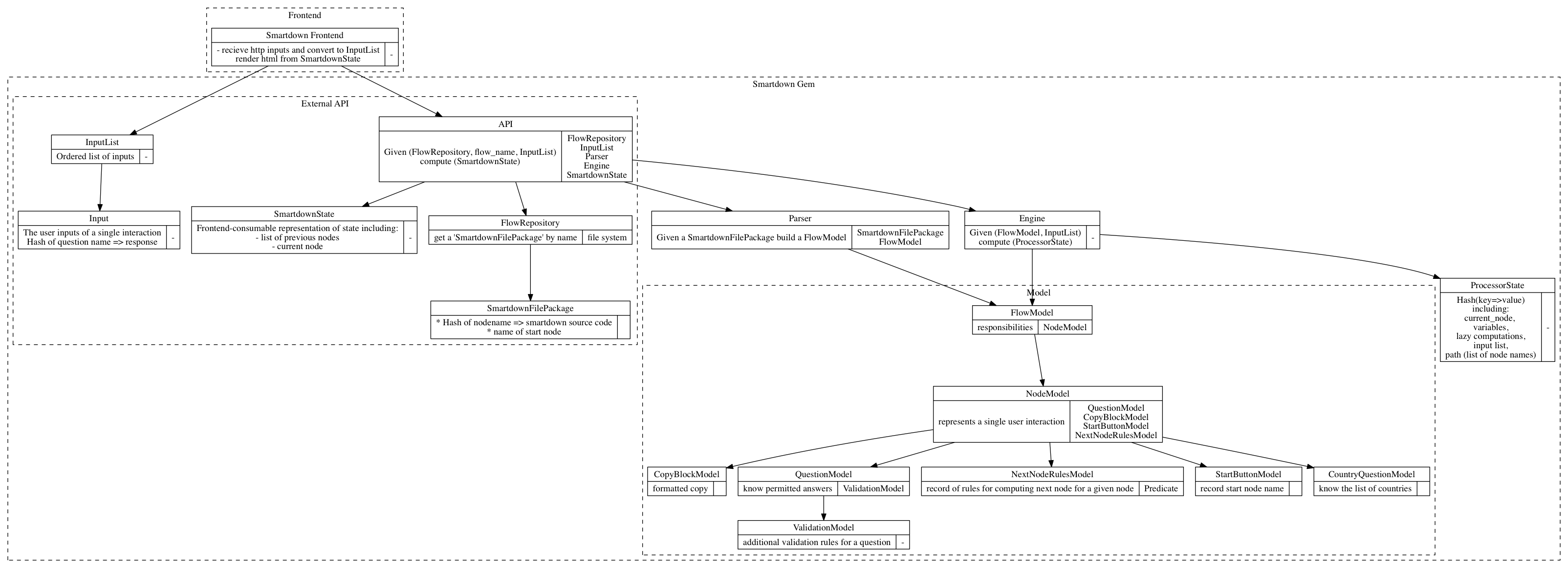
Software design
The software design can be seen in this diagram: