

puma-ngrok-tunnel
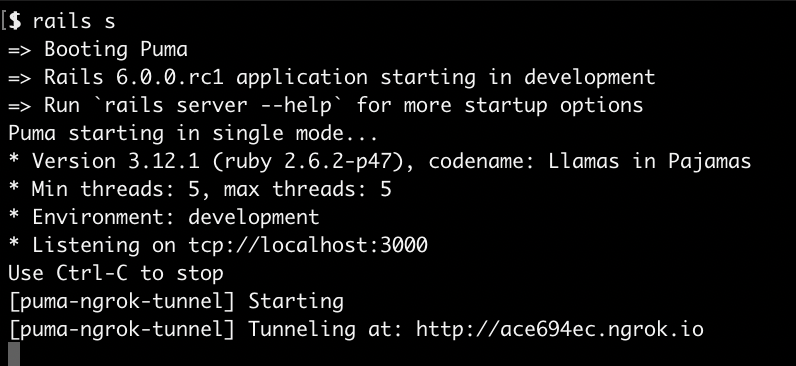
A plugin for puma that'll start a ngrok tunnel to your rails server when puma starts. Primary I built this to make the following a little easier:
* Working with apps that require Webhooks to be received by the app to work correctly
* Demoing your local rails app to someone else without have to share IPs
* Working with [Puma-dev](https://github.com/puma/puma-dev/) so your apps feels as production-like as possible.
* Testing on mobile.
I've setup a sample Rails 6 app that demos an implementation of this gem.
Installation
Make sure you have installed ngrok on your machine:
brew tap caskroom/cask
brew cask install ngrok
Add this line to your application's Gemfile:
group :development do
  gem 'puma-ngrok-tunnel'
end
And then execute:
bundle
Lastly in your config/puma.rb file, append the line:
plugin :ngrok_tunnel if ENV.fetch('RAILS_ENV') { 'development' } == 'development'
Usage
Read about how to configure puma to use this in the Puma documentation.
There are a few variables this plugin reads from the environment which control its behavior. These are based on the arguments you'd pass to the ngrok terminal command.
* `PORT` - Optional, your rails port, defaults to `3000`. If `NGROK_ADDR` is set, this is ignored.
* `NGROK_ADDR` - Optional, if you're using Puma-dev set this to be your hostname & port, e.g. `my-app-name.test:443`.
* `NGROK_AUTHTOKEN` - Optional, your ngrok authtoken. If you have ngrok configured on your local machine you don't need this.
* `NGROK_HOST_HEADER` - Optional, if you're using Puma-dev you should set this to your virtual host e.g. `my-app-name.test`.
* `NGROK_CONFIG` - Optional, your ngrok configuration file location, defaults to `~/.ngrok2/ngrok.yml`.
* `NGROK_SUBDOMAIN` - Optional, ngrok will assign you a random subdomain unless this is set.
* `NGROK_REGION` - Optional, the region of your ngrok tunnel. defaults to `us`.
* `NGROK_HOSTNAME` - Optional, full ngrok hostname, shouldn't be set if `NGROK_SUBDOMAIN` is set.
Sample .env for use with rails s
# puma-ngrok-tunnel setup
# You need https://github.com/bkeepers/dotenv setup to make sure Puma can use these.
export NGROK_TUNNEL_ENABLED=true
export NGROK_SUBDOMAIN=my-app-name
export NGROK_REGION=eu
Sample .env for use with Puma-dev
# Puma-dev: You need to define this otherwise it uses it's own puma.rb file.
CONFIG=config/puma.rb

# puma-ngrok-tunnel setup
# These should start with 'export' otherwise puma-dev won't use them.
export NGROK_SUBDOMAIN=my-app-name
export NGROK_REGION=eu
# The URL (and HTTPS Port) you might use to access this under Puma-dev
export NGROK_ADDR=my-app-name.test:443
export NGROK_HOST_HEADER=my-app-name.test
Pitfalls & solutions
ngrok tunnel not always stopping when puma-dev stops
If you see an error saying http: proxy error: dial unix, it means ngrok was able to stop when puma was stopped. Right now the solution is to run:
pkill ngrok
in your terminal.
Rails 6 "Blocked host" error
If you seeing an error like:
Blocked host: a620ba29.ngrok.io
To allow requests to a620ba29.ngrok.io, add the following to your environment configuration:
config.hosts << "a620ba29.ngrok.io"
Open your config/environments/development.rb file add add:
# Whitelist ngrok connections to development enviroment.
config.hosts << /[a-z0-9]+\.ngrok\.io/
# Whitelist Puma-Dev hostname.
config.hosts << 'samplerailsapp.test'
config.hosts << /[a-z0-9]+\.samplerailsapp.test/
This will whitelist the ngrok subdomain to access your rails host.
License
The gem is available as open source under the terms of the MIT License.