Pimon


Description
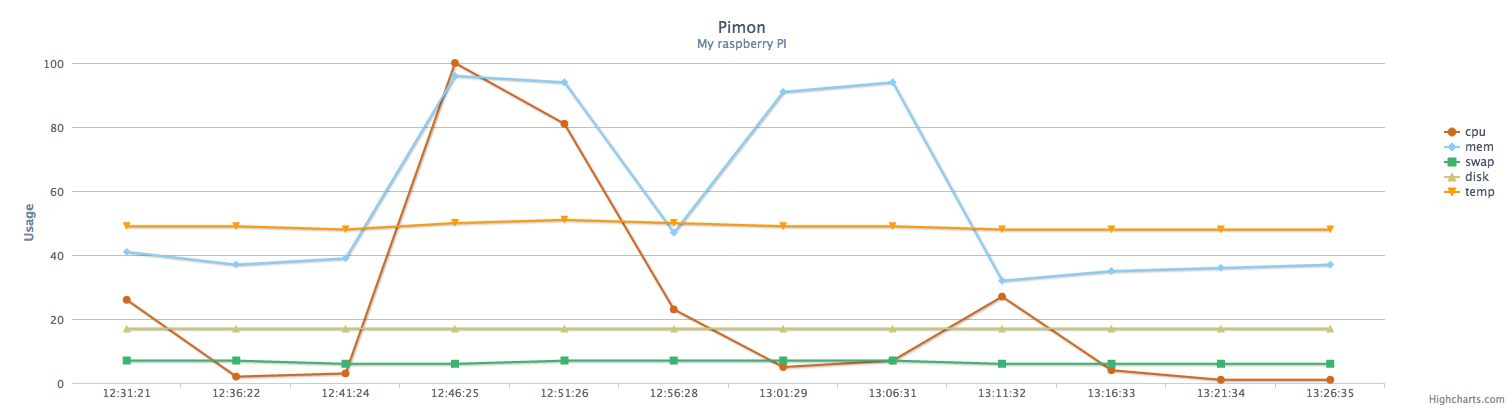
Pimon is a simple server monitor designed for the Raspberry Pi. It uses redis lists to keep the latest observed statistics and also uses highcharts to display some nice charts on your web browser.
What do I need to get it to work?
- Clone this repo: git clone git://github.com/pedrocarrico/pimon.git
- Install redis an configure it to run on a socket on /tmp/redis.sock
- bundle
- bin/pimon start # run the sinatra app
- go to http://localhost:3000 and PROFIT! Optionally you may install it as a gem and run it, please check "Installing as a gem" further down.
Configuration
Configuration is done through a YAML file, you may check some examples on the config directory.
- redis - location of the redis socket
- chart - colors for each chart
- queues - redis list names for the series in the charts
- stats_collector - configure number of stats and time period between them
Installing as a gem
gem install pimon
After installation just do pimon start and go to http://localhost:3000 and check your stats. If you want you may run Pimon with other options:
Usage: pimon start|stop []
Options:
-c, --config CONFIG YAML configuration file for pimon
-d, --daemonize Run Pimon daemonized in the background
-e, --environment ENVIRONMENT Application environment (default: "development", options: "development", "production")
-i, --interface INTERFACE Hostname or IP address of the interface to listen on (default: "localhost")
-p, --port PORT Port to use (default: 3000)
-P, --pid PIDFILE File to store PID (default: /tmp/pimon.pid)
(This will only work on your Raspberry Pi and perhaps some other linux distros, check the quirks section for more info).
Running tests
To run the coverage suite:
rake coverage:spec
Results will be in coverage/index.html directory.
Quirks
Pimon uses vmstat and free to collect it's stats from the operating system and these are only
available on operating systems that have the /proc filesystem.
So if you want to develop on a Mac you may use the mock implementations that are in the bin directory.
The mock implementations are programmed in C and mimic the output of vmstat and free.
They just change and generate some random values on the observed stats using /dev/urandom.
To use them you must first compile them using make and then include the bin directory of this project
in your $PATH to have them available when you run the sinatra application.
The temperature stat is only available with the latest Raspbian distro (2012-09-18) on your Raspberry Pi and will (may)
not work if you're developing on other systems.
Pimon only works with Ruby 1.9+, please refer to my blog for a way to install Ruby 1.9.3 on your Raspberry Pi.
Deployment with capistrano
To deploy on your raspberry pi you just have to have ssh enabled and your keys authorized.
Then you can deploy with capistrano using:
cap deploy:setup
cap deploy:cold
This will setup your raspberry pi and deploy the application.
The username and password for the basic_auth in the production environment will be asked in the
first deploy.
To start and stop the application you have the usual:
cap deploy:start
cap deploy:stop
I would recommend installing as a gem and tweak your own configuration file instead of deploying with capistrano as this feature will probably be discontinued in the future.
TODO
- Improve disk stats, have a way of having custom mount points
- Show uptime
- Change configuration in realtime
Copyright
Licensed under the WTFPL license.