Perfect Shape 0.3.5
Geometric Algorithms


PerfectShape is a collection of pure Ruby geometric algorithms that are mostly useful for GUI (Graphical User Interface) manipulation like checking containment of a mouse click point in popular geometry shapes such as rectangle, square, arc (open, chord, and pie), ellipse, circle, polygon, and paths containing lines, quadratic bézier curves, and cubic bezier curves (including both Ray Casting Algorithm, aka Even-odd Rule, and Winding Number Algorithm, aka Nonzero Rule).
Additionally, PerfectShape::Math contains some purely mathematical algorithms, like IEEE 754-1985 Remainder.
To ensure high accuracy, this library does all its mathematical operations with BigDecimal numbers.
Setup
Run:
gem install perfect-shape -v 0.3.5
Or include in Bundler Gemfile:
gem 'perfect-shape', '~> 0.3.5'
And, run:
bundle
API
PerfectShape::Math
Module
::degrees_to_radians(angle): converts degrees to radians::radians_to_degrees(angle): converts radians to degrees::normalize_degrees(angle): normalizes the specified angle into the range -180 to 180.::ieee_remainder(x, y)(alias:ieee754_remainder): IEEE 754-1985 Remainder (different from standard%modulo operator as it operates on floats and could return a negative result)
PerfectShape::Shape
Class
This is a base class for all shapes. It is not meant to be used directly. Subclasses implement/override its methods as needed.
#min_x: min x#min_y: min y#max_x: max x#max_y: max y#width: width#height: height#center_point: center point asArrayof[center_x, center_y]coordinates#center_x: center x#center_y: center y#bounding_box: bounding box is a rectangle with x = min x, y = min y, and width/height just as those of shape#==(other): Returnstrueif equal tootherorfalseotherwise#normalize_point(x_or_point, y = nil): normalizes point into anArrayof[x,y]coordinates#contain?(x_or_point, y=nil, outline: false, distance_tolerance: 0): checks if point is inside ifoutlineisfalseor if point is on the outline ifoutlineistrue.distance_tolerancecan be used as a fuzz factor whenoutlineistrue, for example, to help GUI users mouse-click-select a shape from its outline more successfully
PerfectShape::PointLocation
Module
#initialize(x: 0, y: 0): initializes a point location, usually representing the top-left point in a shape#x: top-left x#y: top-left y#min_x: min x (x by default)#min_y: min y (y by default)
PerfectShape::RectangularShape
Module
Includes PerfectShape::PointLocation
#initialize(x: 0, y: 0, width: 1, height: 1): initializes a rectangular shape#x: top-left x#y: top-left y#width: width#height: height#min_x: min x#min_y: min y#max_x: max x#max_y: max y
PerfectShape::Point
Class
Extends PerfectShape::Shape
Includes PerfectShape::PointLocation

Points are simply represented by an Array of [x,y] coordinates when used within other shapes, but when needing point-specific operations like point_distance, the PerfectShape::Point class can come in handy.
::point_distance(x, y, px, py): Returns the distance from a point to another point::new(x_or_point=nil, y_arg=nil, x: nil, y: nil): constructs a point with (x,y) pair (default: 0,0) whether specified asArrayof (x,y) pair, flatx,yargs, orx:, y:kwargs.#min_x: min x (always x)#min_y: min y (always y)#max_x: max x (always x)#max_y: max y (always y)#width: width (always 0)#height: height (always 0)#center_point: center point asArrayof[center_x, center_y]coordinates#center_x: center x (always x)#center_y: center y (always y)#bounding_box: bounding box is a rectangle with x = min x, y = min y, and width/height of shape#==(other): Returnstrueif equal tootherorfalseotherwise#contain?(x_or_point, y=nil, outline: true, distance_tolerance: 0): checks if point matches self, with a distance tolerance (0 by default). Distance tolerance provides a fuzz factor that for example enables GUI users to mouse-click-select a point shape more successfully.outlineoption makes no difference on point#point_distance(x_or_point, y=nil): Returns the distance from a point to another point
Example:
require 'perfect-shape'

shape = PerfectShape::Point.new(x: 200, y: 150)

shape.contain?(200, 150) # => true
shape.contain?([200, 150]) # => true
shape.contain?(200, 151) # => false
shape.contain?([200, 151]) # => false
shape.contain?(200, 151, distance_tolerance: 5) # => true
shape.contain?([200, 151], distance_tolerance: 5) # => true
PerfectShape::Line
Class
Extends PerfectShape::Shape
Includes PerfectShape::MultiPoint

::relative_counterclockwise(x1, y1, x2, y2, px, py): Returns an indicator of where the specified point (px,py) lies with respect to the line segment from (x1,y1) to (x2,y2). The return value can be either 1, -1, or 0 and indicates in which direction the specified line must pivot around its first end point, (x1,y1), in order to point at the specified point (px,py). A return value of 1 indicates that the line segment must turn in the direction that takes the positive X axis towards the negative Y axis. In the default coordinate system used by Java 2D, this direction is counterclockwise. A return value of -1 indicates that the line segment must turn in the direction that takes the positive X axis towards the positive Y axis. In the default coordinate system, this direction is clockwise. A return value of 0 indicates that the point lies exactly on the line segment. Note that an indicator value of 0 is rare and not useful for determining collinearity because of floating point rounding issues. If the point is colinear with the line segment, but not between the end points, then the value will be -1 if the point lies “beyond (x1,y1)” or 1 if the point lies “beyond (x2,y2)”.::point_distance_square(x1, y1, x2, y2, px, py): Returns the square of distance from a point to a line segment.::point_distance(x1, y1, x2, y2, px, py): Returns the distance from a point to a line segment.::new(points: []): constructs a line with twopointsasArrayofArrays of[x,y]pairs or flattenedArrayof alternating x and y coordinates#min_x: min x#min_y: min y#max_x: max x#max_y: max y#width: width (from min x to max x)#height: height (from min y to max y)#center_point: center point asArrayof[center_x, center_y]coordinates#center_x: center x#center_y: center y#bounding_box: bounding box is a rectangle with x = min x, y = min y, and width/height of shape#==(other): Returnstrueif equal tootherorfalseotherwise#contain?(x_or_point, y=nil, outline: true, distance_tolerance: 0): checks if point lies on line, with a distance tolerance (0 by default). Distance tolerance provides a fuzz factor that for example enables GUI users to mouse-click-select a line shape more successfully.outlineoption makes no difference on line#relative_counterclockwise(x_or_point, y=nil): Returns an indicator of where the specified point (px,py) lies with respect to the line segment from (x1,y1) to (x2,y2). The return value can be either 1, -1, or 0 and indicates in which direction the specified line must pivot around its first end point, (x1,y1), in order to point at the specified point (px,py). A return value of 1 indicates that the line segment must turn in the direction that takes the positive X axis towards the negative Y axis. In the default coordinate system used by Java 2D, this direction is counterclockwise. A return value of -1 indicates that the line segment must turn in the direction that takes the positive X axis towards the positive Y axis. In the default coordinate system, this direction is clockwise. A return value of 0 indicates that the point lies exactly on the line segment. Note that an indicator value of 0 is rare and not useful for determining collinearity because of floating point rounding issues. If the point is colinear with the line segment, but not between the end points, then the value will be -1 if the point lies “beyond (x1,y1)” or 1 if the point lies “beyond (x2,y2)”.#point_distance(x_or_point, y=nil): Returns the distance from a point to a line segment.
Example:
require 'perfect-shape'

shape = PerfectShape::Line.new(points: [[0, 0], [100, 100]]) # start point and end point

shape.contain?(50, 50) # => true
shape.contain?([50, 50]) # => true
shape.contain?(50, 51) # => false
shape.contain?([50, 51]) # => false
shape.contain?(50, 51, distance_tolerance: 5) # => true
shape.contain?([50, 51], distance_tolerance: 5) # => true
PerfectShape::QuadraticBezierCurve
Class
Extends PerfectShape::Shape
Includes PerfectShape::MultiPoint
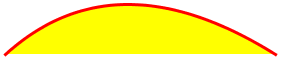
::new(points: []): constructs a quadratic bézier curve with threepoints(start point, control point, and end point) asArrayofArrays of[x,y]pairs or flattenedArrayof alternating x and y coordinates#points: points (start point, control point, and end point)#min_x: min x#min_y: min y#max_x: max x#max_y: max y#width: width (from min x to max x)#height: height (from min y to max y)#center_point: center point asArrayof[center_x, center_y]coordinates#center_x: center x#center_y: center y#bounding_box: bounding box is a rectangle with x = min x, y = min y, and width/height of shape (bounding box only guarantees that the shape is within it, but it might be bigger than the shape)#==(other): Returnstrueif equal tootherorfalseotherwise#contain?(x_or_point, y=nil, outline: false, distance_tolerance: 0): checks if point is inside whenoutlineisfalseor if point is on the outline whenoutlineistrue.distance_tolerancecan be used as a fuzz factor whenoutlineistrue, for example, to help GUI users mouse-click-select a quadratic bezier curve shape from its outline more successfully#curve_center_point: point at the center of the curve outline (not the center of the bounding box area likecenter_xandcenter_y)#curve_center_x: point x coordinate at the center of the curve outline (not the center of the bounding box area likecenter_xandcenter_y)#curve_center_y: point y coordinate at the center of the curve outline (not the center of the bounding box area likecenter_xandcenter_y)#subdivisions(level=1): subdivides quadratic bezier curve at its center into into 2 quadratic bezier curves by default, or more iflevelof recursion is specified. The resulting number of subdivisions is2to the power oflevel.#point_distance(x_or_point, y=nil, minimum_distance_threshold: OUTLINE_MINIMUM_DISTANCE_THRESHOLD): calculates distance from point to curve segment. It does so by subdividing curve into smaller curves and checking against the curve center points until the distance is less thanminimum_distance_threshold, to avoid being an overly costly operation.
Example:
require 'perfect-shape'

shape = PerfectShape::QuadraticBezierCurve.new(points: [[200, 150], [270, 320], [380, 150]]) # start point, control point, and end point

shape.contain?(270, 220) # => true
shape.contain?([270, 220]) # => true
shape.contain?(270, 220, outline: true) # => false
shape.contain?([270, 220], outline: true) # => false
shape.contain?(280, 235, outline: true) # => true
shape.contain?([280, 235], outline: true) # => true
shape.contain?(281, 235, outline: true) # => false
shape.contain?([281, 235], outline: true) # => false
shape.contain?(281, 235, outline: true, distance_tolerance: 1) # => true
shape.contain?([281, 235], outline: true, distance_tolerance: 1) # => true
PerfectShape::CubicBezierCurve
Class
Extends PerfectShape::Shape
Includes PerfectShape::MultiPoint
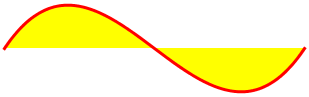
::new(points: []): constructs a cubic bézier curve with fourpoints(start point, two control points, and end point) asArrayofArrays of[x,y]pairs or flattenedArrayof alternating x and y coordinates#points: points (start point, two control points, and end point)#min_x: min x#min_y: min y#max_x: max x#max_y: max y#width: width (from min x to max x)#height: height (from min y to max y)#center_point: center point asArrayof[center_x, center_y]coordinates#center_x: center x#center_y: center y#bounding_box: bounding box is a rectangle with x = min x, y = min y, and width/height of shape (bounding box only guarantees that the shape is within it, but it might be bigger than the shape)#==(other): Returnstrueif equal tootherorfalseotherwise#contain?(x_or_point, y=nil, outline: false, distance_tolerance: 0): checks if point is inside whenoutlineisfalseor if point is on the outline whenoutlineistrue.distance_tolerancecan be used as a fuzz factor whenoutlineistrue, for example, to help GUI users mouse-click-select a cubic bezier curve shape from its outline more successfully#curve_center_point: point at the center of the curve outline (not the center of the bounding box area likecenter_xandcenter_y)#curve_center_x: point x coordinate at the center of the curve outline (not the center of the bounding box area likecenter_xandcenter_y)#curve_center_y: point y coordinate at the center of the curve outline (not the center of the bounding box area likecenter_xandcenter_y)#subdivisions(level=1): subdivides cubic bezier curve at its center into into 2 cubic bezier curves by default, or more iflevelof recursion is specified. The resulting number of subdivisions is2to the power oflevel.#point_distance(x_or_point, y=nil, minimum_distance_threshold: OUTLINE_MINIMUM_DISTANCE_THRESHOLD): calculates distance from point to curve segment. It does so by subdividing curve into smaller curves and checking against the curve center points until the distance is less thanminimum_distance_threshold, to avoid being an overly costly operation.
Example:
require 'perfect-shape'

shape = PerfectShape::CubicBezierCurve.new(points: [[200, 150], [235, 235], [270, 320], [380, 150]]) # start point, two control points, and end point

shape.contain?(270, 220) # => true
shape.contain?([270, 220]) # => true
shape.contain?(270, 220, outline: true) # => false
shape.contain?([270, 220], outline: true) # => false
shape.contain?(261.875, 245.625, outline: true) # => true
shape.contain?([261.875, 245.625], outline: true) # => true
shape.contain?(261.875, 246.625, outline: true) # => false
shape.contain?([261.875, 246.625], outline: true) # => false
shape.contain?(261.875, 246.625, outline: true, distance_tolerance: 1) # => true
shape.contain?([261.875, 246.625], outline: true, distance_tolerance: 1) # => true
PerfectShape::Rectangle
Class
Extends PerfectShape::Shape
Includes PerfectShape::RectangularShape
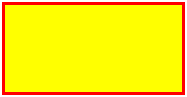
::new(x: 0, y: 0, width: 1, height: 1): constructs a rectangle#x: top-left x#y: top-left y#width: width#height: height#center_point: center point asArrayof[center_x, center_y]coordinates#center_x: center x#center_y: center y#min_x: min x#min_y: min y#max_x: max x#max_y: max y#bounding_box: bounding box is a rectangle with x = min x, y = min y, and width/height of shape#==(other): Returnstrueif equal tootherorfalseotherwise#contain?(x_or_point, y=nil, outline: false, distance_tolerance: 0): checks if point is inside whenoutlineisfalseor if point is on the outline whenoutlineistrue.distance_tolerancecan be used as a fuzz factor whenoutlineistrue, for example, to help GUI users mouse-click-select a rectangle shape from its outline more successfully#edges: edges of rectangle asPerfectShape::Lineobjects
Example:
require 'perfect-shape'

shape = PerfectShape::Rectangle.new(x: 15, y: 30, width: 200, height: 100)

shape.contain?(115, 80) # => true
shape.contain?([115, 80]) # => true
shape.contain?(115, 80, outline: true) # => false
shape.contain?([115, 80], outline: true) # => false
shape.contain?(115, 30, outline: true) # => true
shape.contain?([115, 30], outline: true) # => true
shape.contain?(115, 31, outline: true) # => false
shape.contain?([115, 31], outline: true) # => false
shape.contain?(115, 31, outline: true, distance_tolerance: 1) # => true
shape.contain?([115, 31], outline: true, distance_tolerance: 1) # => true
PerfectShape::Square
Class
Extends PerfectShape::Rectangle

::new(x: 0, y: 0, length: 1): constructs a square#x: top-left x#y: top-left y#length: length#width: width (equal to length)#height: height (equal to length)#center_point: center point asArrayof[center_x, center_y]coordinates#center_x: center x#center_y: center y#min_x: min x#min_y: min y#max_x: max x#max_y: max y#bounding_box: bounding box is a rectangle with x = min x, y = min y, and width/height of shape#==(other): Returnstrueif equal tootherorfalseotherwise#contain?(x_or_point, y=nil, outline: false, distance_tolerance: 0): checks if point is inside whenoutlineisfalseor if point is on the outline whenoutlineistrue.distance_tolerancecan be used as a fuzz factor whenoutlineistrue, for example, to help GUI users mouse-click-select a square shape from its outline more successfully#edges: edges of square asPerfectShape::Lineobjects
Example:
require 'perfect-shape'

shape = PerfectShape::Square.new(x: 15, y: 30, length: 200)

shape.contain?(115, 130) # => true
shape.contain?([115, 130]) # => true
shape.contain?(115, 130, outline: true) # => false
shape.contain?([115, 130], outline: true) # => false
shape.contain?(115, 30, outline: true) # => true
shape.contain?([115, 30], outline: true) # => true
shape.contain?(115, 31, outline: true) # => false
shape.contain?([115, 31], outline: true) # => false
shape.contain?(115, 31, outline: true, distance_tolerance: 1) # => true
shape.contain?([115, 31], outline: true, distance_tolerance: 1) # => true
PerfectShape::Arc
Class
Extends PerfectShape::Shape
Includes PerfectShape::RectangularShape
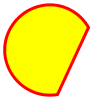
Arcs can be of type :open, :chord, or :pie
| Open Arc | Chord Arc | Pie Arc |
|---|---|---|
 |
 |
 |
::new(type: :open, x: 0, y: 0, width: 1, height: 1, start: 0, extent: 360, center_x: nil, center_y: nil, radius_x: nil, radius_y: nil): constructs an arc of type:open(default),:chord, or:pie#type::open,:chord, or:pie#x: top-left x#y: top-left y#width: width#height: height#start: start angle in degrees#extent: extent angle in degrees#center_point: center point asArrayof[center_x, center_y]coordinates#center_x: center x#center_y: center y#radius_x: radius along the x-axis#radius_y: radius along the y-axis#min_x: min x#min_y: min y#max_x: max x#max_y: max y#bounding_box: bounding box is a rectangle with x = min x, y = min y, and width/height of shape#==(other): Returnstrueif equal tootherorfalseotherwise#contain?(x_or_point, y=nil, outline: false, distance_tolerance: 0): checks if point is inside whenoutlineisfalseor if point is on the outline whenoutlineistrue.distance_tolerancecan be used as a fuzz factor whenoutlineistrue, for example, to help GUI users mouse-click-select an arc shape from its outline more successfully
Example:
require 'perfect-shape'

shape = PerfectShape::Arc.new(type: :open, x: 2, y: 3, width: 50, height: 60, start: 45, extent: 270)
shape2 = PerfectShape::Arc.new(type: :open, center_x: 2 + 25, center_y: 3 + 30, radius_x: 25, radius_y: 30, start: 45, extent: 270)

shape.contain?(39.5, 33.0) # => true
shape.contain?([39.5, 33.0]) # => true
shape2.contain?(39.5, 33.0) # => true
shape2.contain?([39.5, 33.0]) # => true
shape.contain?(39.5, 33.0, outline: true) # => false
shape.contain?([39.5, 33.0], outline: true) # => false
shape2.contain?(39.5, 33.0, outline: true) # => false
shape2.contain?([39.5, 33.0], outline: true) # => false
shape.contain?(2.0, 33.0, outline: true) # => true
shape.contain?([2.0, 33.0], outline: true) # => true
shape2.contain?(2.0, 33.0, outline: true) # => true
shape2.contain?([2.0, 33.0], outline: true) # => true
shape.contain?(3.0, 33.0, outline: true) # => false
shape.contain?([3.0, 33.0], outline: true) # => false
shape2.contain?(3.0, 33.0, outline: true) # => false
shape2.contain?([3.0, 33.0], outline: true) # => false
shape.contain?(3.0, 33.0, outline: true, distance_tolerance: 1.0) # => true
shape.contain?([3.0, 33.0], outline: true, distance_tolerance: 1.0) # => true
shape2.contain?(3.0, 33.0, outline: true, distance_tolerance: 1.0) # => true
shape2.contain?([3.0, 33.0], outline: true, distance_tolerance: 1.0) # => true
shape.contain?(shape.center_x, shape.center_y, outline: true) # => false
shape.contain?([shape.center_x, shape.center_y], outline: true) # => false
shape2.contain?(shape2.center_x, shape2.center_y, outline: true) # => false
shape2.contain?([shape2.center_x, shape2.center_y], outline: true) # => false

shape3 = PerfectShape::Arc.new(type: :chord, x: 2, y: 3, width: 50, height: 60, start: 45, extent: 270)
shape4 = PerfectShape::Arc.new(type: :chord, center_x: 2 + 25, center_y: 3 + 30, radius_x: 25, radius_y: 30, start: 45, extent: 270)

shape3.contain?(39.5, 33.0) # => true
shape3.contain?([39.5, 33.0]) # => true
shape4.contain?(39.5, 33.0) # => true
shape4.contain?([39.5, 33.0]) # => true
shape3.contain?(39.5, 33.0, outline: true) # => false
shape3.contain?([39.5, 33.0], outline: true) # => false
shape4.contain?(39.5, 33.0, outline: true) # => false
shape4.contain?([39.5, 33.0], outline: true) # => false
shape3.contain?(2.0, 33.0, outline: true) # => true
shape3.contain?([2.0, 33.0], outline: true) # => true
shape4.contain?(2.0, 33.0, outline: true) # => true
shape4.contain?([2.0, 33.0], outline: true) # => true
shape3.contain?(3.0, 33.0, outline: true) # => false
shape3.contain?([3.0, 33.0], outline: true) # => false
shape4.contain?(3.0, 33.0, outline: true) # => false
shape4.contain?([3.0, 33.0], outline: true) # => false
shape3.contain?(3.0, 33.0, outline: true, distance_tolerance: 1.0) # => true
shape3.contain?([3.0, 33.0], outline: true, distance_tolerance: 1.0) # => true
shape4.contain?(3.0, 33.0, outline: true, distance_tolerance: 1.0) # => true
shape4.contain?([3.0, 33.0], outline: true, distance_tolerance: 1.0) # => true
shape3.contain?(shape3.center_x, shape3.center_y, outline: true) # => false
shape3.contain?([shape3.center_x, shape3.center_y], outline: true) # => false
shape4.contain?(shape4.center_x, shape4.center_y, outline: true) # => false
shape4.contain?([shape4.center_x, shape4.center_y], outline: true) # => false

shape5 = PerfectShape::Arc.new(type: :pie, x: 2, y: 3, width: 50, height: 60, start: 45, extent: 270)
shape6 = PerfectShape::Arc.new(type: :pie, center_x: 2 + 25, center_y: 3 + 30, radius_x: 25, radius_y: 30, start: 45, extent: 270)

shape5.contain?(39.5, 33.0) # => false
shape5.contain?([39.5, 33.0]) # => false
shape6.contain?(39.5, 33.0) # => false
shape6.contain?([39.5, 33.0]) # => false
shape5.contain?(9.5, 33.0) # => true
shape5.contain?([9.5, 33.0]) # => true
shape6.contain?(9.5, 33.0) # => true
shape6.contain?([9.5, 33.0]) # => true
shape5.contain?(39.5, 33.0, outline: true) # => false
shape5.contain?([39.5, 33.0], outline: true) # => false
shape6.contain?(39.5, 33.0, outline: true) # => false
shape6.contain?([39.5, 33.0], outline: true) # => false
shape5.contain?(2.0, 33.0, outline: true) # => true
shape5.contain?([2.0, 33.0], outline: true) # => true
shape6.contain?(2.0, 33.0, outline: true) # => true
shape6.contain?([2.0, 33.0], outline: true) # => true
shape5.contain?(3.0, 33.0, outline: true) # => false
shape5.contain?([3.0, 33.0], outline: true) # => false
shape6.contain?(3.0, 33.0, outline: true) # => false
shape6.contain?([3.0, 33.0], outline: true) # => false
shape5.contain?(3.0, 33.0, outline: true, distance_tolerance: 1.0) # => true
shape5.contain?([3.0, 33.0], outline: true, distance_tolerance: 1.0) # => true
shape6.contain?(3.0, 33.0, outline: true, distance_tolerance: 1.0) # => true
shape6.contain?([3.0, 33.0], outline: true, distance_tolerance: 1.0) # => true
shape5.contain?(shape5.center_x, shape5.center_y, outline: true) # => true
shape5.contain?([shape5.center_x, shape5.center_y], outline: true) # => true
shape6.contain?(shape6.center_x, shape6.center_y, outline: true) # => true
shape6.contain?([shape6.center_x, shape6.center_y], outline: true) # => true
PerfectShape::Ellipse
Class
Extends PerfectShape::Arc
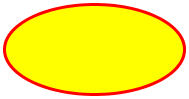
::new(x: 0, y: 0, width: 1, height: 1, center_x: nil, center_y: nil, radius_x: nil, radius_y: nil): constructs an ellipse#x: top-left x#y: top-left y#width: width#height: height#center_point: center point asArrayof[center_x, center_y]coordinates#center_x: center x#center_y: center y#radius_x: radius along the x-axis#radius_y: radius along the y-axis#type: always:open#start: always0#extent: always360#min_x: min x#min_y: min y#max_x: max x#max_y: max y#bounding_box: bounding box is a rectangle with x = min x, y = min y, and width/height of shape#==(other): Returnstrueif equal tootherorfalseotherwise#contain?(x_or_point, y=nil, outline: false, distance_tolerance: 0): checks if point is inside whenoutlineisfalseor if point is on the outline whenoutlineistrue.distance_tolerancecan be used as a fuzz factor whenoutlineistrue, for example, to help GUI users mouse-click-select an ellipse shape from its outline more successfully
Example:
require 'perfect-shape'

shape = PerfectShape::Ellipse.new(x: 2, y: 3, width: 50, height: 60)
shape2 = PerfectShape::Ellipse.new(center_x: 27, center_y: 33, radius_x: 25, radius_y: 30)

shape.contain?(27, 33) # => true
shape.contain?([27, 33]) # => true
shape2.contain?(27, 33) # => true
shape2.contain?([27, 33]) # => true
shape.contain?(27, 33, outline: true) # => false
shape.contain?([27, 33], outline: true) # => false
shape2.contain?(27, 33, outline: true) # => false
shape2.contain?([27, 33], outline: true) # => false
shape.contain?(2, 33, outline: true) # => true
shape.contain?([2, 33], outline: true) # => true
shape2.contain?(2, 33, outline: true) # => true
shape2.contain?([2, 33], outline: true) # => true
shape.contain?(1, 33, outline: true) # => false
shape.contain?([1, 33], outline: true) # => false
shape2.contain?(1, 33, outline: true) # => false
shape2.contain?([1, 33], outline: true) # => false
shape.contain?(1, 33, outline: true, distance_tolerance: 1) # => true
shape.contain?([1, 33], outline: true, distance_tolerance: 1) # => true
shape2.contain?(1, 33, outline: true, distance_tolerance: 1) # => true
shape2.contain?([1, 33], outline: true, distance_tolerance: 1) # => true
PerfectShape::Circle
Class
Extends PerfectShape::Ellipse

::new(x: 0, y: 0, diameter: 1, width: 1, height: 1, center_x: nil, center_y: nil, radius: nil, radius_x: nil, radius_y: nil): constructs a circle#x: top-left x#y: top-left y#diameter: diameter#width: width (equal to diameter)#height: height (equal to diameter)#center_point: center point asArrayof[center_x, center_y]coordinates#center_x: center x#center_y: center y#radius: radius#radius_x: radius along the x-axis (equal to radius)#radius_y: radius along the y-axis (equal to radius)#type: always:open#start: always0#extent: always360#min_x: min x#min_y: min y#max_x: max x#max_y: max y#bounding_box: bounding box is a rectangle with x = min x, y = min y, and width/height of shape#==(other): Returnstrueif equal tootherorfalseotherwise#contain?(x_or_point, y=nil, outline: false, distance_tolerance: 0): checks if point is inside whenoutlineisfalseor if point is on the outline whenoutlineistrue.distance_tolerancecan be used as a fuzz factor whenoutlineistrue, for example, to help GUI users mouse-click-select a circle shape from its outline more successfully
Example:
require 'perfect-shape'

shape = PerfectShape::Circle.new(x: 2, y: 3, diameter: 60)
shape2 = PerfectShape::Circle.new(center_x: 2 + 30, center_y: 3 + 30, radius: 30)

shape.contain?(32, 33) # => true
shape.contain?([32, 33]) # => true
shape2.contain?(32, 33) # => true
shape2.contain?([32, 33]) # => true
shape.contain?(32, 33, outline: true) # => false
shape.contain?([32, 33], outline: true) # => false
shape2.contain?(32, 33, outline: true) # => false
shape2.contain?([32, 33], outline: true) # => false
shape.contain?(2, 33, outline: true) # => true
shape.contain?([2, 33], outline: true) # => true
shape2.contain?(2, 33, outline: true) # => true
shape2.contain?([2, 33], outline: true) # => true
shape.contain?(1, 33, outline: true) # => false
shape.contain?([1, 33], outline: true) # => false
shape2.contain?(1, 33, outline: true) # => false
shape2.contain?([1, 33], outline: true) # => false
shape.contain?(1, 33, outline: true, distance_tolerance: 1) # => true
shape.contain?([1, 33], outline: true, distance_tolerance: 1) # => true
shape2.contain?(1, 33, outline: true, distance_tolerance: 1) # => true
shape2.contain?([1, 33], outline: true, distance_tolerance: 1) # => true
PerfectShape::Polygon
Class
Extends PerfectShape::Shape
Includes PerfectShape::MultiPoint
A polygon can be thought of as a special case of path that is closed, has the Even-Odd winding rule, and consists of lines only.
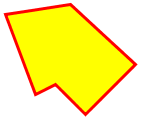
::new(points: []): constructs a polygon withpointsasArrayofArrays of[x,y]pairs or flattenedArrayof alternating x and y coordinates#min_x: min x#min_y: min y#max_x: max x#max_y: max y#width: width (from min x to max x)#height: height (from min y to max y)#center_point: center point asArrayof[center_x, center_y]coordinates#center_x: center x#center_y: center y#bounding_box: bounding box is a rectangle with x = min x, y = min y, and width/height of shape#==(other): Returnstrueif equal tootherorfalseotherwise#contain?(x_or_point, y=nil, outline: false, distance_tolerance: 0): Whenoutlineisfalse, it checks if point is inside using the Ray Casting Algorithm (aka Even-Odd Rule). Otherwise, whenoutlineistrue, it checks if point is on the outline.distance_tolerancecan be used as a fuzz factor whenoutlineistrue, for example, to help GUI users mouse-click-select a polygon shape from its outline more successfully#edges: edges of polygon asPerfectShape::Lineobjects
Example:
require 'perfect-shape'

shape = PerfectShape::Polygon.new(points: [[200, 150], [270, 170], [250, 220], [220, 190], [200, 200], [180, 170]])

shape.contain?(225, 185) # => true
shape.contain?([225, 185]) # => true
shape.contain?(225, 185, outline: true) # => false
shape.contain?([225, 185], outline: true) # => false
shape.contain?(200, 150, outline: true) # => true
shape.contain?([200, 150], outline: true) # => true
shape.contain?(200, 151, outline: true) # => false
shape.contain?([200, 151], outline: true) # => false
shape.contain?(200, 151, outline: true, distance_tolerance: 1) # => true
shape.contain?([200, 151], outline: true, distance_tolerance: 1) # => true
PerfectShape::Path
Class
Extends PerfectShape::Shape
Includes PerfectShape::MultiPoint
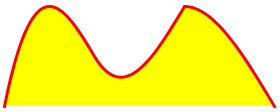
::new(shapes: [], closed: false, winding_rule: :wind_non_zero): constructs a path withshapesasArrayof shape objects, which can bePerfectShape::Point(orArrayof[x, y]coordinates),PerfectShape::Line,PerfectShape::QuadraticBezierCurve, orPerfectShape::CubicBezierCurve. If a path is closed, its last point is automatically connected to its first point with a line segment. The winding rule can be:wind_non_zero(default) or:wind_even_odd.#shapes: the shapes that the path is composed of (must always start withPerfectShape::Pointor Array of [x,y] coordinates representing start point)#closed?: returnstrueif closed andfalseotherwise#winding_rule: returns winding rule (:wind_non_zeroor:wind_even_odd)#points: path points calculated (derived) from shapes#min_x: min x#min_y: min y#max_x: max x#max_y: max y#width: width (from min x to max x)#height: height (from min y to max y)#center_point: center point asArrayof[center_x, center_y]coordinates#center_x: center x#center_y: center y#bounding_box: bounding box is a rectangle with x = min x, y = min y, and width/height of shape (bounding box only guarantees that the shape is within it, but it might be bigger than the shape)#==(other): Returnstrueif equal tootherorfalseotherwise#contain?(x_or_point, y=nil, outline: false, distance_tolerance: 0): Whenoutlineisfalse, it checks if point is inside path utilizing the configured winding rule, which can be the Nonzero-Rule (aka Winding Number Algorithm) or the Even-Odd Rule (aka Ray Casting Algorithm). Otherwise, whenoutlineistrue, it checks if point is on the outline.distance_tolerancecan be used as a fuzz factor whenoutlineistrue, for example, to help GUI users mouse-click-select a path shape from its outline more successfully#point_crossings(x_or_point, y=nil): calculates the number of times the given path crosses the ray extending to the right from (x,y)#disconnected_shapes: Disconnected shapes have their start point filled in so that each shape does not depend on the previous shape to determine its start point. Also, if a point is followed by a non-point shape, it is removed since it is augmented to the following shape as its start point. Lastly, if the path is closed, an extra shape is added to represent the line connecting the last point to the first
Example:
require 'perfect-shape'

path_shapes = []
path_shapes << PerfectShape::Point.new(x: 200, y: 150)
path_shapes << PerfectShape::Line.new(points: [250, 170]) # no need for start point, just end point
path_shapes << PerfectShape::QuadraticBezierCurve.new(points: [[300, 185], [350, 150]]) # no need for start point, just control point and end point
path_shapes << PerfectShape::CubicBezierCurve.new(points: [[370, 50], [430, 220], [480, 170]]) # no need for start point, just two control points and end point

shape = PerfectShape::Path.new(shapes: path_shapes, closed: false, winding_rule: :wind_even_odd)

shape.contain?(275, 165) # => true
shape.contain?([275, 165]) # => true
shape.contain?(275, 165, outline: true) # => false
shape.contain?([275, 165], outline: true) # => false
shape.contain?(shape.disconnected_shapes[1].curve_center_x, shape.disconnected_shapes[1].curve_center_y, outline: true) # => true
shape.contain?([shape.disconnected_shapes[1].curve_center_x, shape.disconnected_shapes[1].curve_center_y], outline: true) # => true
shape.contain?(shape.disconnected_shapes[1].curve_center_x + 1, shape.disconnected_shapes[1].curve_center_y, outline: true) # => false
shape.contain?([shape.disconnected_shapes[1].curve_center_x + 1, shape.disconnected_shapes[1].curve_center_y], outline: true) # => false
shape.contain?(shape.disconnected_shapes[1].curve_center_x + 1, shape.disconnected_shapes[1].curve_center_y, outline: true, distance_tolerance: 1) # => true
shape.contain?([shape.disconnected_shapes[1].curve_center_x + 1, shape.disconnected_shapes[1].curve_center_y], outline: true, distance_tolerance: 1) # => true
PerfectShape::CompositeShape
Class
Extends PerfectShape::Shape
A composite shape is simply an aggregate of multiple shapes (e.g. square and polygon)
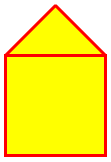
::new(shapes: []): constructs a composite shape withshapesasArrayofPerfectShape::Shapeobjects#shapes: the shapes that the composite shape is composed of#min_x: min x#min_y: min y#max_x: max x#max_y: max y#width: width (from min x to max x)#height: height (from min y to max y)#center_point: center point asArrayof[center_x, center_y]coordinates#center_x: center x#center_y: center y#bounding_box: bounding box is a rectangle with x = min x, y = min y, and width/height of shape (bounding box only guarantees that the shape is within it, but it might be bigger than the shape)#==(other): Returnstrueif equal tootherorfalseotherwise#contain?(x_or_point, y=nil): Whenoutlineisfalse, it checks if point is inside any of the shapes owned by the composite shape. Otherwise, whenoutlineistrue, it checks if point is on the outline of any of the shapes owned by the composite shape.distance_tolerancecan be used as a fuzz factor whenoutlineistrue, for example, to help GUI users mouse-click-select a composite shape from its outline more successfully
Example:
require 'perfect-shape'

shapes = []
shapes << PerfectShape::Square.new(x: 120, y: 215, length: 100)
shapes << PerfectShape::Polygon.new(points: [[120, 215], [170, 165], [220, 215]])

shape = PerfectShape::CompositeShape.new(shapes: shapes)

shape.contain?(170, 265) # => true inside square
shape.contain?([170, 265]) # => true inside square
shape.contain?(170, 265, outline: true) # => false
shape.contain?([170, 265], outline: true) # => false
shape.contain?(170, 315, outline: true) # => true
shape.contain?([170, 315], outline: true) # => true
shape.contain?(170, 316, outline: true) # => false
shape.contain?([170, 316], outline: true) # => false
shape.contain?(170, 316, outline: true, distance_tolerance: 1) # => true
shape.contain?([170, 316], outline: true, distance_tolerance: 1) # => true

shape.contain?(170, 190) # => true inside polygon
shape.contain?([170, 190]) # => true inside polygon
shape.contain?(170, 190, outline: true) # => false
shape.contain?([170, 190], outline: true) # => false
shape.contain?(145, 190, outline: true) # => true
shape.contain?([145, 190], outline: true) # => true
shape.contain?(145, 189, outline: true) # => false
shape.contain?([145, 189], outline: true) # => false
shape.contain?(145, 189, outline: true, distance_tolerance: 1) # => true
shape.contain?([145, 189], outline: true, distance_tolerance: 1) # => true
Process
Resources
- Rubydoc: https://www.rubydoc.info/gems/perfect-shape
- AWT Geom Javadoc (inspiration): https://docs.oracle.com/javase/8/docs/api/java/awt/geom/package-summary.html
TODO
Change Log
Contributing
- Check out the latest master to make sure the feature hasn't been implemented or the bug hasn't been fixed yet.
- Check out the issue tracker to make sure someone already hasn't requested it and/or contributed it.
- Fork the project.
- Start a feature/bugfix branch.
- Commit and push until you are happy with your contribution.
- Make sure to add tests for it. This is important so I don't break it in a future version unintentionally.
- Please try not to mess with the Rakefile, version, or history. If you want to have your own version, or is otherwise necessary, that is fine, but please isolate to its own commit so I can cherry-pick around it.
Copyright
Copyright (c) 2021-2022 Andy Maleh. See LICENSE.txt for further details.