
Intro
Opskelaton is an opinionated bootstrap tool for local Sandbox projects.
Opsk aims to solve the following common issues:
- Devops develop Puppet modules on master machines which results with 'It works on my (machine) master' approach.
- Implicit/Missing dependencies, like ruby version used, operating system, gems, third party puppet module
- Manual steps in setting up puppet modules and local sandboxes (like installing third party code).
- Non standard layout, projects missing README and LICENSE files, no clear separation between developed and dependant code.
- No clear development guidelines, for example extracting general modules and exporting them.
See it in action here.

Usage
Perquisites (on Ubuntu):
- Vagrant 1.4.x
- RVM
- Ruby 1.9.x
 $ rvm use system
 $ sudo gem install opskeleton
Creating out first sandbox
 $ rvm use system
 # parameters include name vagrant-box
 $ opsk generate redis ubuntu-13.10
 $ cd redis-sandbox
 $ bundle install
 $ librarian-puppet install
 $ vagrant up
Layout
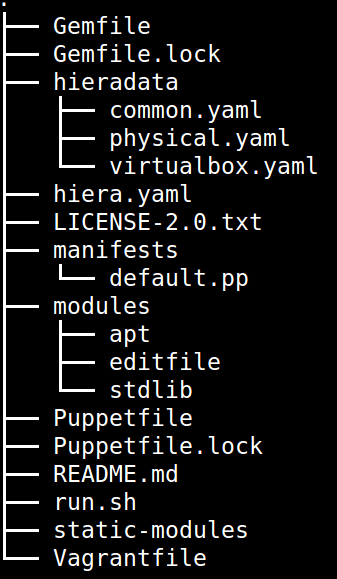
Opskelaton creates the complete folder structure fine tuned to match best practices:
Folder layout:
Module lifecycle
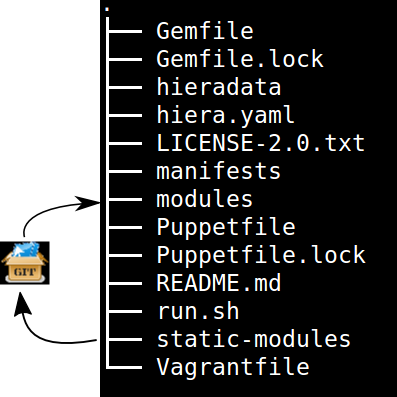
Opskelaton defines a simple module life cycle:
- Internal non reusable modules (usually specific to a client site) go under static-modules
- If we create a general reusable module which is ready for prime time we pull out to a new git repository.
- The extracted module is added back as a third party (using librarian-puppet module which resides under modules folder.
Life cycle scheme:
Creating new (static) modules is easy as:
$ opsk module foo
Each generated module will contain puppet-rspec with matching Rakefile (see testing).
Testing
Opskelaton supports two levels of testing:
- Static module testing that includes rspec and linting.
- Integration testing using serverspec and Vagrant.
# linting all static modules
$ rake lint
# rspecing
$ rake modspec
# running serverspec
$ rake spec
Packaging
Opskelaton fully supports deployment and portable execution of sandboxes on non Vagrant environments:
$ opsk generate foo ubuntu-13.10
$ cd foo-sandbox
# The package version file
$ cat opsk.yaml
---
  version: '0.0.1'
  name: foo

# post bundle and gem install ..
$ opsk package
      create  pkg/foo-sandbox-0.0.1
      create  pkg/foo-sandbox-0.0.1/scripts
      create  pkg/foo-sandbox-0.0.1/scripts/lookup.rb
       chmod  pkg/foo-sandbox-0.0.1/scripts/lookup.rb
      create  pkg/foo-sandbox-0.0.1/scripts/run.sh
       chmod  pkg/foo-sandbox-0.0.1/scripts/run.sh
      create  pkg/foo-sandbox-0.0.1/manifests/site.pp
       exist  pkg
$ ls pkg
foo-sandbox-0.0.1  foo-sandbox-0.0.1.tar.gz
The packaging process creates a portable tar file that can be run on any machine with puppet installed via the bundled run.sh:
$ tar -xvzf foo-sandbox-0.0.1.tar.gz
$ cd foo-sandbox-0.0.1
$ sudo ./run.sh
An external node classifier based runner is also available under scripts/run.sh, this runner expects to get a
Deployment
The packaged tar files can be consumed using any tool and protocol however http is recommended, opsk has built in support for deploying public sandboxes into bintray:
$ opsk package
$ opsk deploy <bintray-repo>
deployed foo-sandbox-0.0.1.tar.gz to http://dl.bintray.com/narkisr/<bintray-repo>/foo-sandbox-0.0.1.tar.gz
Make sure to configure configure the bintray API key.
Updating
Keeping you box up to date with latest opsk version is easy, just re-generate it again and resolve conflicts by answering y/n:
# Moving to latest opsk
$ gem update opskeleton
# foo box already exists
$ opsk generate foo <vagrant-box>
 exist  foo-sandbox
    conflict  foo-sandbox/Vagrantfile
Overwrite /home/ronen/code/foo-sandbox/Vagrantfile? (enter "h" for help) [Ynaqdh]
Vagrant
Opskeleton generates a Vagrant file with couple of enhancements:
- VAGRANT_BRIDGE (default eth0) for setting up public bridge on the go.
- PUPPET_ENV (default dev) for setting puppet environment.
- Puppet options preset to match modules and hiera folders.
Boxes
Opskeleton recommends the use of box-cutter in order to create Vagrant boxes in a consistent manner (as no free hosting solution currently exist):
# make sure to have latest packer
$ packer version
Packer v0.6.0
$ git clone [email protected]:box-cutter/ubuntu-vm.git
$ cd ubuntu-vm
# Edit Makefile.local
$ cat Makefile.local
# Makefile.local
CM := puppet
CM_VERSION := 3.6.1
$ make virtualbox/ubuntu1404
A useful convention for Box names:
ubuntu-14.04_puppet-3.6.1 ([os]-[version]_[provisioner]-[version])
Copyright and license
Copyright [2013] [Ronen Narkis]
Licensed under the Apache License, Version 2.0 (the "License"); you may not use this file except in compliance with the License. You may obtain a copy of the License at
[http://www.apache.org/licenses/LICENSE-2.0](http://www.apache.org/licenses/LICENSE-2.0)
Unless required by applicable law or agreed to in writing, software distributed under the License is distributed on an "AS IS" BASIS, WITHOUT WARRANTIES OR CONDITIONS OF ANY KIND, either express or implied. See the License for the specific language governing permissions and limitations under the License.