 minimal-music-project Jekyll theme </h1>
[](https://raw.githubusercontent.com/itsmeaga1n/minimal-music-project/master/LICENSE.txt)
[](https://jekyllrb.com/)
[](https://badge.fury.io/rb/minimal-music-project)
minimal-music-project Jekyll theme </h1>
[](https://raw.githubusercontent.com/itsmeaga1n/minimal-music-project/master/LICENSE.txt)
[](https://jekyllrb.com/)
[](https://badge.fury.io/rb/minimal-music-project)
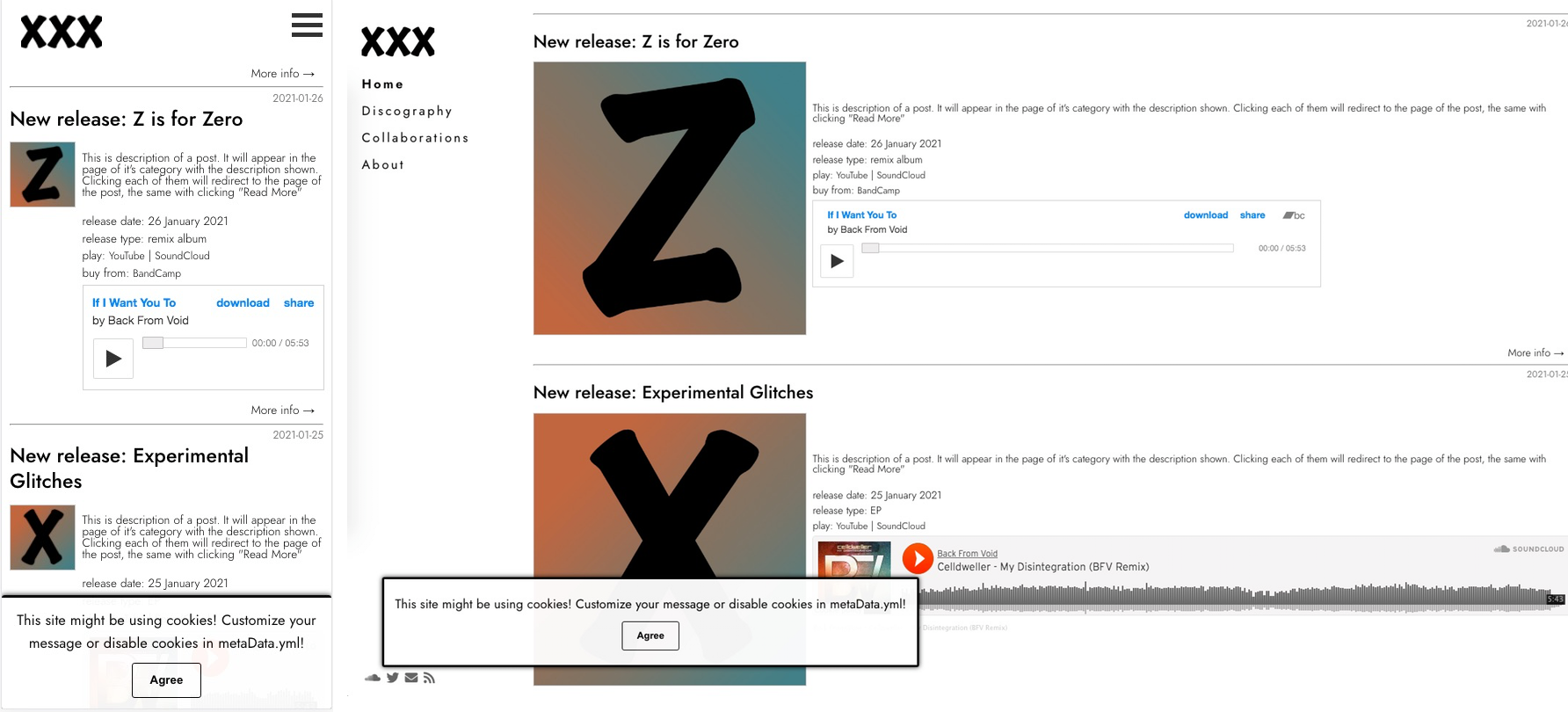
 minimal-music-project is a flexible, extendable Jekyll theme. With this theme it's plain simple to create a good looking website for a music band with all the required components to list all releases and news. Demo is available [here](https://minimal-music-project.netlify.app/).
## Installation
There are three ways to install:
* As a ruby gem theme:
Add this line to your Jekyll site's `Gemfile`:
```ruby
gem "minimal-categorized"
```
And add this line to your Jekyll site's `_config.yml`:
```yaml
theme: minimal-categorized
```
And then execute:
$ bundle
Or install it yourself as:
$ gem install minimal-categorized
* As a remote theme (GitHub Pages compatible)
In your Jekyll site's _config.yml remove other themes and add this entry:
```
remote_theme: ItsMeaga1n/minimal-categorized
```
* Forking/directly copying all of the theme files into your project.
## Usage
This theme uses pager plugin `jekyll-paginate-v2` for pagination and `jekyll-seo-tag` for seo tags. It can be configured in main _config file.
Configuration via .yml files
Structure of `_data/menu.yml`:
* menu_pages: a list of items in menu. Each item contains information:
* title: Menu position title
* url: URL for href
* category: unique identifier of category. Used to determine which menu item is selected
* tooltip: Tooltip for menu item
* menu_contacts: a list of items to be displayed for a contact section in menu
* faicon: FavIcon to be displayed in menu
* url: URL for href
* target: target value of \ tag
Structure of `_data/metaData.yml`:
* author: Site Author name
* logo: relative url to the logo
* clickToEnlargeImages: boolean value to enable/disable "full-screen" images on click
* cookies: customize information about site cookies
* enabled: determine if should show cookies pop-up
* message: text on cookie pop-up
* agreeButtonText: text on agree button
* disagreeButtonText: text on disagree button
* agreeButtonFnName: function in the `window` scope to execute on cookie agree
* disagreeButtonFnName: function in the `window` scope to execute on cookie disagree
* header: title of the pop-up window
* consent: list of objects that will be rendered on a site with "cookies" layout for acceptance. Each object needs to have:
* name: bolded on render
* description: description of the cookie
* cookieName: under what name it will be saved in the local storage (selected checkbox as "true", unselected as "false")
Structure of `_data/customs.yml`:
* custom-css: a list of urls to custom css files
* custom-js: a list of urls to custom javascript files
## Posts front matter parameters
### Embedding media
Each post can have it's own associated player. Information on how to embed the player should be described under *embed\_player* parameter. Each player should have at least two parameters: *src* and *type*, where *type* will define on how to fill *src*. Supported types:
* soundcloud - src should be full url to song
* bandcamp - on a "embed song" option on bandcamp, everything after *EmbeddedPlayer/* in generated code should be put to src parameter in front matter
* spotify - src should be id of the song. It can be acquired via "copy song link", e.g. for url https://open.spotify.com/track/67IdIp2ij8oqTFsSguvy2I?si=f735480b74414902 the src should be 67IdIp2ij8oqTFsSguvy2I
* youtube - src should be the *v* uri parameter, e.g. for url https://www.youtube.com/watch?v=dfdruxvE9-0 the src should be dfdruxvE9-0
* anchor.fm - src is the full episode name (e.g. for URL https://anchor.fm/sucias/episodes/Not-All-Men-e15v6dv src should be Not-All-Men-e15v6dv)
* audio_file - src should be path to file. Additionaly, required properties are name of the song (it will display in player) and boolean value *is\_relative\_url* (for easy access to files served from the same domain)
## Contributing
Bug reports and pull requests are welcome on [GitHub](https://github.com/ItsMeaga1n/minimal-music-project). This project is intended to be a safe, welcoming space for collaboration, and contributors are expected to adhere to the [Contributor Covenant](http://contributor-covenant.org) code of conduct.
## Development
To set up your environment to develop this theme, run `bundle install`.
Your theme is setup just like a normal Jekyll site! To test your theme, run `bundle exec jekyll serve` and open your browser at `http://localhost:4000`. This starts a Jekyll server using your theme. Add pages, documents, data, etc. like normal to test your theme's contents. As you make modifications to your theme and to your content, your site will regenerate and you should see the changes in the browser after a refresh, just like normal.
When your theme is released, only the files in `_layouts`, `_includes`, `_sass` and `assets` tracked with Git will be bundled.
To add a custom directory to your theme-gem, please edit the regexp in `minimal-music-project.gemspec` accordingly.
## License
The theme is available as open source under the terms of the [MIT License](https://opensource.org/licenses/MIT).
Custom Volume Slider was developed with the fundaments based on [codepen project](https://codepen.io/EmNudge/pen/rRbLJQ), thus this component is licensed under [Copyright (c) 2021 by EmNudge](https://codepen.io/EmNudge/pen/rRbLJQ).
minimal-music-project is a flexible, extendable Jekyll theme. With this theme it's plain simple to create a good looking website for a music band with all the required components to list all releases and news. Demo is available [here](https://minimal-music-project.netlify.app/).

## Installation
There are three ways to install:
* As a ruby gem theme:
Add this line to your Jekyll site's `Gemfile`:
```ruby
gem "minimal-categorized"
```
And add this line to your Jekyll site's `_config.yml`:
```yaml
theme: minimal-categorized
```
And then execute:
$ bundle
Or install it yourself as:
$ gem install minimal-categorized
* As a remote theme (GitHub Pages compatible)
In your Jekyll site's _config.yml remove other themes and add this entry:
```
remote_theme: ItsMeaga1n/minimal-categorized
```
* Forking/directly copying all of the theme files into your project.
## Usage
This theme uses pager plugin `jekyll-paginate-v2` for pagination and `jekyll-seo-tag` for seo tags. It can be configured in main _config file.
Configuration via .yml files
Structure of `_data/menu.yml`:
* menu_pages: a list of items in menu. Each item contains information:
* title: Menu position title
* url: URL for href
* category: unique identifier of category. Used to determine which menu item is selected
* tooltip: Tooltip for menu item
* menu_contacts: a list of items to be displayed for a contact section in menu
* faicon: FavIcon to be displayed in menu
* url: URL for href
* target: target value of \ tag
Structure of `_data/metaData.yml`:
* author: Site Author name
* logo: relative url to the logo
* clickToEnlargeImages: boolean value to enable/disable "full-screen" images on click
* cookies: customize information about site cookies
* enabled: determine if should show cookies pop-up
* message: text on cookie pop-up
* agreeButtonText: text on agree button
* disagreeButtonText: text on disagree button
* agreeButtonFnName: function in the `window` scope to execute on cookie agree
* disagreeButtonFnName: function in the `window` scope to execute on cookie disagree
* header: title of the pop-up window
* consent: list of objects that will be rendered on a site with "cookies" layout for acceptance. Each object needs to have:
* name: bolded on render
* description: description of the cookie
* cookieName: under what name it will be saved in the local storage (selected checkbox as "true", unselected as "false")
Structure of `_data/customs.yml`:
* custom-css: a list of urls to custom css files
* custom-js: a list of urls to custom javascript files
## Posts front matter parameters
### Embedding media
Each post can have it's own associated player. Information on how to embed the player should be described under *embed\_player* parameter. Each player should have at least two parameters: *src* and *type*, where *type* will define on how to fill *src*. Supported types:
* soundcloud - src should be full url to song
* bandcamp - on a "embed song" option on bandcamp, everything after *EmbeddedPlayer/* in generated code should be put to src parameter in front matter
* spotify - src should be id of the song. It can be acquired via "copy song link", e.g. for url https://open.spotify.com/track/67IdIp2ij8oqTFsSguvy2I?si=f735480b74414902 the src should be 67IdIp2ij8oqTFsSguvy2I
* youtube - src should be the *v* uri parameter, e.g. for url https://www.youtube.com/watch?v=dfdruxvE9-0 the src should be dfdruxvE9-0
* anchor.fm - src is the full episode name (e.g. for URL https://anchor.fm/sucias/episodes/Not-All-Men-e15v6dv src should be Not-All-Men-e15v6dv)
* audio_file - src should be path to file. Additionaly, required properties are name of the song (it will display in player) and boolean value *is\_relative\_url* (for easy access to files served from the same domain)
## Contributing
Bug reports and pull requests are welcome on [GitHub](https://github.com/ItsMeaga1n/minimal-music-project). This project is intended to be a safe, welcoming space for collaboration, and contributors are expected to adhere to the [Contributor Covenant](http://contributor-covenant.org) code of conduct.
## Development
To set up your environment to develop this theme, run `bundle install`.
Your theme is setup just like a normal Jekyll site! To test your theme, run `bundle exec jekyll serve` and open your browser at `http://localhost:4000`. This starts a Jekyll server using your theme. Add pages, documents, data, etc. like normal to test your theme's contents. As you make modifications to your theme and to your content, your site will regenerate and you should see the changes in the browser after a refresh, just like normal.
When your theme is released, only the files in `_layouts`, `_includes`, `_sass` and `assets` tracked with Git will be bundled.
To add a custom directory to your theme-gem, please edit the regexp in `minimal-music-project.gemspec` accordingly.
## License
The theme is available as open source under the terms of the [MIT License](https://opensource.org/licenses/MIT).
Custom Volume Slider was developed with the fundaments based on [codepen project](https://codepen.io/EmNudge/pen/rRbLJQ), thus this component is licensed under [Copyright (c) 2021 by EmNudge](https://codepen.io/EmNudge/pen/rRbLJQ).