LinuxStat

For reading the eyecandy HTML version, visit linux_stat.
LinuxStat lets you read status of a Linux system. It can show you cpu stats and usages, memory stats and usages, swap stats and usages, battery usage, bios info, kernel details, local ip, os details and parse os-release + lsb-release, etc.
It only works for Linux, and detecting the OS is upto the user of this gem.
Dependencies:
- You need to have the C compile to be able to compile the C extension.
On Arch Linux:
# pacman -S gcc make
On Debian based systems:
# apt install gcc build-essential
You might also require ruby-dev in Debian based systems which provides support for ruby.h header file:
# apt install ruby-devOnce your are done, and you can compile the C file, you can follow the installation!
Installation
Add this line to your application's Gemfile:
gem 'linux_stat'
And then execute:
$ bundle install
Or install it yourself as:
$ gem install linux_stat
Usage
LinuxStat::BIOS
LinuxStat::BIOS.date
=> "04/10/2017"

LinuxStat::BIOS.model
=> "Inspiron 5567"

LinuxStat::BIOS.vendor
=> "Dell Inc."

LinuxStat::BIOS.version
=> "1.1.2"
LinuxStat::Battery
LinuxStat::Battery.charge
=> 100.0

LinuxStat::Battery.charging?
=> true

LinuxStat::Battery.discharging?
=> false

LinuxStat::Battery.full?
=> true

LinuxStat::Battery.manufacturer
=> "Samsung SDI"

LinuxStat::Battery.model
=> "DELL CYMGM77"

LinuxStat::Battery.present?
=> true

LinuxStat::Battery.stat
=> {:model=>"DELL CYMGM77", :manufacturer=>"Samsung SDI", :technology=>"Li-ion", :status=>"Full", :charge=>100.0, :charging=>true, :discharging=>false, :full=>true}

LinuxStat::Battery.status
=> "Full"

LinuxStat::Battery.technology
=> "Li-ion"
LinuxStat::CPU
LinuxStat::CPU.count
=> 4

LinuxStat::CPU.cur_freq
=> [1863999, 1934584, 1996927, 1978102]

LinuxStat::CPU.max_freq
=> [2000000, 2000000, 2000000, 2000000]

LinuxStat::CPU.model
=> "Intel(R) Core(TM) i3-6006U CPU @ 2.00GHz"

LinuxStat::CPU.stat
=> {0=>20.0, 1=>50.0, 2=>0.0, 3=>0.0, 4=>0.0}

LinuxStat::CPU.total_usage
=> 0.0

LinuxStat::CPU.usage
=> 25.0

LinuxStat::CPU.usages
=> {0=>0.0, 1=>0.0, 2=>0.0, 3=>0.0, 4=>0.0}
LinuxStat::Filesystem
LinuxStat::Filesystem.available
=> 34612666368

LinuxStat::Filesystem.free
=> 34612666368

LinuxStat::Filesystem.stat
=> {:total=>119981191168, :free=>34612666368, :used=>85368524800}

LinuxStat::Filesystem.stat_raw
=> {:block_size=>4096, :fragment_size=>4096, :blocks=>29292283, :block_free=>8450358, :block_avail_unpriv=>8450358, :inodes=>58612160, :free_inodes=>56582049, :filesystem_id=>2050, :mount_flags=>1024, :max_filename_length=>255}

LinuxStat::Filesystem.total
=> 119981191168

LinuxStat::Filesystem.used
=> 85368524800
LinuxStat::Kernel
LinuxStat::Kernel.build_date
=> 2020-11-20 07:44:55 +0000

LinuxStat::Kernel.build_date_string
=> "20 Nov 2020 07:44:55 +0000"

LinuxStat::Kernel.build_user
=> "souravgoswami@archlinux"

LinuxStat::Kernel.clk_tck
=> 100

LinuxStat::Kernel.compiler
=> [:gcc, "10.2.0"]

LinuxStat::Kernel.compiler_version
=> "10.2.0"

LinuxStat::Kernel.release
=> "5.9.9-xanmod1-1"

LinuxStat::Kernel.string
=> "Linux version 5.9.9-xanmod1-1 (souravgoswami@archlinux) (gcc (GCC) 10.2.0, GNU ld (GNU Binutils) 2.35.1) #1 SMP PREEMPT Fri, 20 Nov 2020 07:44:55 +0000"

LinuxStat::Kernel.ticks
=> 100

LinuxStat::Kernel.version
=> "5.9.9-xanmod1-1"
LinuxStat::Memory
LinuxStat::Memory.available
=> 185060

LinuxStat::Memory.percent_available
=> 4.82

LinuxStat::Memory.percent_used
=> 95.18

LinuxStat::Memory.stat
=> {:total=>3836228, :used=>3651168, :available=>185060, :percent_used=>95.18, :percent_available=>4.82}

LinuxStat::Memory.total
=> 3836228

LinuxStat::Memory.used
=> 3651168
LinuxStat::Mounts
LinuxStat::Mounts.device_stat
=> {:mountpoint=>"/", :total=>119981191168, :free=>34098106368, :available=>34098106368, :used=>85883084800, :percent_used=>71.58, :percent_free=>28.42, :percent_available=>28.42}

LinuxStat::Mounts.devices_stat
=> {"proc"=>{:mountpoint=>"/proc", :total=>0, :free=>0, :available=>0, :used=>0, :percent_used=>NaN, :percent_free=>NaN, :percent_available=>NaN}, "sys"=>{:mountpoint=>"/sys", :total=>0, :free=>0, :available=>0, :used=>0, :percent_used=>NaN, :percent_fre...

LinuxStat::Mounts.list
=> ["proc /proc proc rw,nosuid,nodev,noexec,relatime 0 0", "sys /sys sysfs rw,nosuid,nodev,noexec,relatime 0 0", "dev /dev devtmpfs rw,nosuid,relatime,size=1892904k,nr_inodes=473226,mode=755 0 0", "run /run tmpfs rw,nosuid,nodev,relatime,mode=755 0 0", "...

LinuxStat::Mounts.list_devices
=> ["proc", "sys", "dev", "run", "/dev/sda2", "securityfs", "tmpfs", "devpts", "tmpfs", "cgroup2", "cgroup", "pstore", "none", "cgroup", "cgroup", "cgroup", "cgroup", "cgroup", "cgroup", "cgroup", "cgroup", "cgroup", "cgroup", "cgroup", "systemd-1", "deb...

LinuxStat::Mounts.list_devices_mount_point
=> {"proc"=>"/proc", "sys"=>"/sys", "dev"=>"/dev", "run"=>"/run", "/dev/sda2"=>"/", "securityfs"=>"/sys/kernel/security", "tmpfs"=>"/run/user/1000", "devpts"=>"/dev/pts", "cgroup2"=>"/sys/fs/cgroup/unified", "cgroup"=>"/sys/fs/cgroup/perf_event", "pstore...

LinuxStat::Mounts.mount_point
=> "/"

LinuxStat::Mounts.root
=> "/dev/sda2"

LinuxStat::Mounts.root_fs
=> "xfs"

LinuxStat::Mounts.root_mount_options
=> "rw,noatime,attr2,inode64,logbufs=8,logbsize=32k,noquota"

LinuxStat::Mounts.tmpfs
=> {"/dev/shm"=>"tmpfs /dev/shm tmpfs rw,nosuid,nodev 0 0", "/sys/fs/cgroup"=>"tmpfs /sys/fs/cgroup tmpfs ro,nosuid,nodev,noexec,size=4096k,nr_inodes=1024,mode=755 0 0", "/cache"=>"tmpfs /cache tmpfs rw,nosuid,nodev,relatime,size=2097152k 0 0", "/ramdisk...
LinuxStat::Net
LinuxStat::Net.ipv4_private
=> "192.168.0.102"
LinuxStat::OS
LinuxStat::OS.bits
=> 64

LinuxStat::OS.distribution
=> "Arch Linux"

LinuxStat::OS.hostname
=> "archlinux"

LinuxStat::OS.lsb_release
=> {:LSB_VERSION=>"1.4", :DISTRIB_ID=>"Arch", :DISTRIB_RELEASE=>"rolling", :DISTRIB_DESCRIPTION=>"Arch Linux"}

LinuxStat::OS.machine
=> "x86_64"

LinuxStat::OS.nodename
=> "archlinux"

LinuxStat::OS.os_release
=> {:NAME=>"Arch Linux", :PRETTY_NAME=>"Arch Linux", :ID=>"arch", :BUILD_ID=>"rolling", :ANSI_COLOR=>"38;2;23;147;209", :HOME_URL=>"https://www.archlinux.org/", :DOCUMENTATION_URL=>"https://wiki.archlinux.org/", :SUPPORT_URL=>"https://bbs.archlinux.org/"...

LinuxStat::OS.uptime
=> {:hour=>9, :minute=>21, :second=>17.73}
LinuxStat::Process
LinuxStat::Process.count
=> 214

LinuxStat::Process.idle
=> [3, 4, 6, 9, 12, 23, 30, 37, 39, 49, 102, 103, 104, 106, 107, 108, 109, 110, 117, 118, 119, 121, 131, 134, 140, 152, 153, 178, 180, 183, 184, 188, 192, 193, 194, 195, 196, 197, 199, 241, 287, 337, 341, 349, 3799, 3800, 3801, 3802, 3803, 3804, 17865, 2...

LinuxStat::Process.list
=> [1, 2, 3, 4, 6, 9, 10, 11, 12, 13, 14, 15, 16, 17, 18, 19, 20, 21, 23, 24, 25, 26, 27, 28, 30, 31, 32, 33, 34, 35, 37, 38, 39, 40, 41, 42, 46, 47, 48, 49, 50, 51, 52, 102, 103, 104, 106, 107, 108, 109, 110, 112, 114, 115, 117, 118, 119, 121, 131, 134,...

LinuxStat::Process.names
=> {1=>"systemd", 2=>"kthreadd", 3=>"rcu_gp", 4=>"rcu_par_gp", 6=>"kworker/0:0H-kblockd", 9=>"mm_percpu_wq", 10=>"ksoftirqd/0", 11=>"rcuc/0", 12=>"rcu_preempt", 13=>"rcub/0", 14=>"migration/0", 15=>"idle_inject/0", 16=>"cpuhp/0", 17=>"cpuhp/1", 18=>"idle...

LinuxStat::Process.running
=> [24893]

LinuxStat::Process.sleeping
=> [1, 2, 10, 11, 13, 14, 15, 16, 17, 18, 19, 20, 21, 24, 25, 26, 27, 28, 31, 32, 33, 34, 35, 38, 40, 41, 42, 46, 47, 48, 50, 51, 52, 112, 114, 115, 177, 179, 198, 228, 246, 310, 316, 323, 324, 325, 336, 338, 370, 371, 372, 373, 380, 384, 388, 399, 410,...

LinuxStat::Process.types
=> {1=>:sleeping, 2=>:sleeping, 3=>:idle, 4=>:idle, 6=>:idle, 9=>:idle, 10=>:sleeping, 11=>:sleeping, 12=>:idle, 13=>:sleeping, 14=>:sleeping, 15=>:sleeping, 16=>:sleeping, 17=>:sleeping, 18=>:sleeping, 19=>:sleeping, 20=>:sleeping, 21=>:sleeping, 23=>:i...

LinuxStat::Process.zombie
=> []
LinuxStat::ProcessInfo
LinuxStat::ProcessInfo.cmdline
=> "ruby exe/linuxstat.rb -md"

LinuxStat::ProcessInfo.command_name
=> "ruby"

LinuxStat::ProcessInfo.cpu_stat
=> {:cpu_usage=>0.0, :threads=>1, :last_executed_cpu=>2}

LinuxStat::ProcessInfo.cpu_usage
=> 0.0

LinuxStat::ProcessInfo.gid
=> {:real=>1000, :effective=>1000, :saved_set=>1000, :filesystem_uid=>1000}

LinuxStat::ProcessInfo.last_executed_cpu
=> 2

LinuxStat::ProcessInfo.mem_stat
=> {:memory=>9752, :virtual_memory=>79824, :resident_memory=>15564}

LinuxStat::ProcessInfo.memory
=> 9752

LinuxStat::ProcessInfo.owner
=> "sourav"

LinuxStat::ProcessInfo.resident_memory
=> 15564

LinuxStat::ProcessInfo.threads
=> 1

LinuxStat::ProcessInfo.total_io
=> {:read_bytes=>0, :write_bytes=>0}

LinuxStat::ProcessInfo.uid
=> {:real=>1000, :effective=>1000, :saved_set=>1000, :filesystem_uid=>1000}

LinuxStat::ProcessInfo.virtual_memory
=> 79824
LinuxStat::Swap
LinuxStat::Swap.any?
=> true

LinuxStat::Swap.available
=> 1929788

LinuxStat::Swap.list
=> {"/dev/zram0"=>[:partition, 4194300, 2264512, -2]}

LinuxStat::Swap.percent_available
=> 46.01

LinuxStat::Swap.percent_used
=> 53.99

LinuxStat::Swap.stat
=> {:total=>4194300, :used=>2264512, :available=>1929788, :percent_used=>53.99, :percent_available=>46.01}

LinuxStat::Swap.total
=> 4194300

LinuxStat::Swap.used
=> 2264512
LinuxStat::Sysconf
LinuxStat::Sysconf.child_max
=> 2000000

LinuxStat::Sysconf.get_euid
=> 1000

LinuxStat::Sysconf.get_gid
=> 1000

LinuxStat::Sysconf.get_login
=> "sourav"

LinuxStat::Sysconf.get_uid
=> 1000

LinuxStat::Sysconf.get_user
=> "sourav"

LinuxStat::Sysconf.hostname_max
=> 64

LinuxStat::Sysconf.login_name_max
=> 256

LinuxStat::Sysconf.open_max
=> 1024

LinuxStat::Sysconf.page_size_max
=> 4096

LinuxStat::Sysconf.posix_version
=> 200809

LinuxStat::Sysconf.sc_clk_tck
=> 100

LinuxStat::Sysconf.stream_max
=> 16

LinuxStat::Sysconf.tty_name_max
=> 32
LinuxStat::Uname
LinuxStat::Uname.machine
=> "x86_64"

LinuxStat::Uname.nodename
=> "archlinux"

LinuxStat::Uname.release
=> "5.9.9-xanmod1-1"

LinuxStat::Uname.sysname
=> "Linux"

LinuxStat::Uname.version
=> "#1 SMP PREEMPT Fri, 20 Nov 2020 07:44:55 +0000"
LinuxStat::User
LinuxStat::User.get_current_user
=> "sourav"

LinuxStat::User.get_euid
=> 1000

LinuxStat::User.get_gid
=> 1000

LinuxStat::User.get_login
=> "sourav"

LinuxStat::User.get_uid
=> 1000

LinuxStat::User.get_user
=> "sourav"

LinuxStat::User.gid_by_username
=> 1000

LinuxStat::User.gids
=> {:root=>0, :bin=>1, :daemon=>2, :mail=>12, :ftp=>11, :http=>33, :nobody=>65534, :dbus=>81, :"systemd-journal-remote"=>982, :"systemd-network"=>981, :"systemd-resolve"=>980, :"systemd-timesync"=>979, :"systemd-coredump"=>978, :uuidd=>68, :avahi=>977, :...

LinuxStat::User.home_by_gid
=> "/home/sourav"

LinuxStat::User.home_by_username
=> "/home/sourav"

LinuxStat::User.home_directories
=> {:root=>"/root", :bin=>"/", :daemon=>"/", :mail=>"/var/spool/mail", :ftp=>"/srv/ftp", :http=>"/srv/http", :nobody=>"/", :dbus=>"/", :"systemd-journal-remote"=>"/", :"systemd-network"=>"/", :"systemd-resolve"=>"/", :"systemd-timesync"=>"/", :"systemd-c...

LinuxStat::User.homes_by_uid
=> ["/home/sourav"]

LinuxStat::User.ids
=> {:root=>{:uid=>0, :gid=>0}, :bin=>{:uid=>1, :gid=>1}, :daemon=>{:uid=>2, :gid=>2}, :mail=>{:uid=>8, :gid=>12}, :ftp=>{:uid=>14, :gid=>11}, :http=>{:uid=>33, :gid=>33}, :nobody=>{:uid=>65534, :gid=>65534}, :dbus=>{:uid=>81, :gid=>81}, :"systemd-journal...

LinuxStat::User.list
=> ["root", "bin", "daemon", "mail", "ftp", "http", "nobody", "dbus", "systemd-journal-remote", "systemd-network", "systemd-resolve", "systemd-timesync", "systemd-coredump", "uuidd", "avahi", "colord", "git", "lxdm", "polkitd", "rtkit", "usbmux", "sourav...

LinuxStat::User.uid_by_username
=> 1000

LinuxStat::User.uids
=> {:root=>0, :bin=>1, :daemon=>2, :mail=>8, :ftp=>14, :http=>33, :nobody=>65534, :dbus=>81, :"systemd-journal-remote"=>982, :"systemd-network"=>981, :"systemd-resolve"=>980, :"systemd-timesync"=>979, :"systemd-coredump"=>978, :uuidd=>68, :avahi=>977, :c...

LinuxStat::User.username_by_gid
=> "sourav"

LinuxStat::User.usernames_by_uid
=> ["sourav"]
Note 1: Filesystem
Filesystem can take arguments. By default it's '/' or the root of the system...
But for the sake of example, to get the free disk space of /, you do:
$ irb
irb(main):001:0> require 'linux_stat'
=> true

irb(main):002:0> LinuxStat::Filesystem.free('/').fdiv(1024 ** 3).to_s << " GiB"
=> "35.666873931884766 GiB"
To see the free and total space of a thumbdrive:
$ irb
irb(main):001:0> require 'linux_stat'
=> true

irb(main):002:0> LinuxStat::Mounts.list.find { |x| x.include?('/run/media/sourav') }.split[1]
=> "/run/media/sourav/5c2b7af7-d4c3-4ab4-a035-06d18ffc8e6f"

irb(main):003:0> thumbdrive = _
=> "/run/media/sourav/5c2b7af7-d4c3-4ab4-a035-06d18ffc8e6f"

irb(main):004:0> LinuxStat::Filesystem.free(thumbdrive).fdiv(1024 ** 3).to_s << " GiB"
=> "2.504791259765625 GiB"

irb(main):005:0> LinuxStat::Filesystem.total(thumbdrive).fdiv(1024 ** 3).to_s << " GiB"
=> "29.305004119873047 GiB"
Note 2: ProcessInfo
All the methods LinuxStat::ProcessInfo can take an argument containing the Process ID of a process. By default it's $$ or the PID of the current process, ruby, itself.
Example: Say you want to see how much CPU Firefox is consuming, for that you have to do the following (firefox can create a lot of child process though):
Get the PID of Firefox:
LinuxStat::Process.names.find { |x| x[1].include? 'firefox' }[0]
=> 770 # but this differs all the time
Get the CPU usage:
$ irb
irb(main):001:0> require 'linux_stat'
=> true
irb(main):002:0> pid = LinuxStat::Process.names.find { |x| x[1].include? 'firefox' }[0] => 770
irb(main):003:0> LinuxStat::ProcessInfo.cpu_usage(pid: pid) => 0.0
irb(main):004:0> LinuxStat::ProcessInfo.cpu_usage(pid: pid) => 15.0
To get the memory usage of Firefox (for example):
$ irb irb(main):001:0> require 'linux_stat' => true
irb(main):002:0> LinuxStat::ProcessInfo.mem_stat(LinuxStat::Process.names.find { |x| x[1].include? 'firefox'.freeze }[0]) => :virtual_memory=>4754080, :resident_memory=>814388
To get ONLY the memory usage in MiB:
$ irb irb(main):001:0> require 'linux_stat' => true
irb(main):002:0> LinuxStat::ProcessInfo.memory(LinuxStat::Process.names.find { |x| x[1].include? 'firefox'.freeze }[0]).fdiv(1024).round(2).to_s << " MiB" => "467.51 MiB"
## Note 3: FS

LinuxStat::FS module gives you the raw info in Hash collected from statvfs.

It's not documented above because it's not suggested to run this directly. But it shouldn't cause any issue. `LinuxStat::Filesystem.stat_raw(fs = '/')` does that automatically.

It always requires an argument, and it's very fast. It directly calls the C API without any intermediate Ruby code.

For example, to get the info about '/' or root:
$ irb irb(main):001:0> require 'linux_stat' => true
irb(main):002:0> LinuxStat::FS.stat('/') => :fragment_size=>4096, :blocks=>29292283, :block_free=>9349843, :block_avail_unpriv=>9349843, :inodes=>58612160, :free_inodes=>56708247, :filesystem_id=>2050, :mount_flags=>1024, :max_filename_length=>255
irb(main):003:0> t = Time.now ; puts LinuxStat::FS.stat('/') ; Time.now - t :fragment_size=>4096, :blocks=>29292283, :block_free=>9349843, :block_avail_unpriv=>9349843, :inodes=>58612160, :free_inodes=>56708247, :filesystem_id=>2050, :mount_flags=>1024, :max_filename_length=>255 => 5.0468e-05
To learn more about them, just run ri and the method name. To see all available methods.

## Note 4: User
Most of the LinuxStat::User supports arguments.

For example, to get a user's home by the username:
$ irb irb(main):001:0> require 'linux_stat' => true
irb(main):002:0> LinuxStat::User.home_by_username('root') => "/root"
irb(main):003:0> LinuxStat::User.home_by_username('ftp') => "/srv/ftp"
irb(main):004:0> LinuxStat::User.home_by_username('mail') => "/var/spool/mail"
Or to get the user's home by the GID/UID:
$ irb irb(main):001:0> require 'linux_stat' => true
irb(main):002:0> LinuxStat::User.homes_by_uid(1001) => ["/home/userx", "/home/userz"]
irb(main):003:0> LinuxStat::User.homes_by_uid(1000) => ["/home/sourav"]
irb(main):004:0> LinuxStat::User.home_by_gid(1001) => "/home/userx"
irb(main):005:0> LinuxStat::User.home_by_gid(1000) => "/home/sourav"
irb(main):006:0> LinuxStat::User.home_by_gid(0) => "/root"
Or to get the UID/GID by username:
$ irb irb(main):001:0> require 'linux_stat' => true
irb(main):002:0> LinuxStat::User.uid_by_username('root') => 0
irb(main):003:0> LinuxStat::User.uid_by_username('ftp') => 14
irb(main):004:0> LinuxStat::User.gid_by_username('ftp') => 11
irb(main):005:0> LinuxStat::User.gid_by_username('InvalidUser') => nil
Or to get the current user (in docker for example):
$ irb irb(main):001:0> require 'linux_stat' => true
irb(main):002:0> LinuxStat::User.get_current_user => "x"
irb(main):003:0> LinuxStat::User.get_user => "x"
irb(main):004:0> LinuxStat::User.get_login => ""
Right, the get_login() can return an empty string. But LinuxStat::User.get_user also aliased as LinuxStat::User.get_current_user shouldn't return an empty string under most circumstances.

## Note 5: PrettifyBytes
Often times we need to work with KB, MB GB, TB, or KiB, MiB, GiB, TiB, etc.
And we need some work to convert bytes to those units.
Because LinuxStat provides a lot of data in bytes, and kilobytes, it's quite tedious to convert them all the time.
To avoid such duplication, it comes with a PrettifyBytes module.

For example, to convert bytes to decimal suffixes:
$irb irb(main):001:0> require 'linux_stat' => true
irb(main):002:0> LinuxStat::PrettifyBytes.convert_decimal(1000) => "1.00 kilobyte"
irb(main):003:0> LinuxStat::PrettifyBytes.convert_decimal(10000) => "10.00 kilobytes"
irb(main):004:0> LinuxStat::PrettifyBytes.convert_decimal(100000) => "100.00 kilobytes"
irb(main):005:0> LinuxStat::PrettifyBytes.convert_decimal(10 ** 13) => "10.00 terabytes"
To convert bytes to binary suffixes:
irb(main):006:0> LinuxStat::PrettifyBytes.convert_binary(1000) => "1000.00 bytes"
irb(main):007:0> LinuxStat::PrettifyBytes.convert_binary(10000) => "9.77 kibibytes"
irb(main):008:0> LinuxStat::PrettifyBytes.convert_binary(100000) => "97.66 kibibytes"
irb(main):009:0> LinuxStat::PrettifyBytes.convert_binary(10 ** 13) => "9.09 tebibytes"
To convert them to short Metric decimal suffixes:
irb(main):010:0> LinuxStat::PrettifyBytes.convert_short_decimal(1000) => "1.00 kB"
irb(main):011:0> LinuxStat::PrettifyBytes.convert_short_decimal(10000) => "10.00 kB"
irb(main):012:0> LinuxStat::PrettifyBytes.convert_short_decimal(100000) => "100.00 kB"
irb(main):013:0> LinuxStat::PrettifyBytes.convert_short_decimal(10 ** 13) => "10.00 TB"
To convert them to short IEC binary suffixes:
irb(main):014:0> LinuxStat::PrettifyBytes.convert_short_binary(1000) => "1000 B"
irb(main):015:0> LinuxStat::PrettifyBytes.convert_short_binary(10000) => "9.77 KiB"
irb(main):016:0> LinuxStat::PrettifyBytes.convert_short_binary(100000) => "97.66 KiB"
irb(main):017:0> LinuxStat::PrettifyBytes.convert_short_binary(10 ** 13) => "9.09 TiB"
It can support values upto hundreds of yottabytes and yobibytes, or yb and yib. You can also do stuff like:
$ irb irb(main):001:0> require 'linux_stat' => true
irb(main):002:0> LinuxStat::PrettifyBytes.convert_short_decimal(LinuxStat::Mounts.device_stat('/dev/sdb1')[:total]) => "31.47 GB"
irb(main):003:0> LinuxStat::PrettifyBytes.convert_short_binary(LinuxStat::Mounts.device_stat('/dev/sdb1')[:total]) => "29.31 GiB"
irb(main):004:0> LinuxStat::PrettifyBytes.convert_short_binary(LinuxStat::Mounts.device_stat('/dev/sdb1')[:used]) => "26.80 GiB"
irb(main):005:0> LinuxStat::PrettifyBytes.convert_short_binary(LinuxStat::Mounts.device_stat('/dev/sdb1')[:available]) => "2.51 GiB"
Read the ri documentation for more info.

---

## Return Types
+ In general, if a method returns either a Float or a Integer or a Time, it will return a Float or Integer or Time in all cases. But if the status isn't available, it will return nil.

+ If the method returns a Hash / Array, it will return return Hash / Array in all cases. If the status isn't available, it will return an empty Hash / Array.

+ If the method returns a String, it will return return String in all cases. If the status isn't available, it will return an empty *frozen* String.

+ It doesn't have implementation of any Error that gets raised in runtime for the ease of use.

+ If you need to check some stat that returns an integer or float, and you get nil, you know it's not available, so you can work accordingly. But if you need the integer or float value in 0 to whatever format, you can use the .to_i or .to_f method on the object, nil will get converted to number then.

If some error is *raised* it should be reported as a bug.

---

## Ruby on Rails

1. Just add `gem linux_stat`:
$ bundle add linux_stat
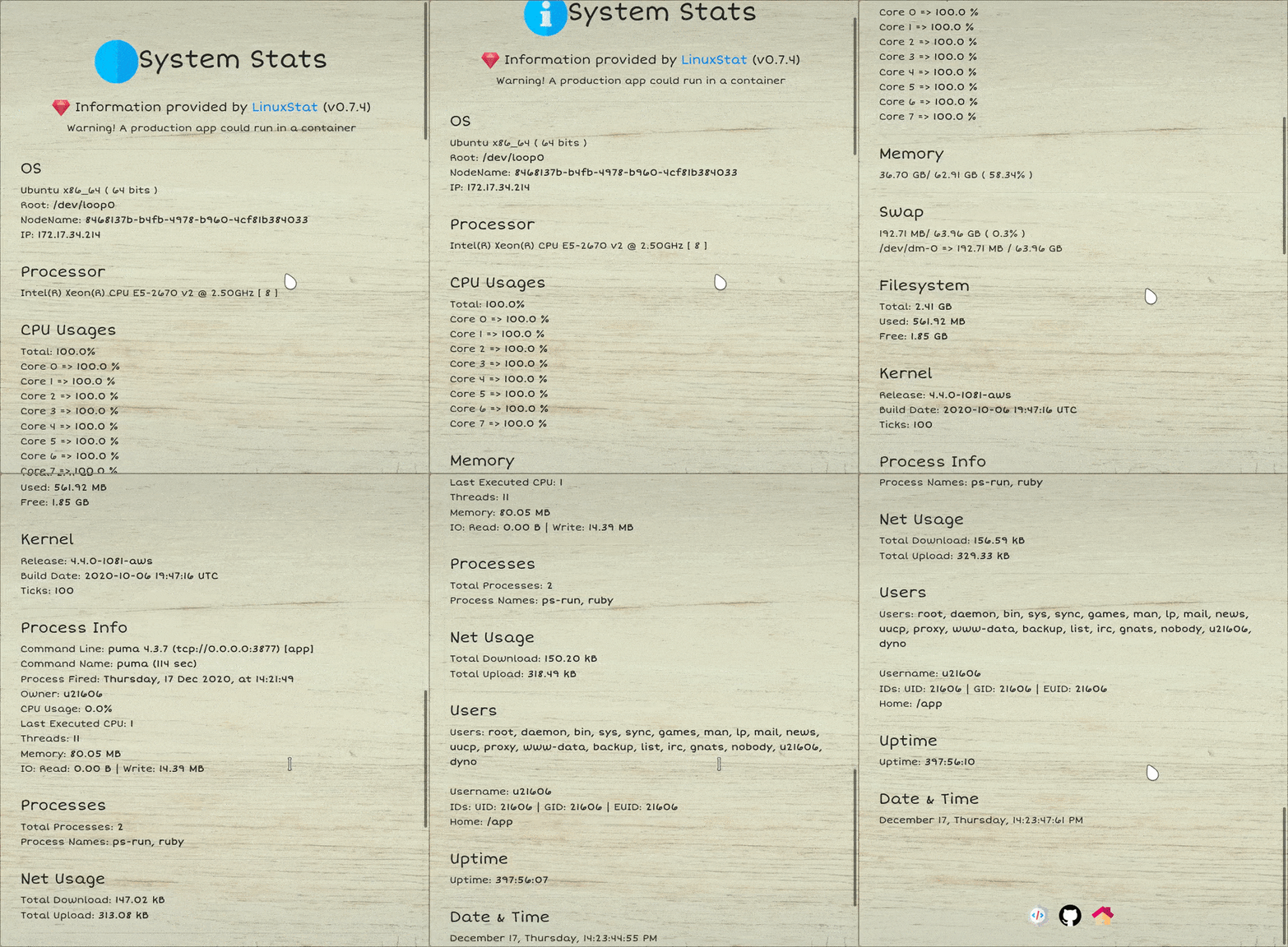
You can use LinuxStat directly in rails.
---
## Android
LinuxStat does support Android OS. But it's not rigorously tested on all device like android apps.
But in Termux you can just run LinuxStat without facing issues.
Note that the CPU count can differ due to hotplugging feature. So if you see the CPU count changes, there's not really nothing to do about that.
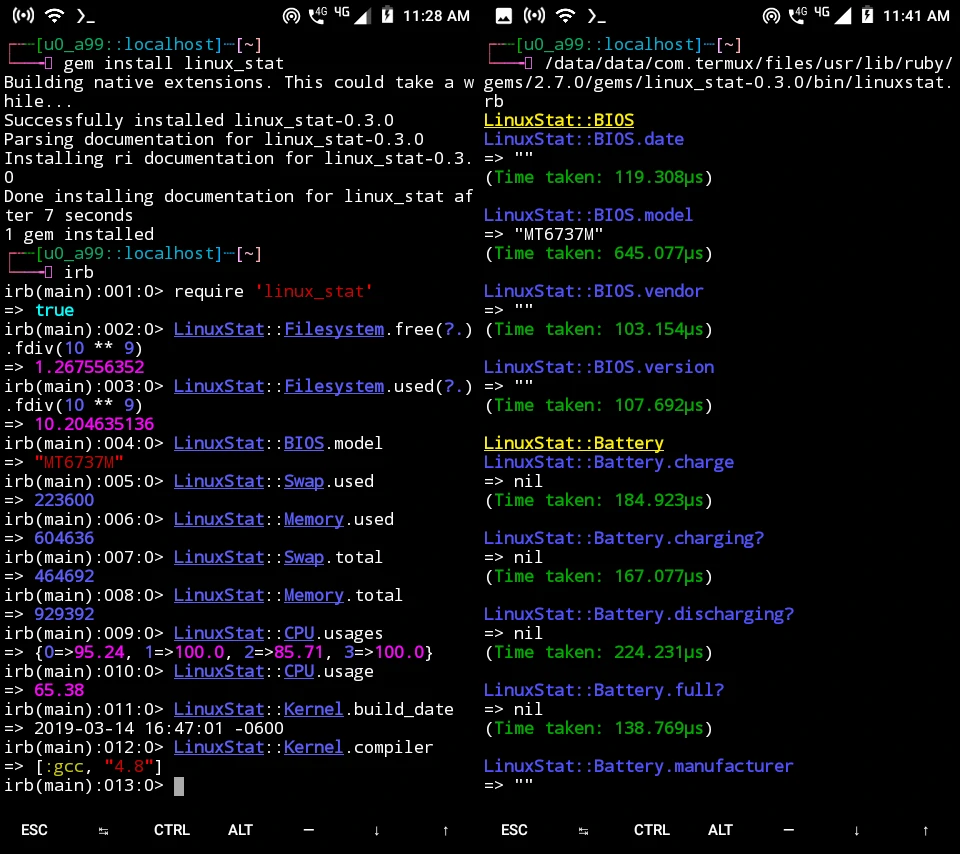
Issues regarding running LinuxStat on termux are also welcomed.
---
## Development
After checking out the repo, compile and install this gem onto your local machine with `bundle exec rake install`
You can also run `bin/console` for an interactive prompt that will allow you to experiment.
To test all modules, run `rake install` and then `exe/linuxstat.rb`. Also check "Testing" below.
---
## Testing
Like other gems, this doesn't have a test like RSpec.
We suggest using the exe/linuxstat.rb file on various Linux systems to test.
First you need to execute `bundle exec rake install` to compile and install this gem.
If you need to test a specific module, say the CPU, just run it like this:
$ ruby exe/linuxstat.rb CPU
Or:
$ ruby exe/linuxstat.rb cpu
That is, the argument passed is not case-sensitive.
But if the argument passed isn't available and outright wrong, it will run all the module methods. For example, you can't do:
$ ruby exe/linuxstat.rb upc
This is not a valid module and can't be run.

---

## Contributing

Bug reports and pull requests are welcome on GitHub at https://github.com/Souravgoswami/linux_stat.

---

## License

The gem is available as open source under the terms of the [MIT License](https://opensource.org/licenses/MIT).