HTML5Validators
Automatic client-side validation using HTML5 Form Validation
What is this?
html5_validators is a gem/plugin for Rails 3+ that enables automatic client-side
validation using ActiveModel + HTML5. Once you bundle this gem on your app,
the gem will automatically translate your model validation code into HTML5
validation attributes on every form_for invocation unless you explicitly
cancel it.
Features
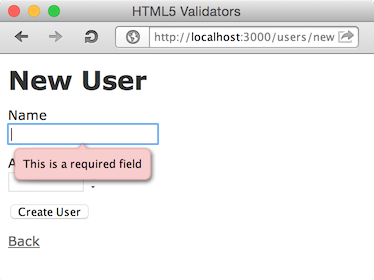
PresenceValidator => required
Model
class User
include ActiveModel::Validations
validates_presence_of :name
end
View
<%= f.text_field :name %>other
text_fieldish helpers,text_area,radio_button, andcheck_boxare also availableHTML
<input id="user_name" name="user[name]" required="required" type="text" />SPEC
http://dev.w3.org/html5/spec/Overview.html#attr-input-required
LengthValidator => maxlength
Model
class User
include ActiveModel::Validations
validates_length_of :name, maximum: 10
end
View
<%= f.text_field :name %>text_areais also availableHTML
<input id="user_name" maxlength="10" name="user[name]" size="10" type="text" />SPEC
http://dev.w3.org/html5/spec/Overview.html#attr-input-maxlength
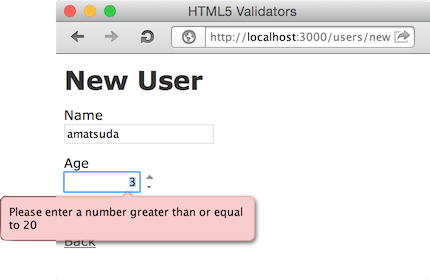
NumericalityValidator => max, min
Model
class User
include ActiveModel::Validations
validates_numericality_of :age, greater_than_or_equal_to: 20
end
View (be sure to use number_field)
<%= f.number_field :age %>HTML
<input id="user_age" min="20" name="user[age]" size="30" type="number" />SPEC
http://dev.w3.org/html5/spec/Overview.html#attr-input-max http://dev.w3.org/html5/spec/Overview.html#attr-input-min
And more (coming soon...?)
:construction:
Disabling automatic client-side validation
There are four ways to cancel the automatic HTML5 validation.
1. Per form (via form_for option)
Set auto_html5_validation: false to form_for parameter.
- View
erb
<%= form_for @user, auto_html5_validation: false do |f| %>
...
<% end %>
2. Per model instance (via model attribute)
Set auto_html5_validation = false attribute to ActiveModelish object.
Controller
@user = User.new auto_html5_validation: falseView
<%= form_for @user do |f| %>
...
<% end %>
3. Per model class (via model class attribute)
Set auto_html5_validation = false to ActiveModelish class' class variable.
This configuration will never be propagated to inherited children classes.
Model
class User < ActiveRecord::Base
self.auto_html5_validation = false
end
Controller
@user = User.newView
<%= form_for @user do |f| %>
...
<% end %>
4. Globally (via HTML5Validators module configuration)
Set config.enabled = false to Html5Validators module.
Maybe you want to put this in your test_helper, or add a controller filter as
follows for development mode.
- Controller
ruby
# an example filter that disables the validator if the request has {h5v: 'disable'} params
around_action do |controller, block|
h5v_enabled_was = Html5Validators.enabled
Html5Validators.enabled = false if params[:h5v] == 'disable'
block.call
Html5Validators.enabled = h5v_enabled_was
end
Supported versions
Ruby 2.0, 2.1, 2.2, 2.3, 2.4 (trunk)
Rails 3.2.x, 4.0.x, 4.1, 4.2, 5.0, 5.1 (edge)
HTML5 compatible browsers
Installation
Put this line into your Gemfile:
gem 'html5_validators'
Then bundle:
% bundle
Notes
When accessed by an HTML5 incompatible lagacy browser, these extra attributes will just be ignored.
Todo
- more validations
Copyright
Copyright (c) 2011 Akira Matsuda. See MIT-LICENSE for further details.