HTML5Validators
Automatic client-side validation using HTML5 Form Validation
What is this?
html5_validators is a gem/plugin for Rails 3+ that enables automatic client-side
validation using ActiveModel + HTML5. Once you bundle this gem on your app,
the gem will automatically translate your model validation code into HTML5
validation attributes on every form_for invocation unless you explicitly
cancel it.
Features
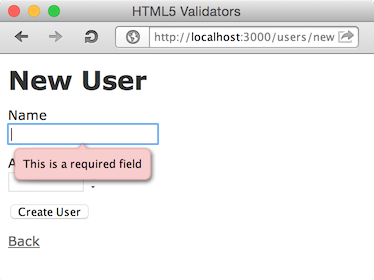
PresenceValidator => required
Model
class User
include ActiveModel::Validations
validates_presence_of :name
end
View
<%= f.text_field :name %>other
text_fieldish helpers,text_area,radio_button, andcheck_boxare also availableHTML
<input id="user_name" name="user[name]" required="required" type="text" />SPEC
http://dev.w3.org/html5/spec/Overview.html#attr-input-required
LengthValidator => maxlength
Model
class User
include ActiveModel::Validations
validates_length_of :name, maximum: 10
end
View
<%= f.text_field :name %>text_areais also availableHTML
<input id="user_name" maxlength="10" name="user[name]" size="10" type="text" />SPEC
http://dev.w3.org/html5/spec/Overview.html#attr-input-maxlength
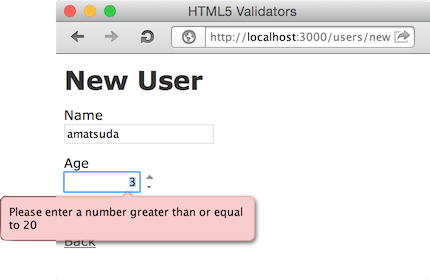
NumericalityValidator => max, min
Model
class User
include ActiveModel::Validations
validates_numericality_of :age, greater_than_or_equal_to: 20
end
View (be sure to use number_field)
<%= f.number_field :age %>HTML
<input id="user_age" min="20" name="user[age]" size="30" type="number" />SPEC
http://dev.w3.org/html5/spec/Overview.html#attr-input-max http://dev.w3.org/html5/spec/Overview.html#attr-input-min
And more (coming soon...?)
:construction:
Disabling automatic client-side validation
There are four ways to cancel the automatic HTML5 validation.
1. Per form (via form_for option)
Set auto_html5_validation: false to form_for parameter.
- View
erb
<%= form_for @user, auto_html5_validation: false do |f| %>
...
<% end %>
2. Per model instance (via model attribute)
Set auto_html5_validation = false attribute to ActiveModelish object.
Controller
@user = User.new auto_html5_validation: falseView
<%= form_for @user do |f| %>
...
<% end %>
3. Per model class (via model class attribute)
Set auto_html5_validation = false to ActiveModelish class variable.
Model
class User < ActiveRecord::Base
self.auto_html5_validation = false
end
Controller
@user = User.newView
<%= form_for @user do |f| %>
...
<% end %>
4. Globally (via HTML5Validators module configuration)
Set config.enabled = false to Html5Validators module.
Maybe you want to put this in your test_helper, or add a controller filter as
follows for development mode.
- Controller
ruby
# an example filter that disables the validator if the request has {h5v: 'disable'} params
around_action do |controller, block|
h5v_enabled_was = Html5Validators.enabled
Html5Validators.enabled = false if params[:h5v] == 'disable'
block.call
Html5Validators.enabled = h5v_enabled_was
end
Supported versions
Ruby 1.8.7, 1.9.2, 1.9.3, 2.0, 2.1, 2.2, 2.3 (trunk)
Rails 3.0.x, 3.1.x, 3.2.x, 4.0.x, 4.1, 4.2, 5.0 (edge)
HTML5 compatible browsers
Installation
Put this line into your Gemfile:
gem 'html5_validators'
Then bundle:
% bundle
Notes
When accessed by an HTML5 incompatible lagacy browser, these extra attributes will just be ignored.
Todo
- more validations
Copyright
Copyright (c) 2011 Akira Matsuda. See MIT-LICENSE for further details.