 Glimmer DSL for Opal 0.9.3 (Pure Ruby Web GUI)


You can finally live in pure Ruby land on the web!
Glimmer DSL for Opal is an alpha gem that enables building web GUI in pure Ruby via Opal on Rails.
Use in one of two ways:
- Direct: build the GUI of web apps with the same friendly desktop GUI Ruby syntax as Glimmer DSL for SWT, thus requiring a lot less code than web technologies that is in pure Ruby and avoiding opaque web concepts like 'render' and 'reactive'. No HTML/JS/CSS skills are even required. Web designers may be involved with CSS styling only if needed.
- Adapter: auto-webify Glimmer desktop apps (i.e. apps built with Glimmer DSL for SWT) via Opal on Rails without changing a line of code. Just insert them as a single require statement in a Rails app, and BOOM! They're running on the web! Apps may then optionally be custom-styled for the web by web designers with standard CSS if needed.
Glimmer DSL for Opal successfully reuses the entire Glimmer core DSL engine in Opal Ruby inside a web browser, and as such inherits the full range of powerful Glimmer desktop data-binding capabilities for the web.
Hello, Table! Sample
Glimmer GUI code from glimmer-dsl-opal/samples/hello/hello_table.rb:
# ...
shell {
grid_layout
text 'Hello, Table!'
label {
layout_data :center, :center, true, false
text 'Baseball Playoff Schedule'
font height: 30, style: :bold
}
combo(:read_only) {
layout_data :center, :center, true, false
selection bind(BaseballGame, :playoff_type)
font height: 16
}
table(:editable) { |table_proxy|
layout_data :fill, :fill, true, true
table_column {
text 'Game Date'
width 150
sort_property :date # ensure sorting by real date value (not `game_date` string specified in items below)
editor :date_drop_down, property: :date_time
}
table_column {
text 'Game Time'
width 150
sort_property :time # ensure sorting by real time value (not `game_time` string specified in items below)
editor :time, property: :date_time
}
table_column {
text 'Ballpark'
width 180
editor :none
}
table_column {
text 'Home Team'
width 150
editor :combo, :read_only # read_only is simply an SWT style passed to combo widget
}
table_column {
text 'Away Team'
width 150
editor :combo, :read_only # read_only is simply an SWT style passed to combo widget
}
table_column {
text 'Promotion'
width 150
# default text editor is used here
}
# Data-bind table items (rows) to a model collection property, specifying column properties ordering per nested model
items bind(BaseballGame, :schedule), column_properties(:game_date, :game_time, :ballpark, :home_team, :away_team, :promotion)
# Data-bind table selection
selection bind(BaseballGame, :selected_game)
# Default initial sort property
sort_property :date
# Sort by these additional properties after handling sort by the column the user clicked
additional_sort_properties :date, :time, :home_team, :away_team, :ballpark, :promotion
}
{
text 'Book Selected Game'
layout_data :center, :center, true, false
font height: 16
enabled bind(BaseballGame, :selected_game)
{
book_selected_game
}
}
}.open
# ...
Hello, Table! originally running on the desktop (using the glimmer-dsl-swt gem):

Hello, Table! (same code) running on the web via Opal on Rails (using the glimmer-dsl-opal gem):

Hello, Table! Editing Game Date

Hello, Table! Editing Game Time

Hello, Table! Editing Home Team

Hello, Table! Sorted Game Date Ascending

Hello, Table! Sorted Game Date Descending

Hello, Table! Playoff Type Combo

Hello, Table! Playoff Type Changed

Hello, Table! Game Booked

NOTE: Glimmer DSL for Opal is an alpha project. Please help make better by contributing, adopting for small or low risk projects, and providing feedback. It is still an early alpha, so the more feedback and issues you report the better.
Alpha Version 0.9.3 only supports bare-minimum capabilities for the following samples (originally written for glimmer-dsl-swt):
- Hello, World!
- Hello, Combo!
- Hello, Computed!
- Hello, List Single Selection!
- Hello, List Multi Selection!
- Hello, Browser!
- Hello, Tab!
- Hello, Custom Widget!
- Hello, Custom Shell!
- Hello, Radio!
- Hello, Radio Group!
- Hello, Group!
- Hello, Checkbox!
- Hello, Checkbox Group!
- Hello, Date Time!
- Hello, Table!
- Hello, Button!
- Hello, Message Box!
- Hello, Pop Up Context Menu!
- Hello, Menu Bar!
Other Glimmer DSL gems:
- glimmer-dsl-swt: Glimmer DSL for SWT (JRuby Desktop Development GUI Library)
- glimmer-dsl-tk: Glimmer DSL for Tk (Ruby Desktop Development GUI Library)
- glimmer-dsl-xml: Glimmer DSL for XML (& HTML)
- glimmer-dsl-css: Glimmer DSL for CSS (Cascading Style Sheets)
Table of Contents
- Glimmer DSL for Opal 0.9.2 (Pure Ruby Web GUI)
- Principles
- Background
- Pre-requisites
- Setup
- Supported Glimmer DSL Keywords
- Samples
- Hello Samples
- Hello, World!
- Hello, Combo!
- Hello, Computed!
- Hello, List Single Selection!
- Hello, List Multi Selection!
- Hello, Browser!
- Hello, Tab!
- Hello, Custom Widget!
- Hello, Custom Shell!
- Hello, Radio!
- Hello, Radio Group!
- Hello, Group!
- Hello, Checkbox!
- Hello, Checkbox Group!
- Hello, Date Time!
- Hello, Table!
- Hello, Button!
- Hello, Message Box!
- Hello, Pop Up Context Menu!
- Hello, Menu Bar!
- Elaborate Samples
- External Samples
- Glimmer Supporting Libraries
- Glimmer Process
- Help
- Issues
- Chat
- Feature Suggestions
- Change Log
- Contributing
- Contributors
- License
Principles
- Live purely in Rubyland via the Glimmer GUI DSL, completely oblivious to web browser technologies.
- Forget Routers! Glimmer DSL for Opal supports auto-routing of custom shells (windows), which are opened as separate tabs in a web browser with automatically generated routes and bookmarkable URLs.
- HTML is strictly made for creating documents not interactive applications. As such, software engineers can avoid it and focus on creating web applications more productively with Glimmer DSL for Opal in pure Ruby instead (just like they do in desktop development) while content creators and web designers can be the ones responsible for creating HTML documents for web content purposes only as HTML was originally intended. That way, Glimmer web GUI is used and embedded in web pages when providing users with applications while the rest of the web pages are maintained by non-engineers as pure HTML. This achieves a correct separation of responsibilities and better productivity and maintainability.
- Approximate styles by developers via the Glimmer GUI DSL. Perfect styles by designers via pure CSS. Developers can simply build GUI with approximate styling similar to desktop GUI and mockups without worrying about pixel-perfect aesthetics. Web designers can take styling further with pure CSS since every HTML element auto-generated by Glimmer DSL for Opal has a predictable ID and CSS class. This achieves a proper separation of responsibilities between developers and designers.
- Web servers are used just like servers in traditional client/server architecture, meaning they simply provide RMI services to enable centralizing some of the application logic and data in the cloud to make available everywhere and enable data-sharing with others.
Background
The original idea behind Glimmer DSL for Opal was that you start by having a Glimmer DSL for SWT desktop app that communicates with a Rails API for any web/cloud concerns. The pure Ruby Glimmer DSL for SWT is very simple, so it is more productive to build GUI in it since it does not go through a server/client request/response cycle and can be iterated on locally with a much shorter feedback cycle. Once the GUI and the rest of the app is built. You simply embed it in a Rails app as a one line require statement, and BOOM, it just works on the web inside a web browser with the same server/client communication you had in the desktop app (I am working on adding minimal support for net/http in Opal so that desktop apps that use it continue to work in a web browser. Until then, just use Opal-jQuery http support). That way, you get two apps for one: desktop and web.
Part of the idea is that web browsers just render GUI widgets similar to those of a desktop app (after all a web browser is a desktop app), so whether you run your GUI on the desktop or on the web should just be a low-level concern, hopefully automated completely with Glimmer DSL for Opal.
Last but not least, you would likely want some special branding on the web, so you can push that off to a web designer who would be more than happy to do the web graphic design and customize the look and feel with pure CSS (no need for programming with Ruby or JavaScript). This enables a clean separation of concerns and distribution of tasks among developers and designers, let alone saving effort on the web GUI by reusing the desktop GUI as a base right off the bat.
Alternatively, web developers may directly use Glimmer DSL for Opal to build the GUI of web apps since it is as simple as desktop development, thus requiring a lot less code that is in pure Ruby only (as demonstrated in examples below) and avoiding opaque web concepts like 'render' and 'reactive' due to treating GUI as persistent just like desktop apps do. No HTML/JS/CSS skills are even required. Still, web designers may be involved with CSS only if needed, thanks to the clean semantic markup Glimmer DSL for Opal automatically produces.
Pre-requisites
- Rails 5: https://github.com/rails/rails/tree/5-2-stable
- Opal 1: https://github.com/opal/opal-rails
- jQuery 3: https://code.jquery.com/ (jQuery 3.5.1 is included in the glimmer-dsl-opal gem)
- jQuery-UI 1.12: https://code.jquery.com/ (jQuery-UI 1.12.1 is included in the glimmer-dsl-opal gem)
- jQuery-UI Timepicker 0.3: https://code.jquery.com/ (jQuery-UI Timepicker 0.3.3 is included in the glimmer-dsl-opal gem)
Setup
(NOTE: Keep in mind this is a very early experimental and incomplete alpha. If you run into issues, try to go back to a previous revision. Also, there is a slight chance any issues you encounter are fixed in master or some other branch that you could check out instead)
The glimmer-dsl-opal gem is a Rails Engine gem that includes assets.
Please follow the following steps to setup.
Install a Rails 5 gem:
gem install rails -v5.2.4.4
Start a new Rails 5 app:
rails new glimmer_app_server
Add the following to Gemfile:
gem 'opal-rails', '~> 1.1.2'
gem 'opal-async', '~> 1.2.0'
gem 'opal-jquery', '~> 0.4.4'
gem 'glimmer-dsl-opal', '~> 0.9.3'
gem 'glimmer-dsl-xml', '~> 1.1.0', require: false
gem 'glimmer-dsl-css', '~> 1.1.0', require: false
Follow (opal-rails)[https://github.com/opal/opal-rails] instructions, basically the configuration of: config/initializers/assets.rb
Edit config/initializers/assets.rb and add the following at the bottom:
Opal.use_gem 'glimmer-dsl-opal'
Run:
rails g scaffold welcome
Modify config/routes.rb:
root to: 'welcomes#index'
Edit app/views/layouts/application.html.erb and add the following below other stylesheet_link_tag declarations:
<%= stylesheet_link_tag 'glimmer/glimmer', media: 'all', 'data-turbolinks-track': 'reload' %>
Clear the file app/views/welcomes/index.html.erb from any content.
Add the following line to the top of an empty app/assets/javascripts/application.rb (replacing application.js), and add Glimmer GUI DSL code or a require statement for one of the samples below.
require 'glimmer-dsl-opal' # brings opal and other dependencies automatically

# require-statement/code goes here.
Example to confirm setup is working:
require 'glimmer-dsl-opal'

include Glimmer

shell {
  fill_layout
  text 'Example to confirm setup is working'
  label {
    text "Welcome to Glimmer DSL for Opal!"
    foreground :red
    font height: 24
  }
}.open
Supported Glimmer DSL Keywords
The following keywords from glimmer-dsl-swt have partial support in Opal:
Widgets:
button: featured in Hello, Checkbox! / Hello, Button! / Hello, Table! / Hello, Radio Group! / Hello, Radio! / Hello, Message Box! / Hello, List Single Selection! / Hello, List Multi Selection! / Hello, Group! / Hello, Combo! / Hello, Checkbox Group! / Contact Manager / Tic Tac Toe / Loginbrowser: featured in Hello, Browser!calendar: featured in Hello, Date Time!checkbox: featured in Hello, Checkbox Group! / Hello, Checkbox!checkbox_group: featured in Hello, Checkbox Group!combo: featured in Hello, Table! / Hello, Combo!composite: featured in Hello, Radio! / Hello, Computed! / Hello, Checkbox! / Tic Tac Toe / Login / Contact Managerdate: featured in Hello, Table! / Hello, Date Time! / Hello, Custom Shell! / Tic Tac Toedate_drop_down: featured in Hello, Table! / Hello, Date Time!group: featured in Hello, Group! / Contact Managerlabel: featured in Hello, Computed! / Hello, Checkbox Group! / Hello, Checkbox! / Hello, World! / Hello, Table! / Hello, Tab! / Hello, Radio Group! / Hello, Radio! / Hello, Pop Up Context Menu! / Hello, Menu Bar! / Hello, Date Time! / Hello, Custom Widget! / Hello, Custom Shell! / Contact Manager / Loginlist(w/ optional:multiSWT style): featured in Hello, List Single Selection! / Hello, List Multi Selection! / Contact Managermenu: featured in Hello, Menu Bar! / Hello, Pop Up Context Menu! / Hello, Table!menu_bar: featured in Hello, Menu Bar!menu_item: featured in Hello, Table! / Hello, Pop Up Context Menu! / Hello, Menu Bar!message_box: featured in Hello, Table! / Hello, Pop Up Context Menu! / Hello, Message Box! / Hello, Menu Bar!radio: featured in Hello, Radio! / Hello, Group!radio_group: featured in Hello, Radio Group!scrolled_compositeshell: featured in Hello, Checkbox! / Hello, Button! / Hello, Table! / Hello, Tab! / Hello, Radio Group! / Hello, Radio! / Hello, List Single Selection! / Hello, List Multi Selection! / Hello, Group! / Hello, Date Time! / Hello, Custom Shell! / Hello, Computed! / Hello, Combo! / Hello, Checkbox Group! / Contact Manager / Tic Tac Toe / Logintab_folder: featured in Hello, Tab!tab_item: featured in Hello, Tab!table: featured in Hello, Custom Shell! / Hello, Table! / Contact Managertable_column: featured in Hello, Table! / Hello, Custom Shell! / Contact Managertext: featured in Hello, Computed! / Login / Contact Managertime: featured in Hello, Table! / Hello, Date Time!- Glimmer::UI::CustomWidget: ability to define any keyword as a custom widget - featured in Hello, Custom Widget!
- Glimmer::UI::CustomShell: ability to define any keyword as a custom shell (aka custom window) that opens in a new browser window (tab) automatically unless there is no shell open in the current browser window (tab) - featured in Hello, Custom Shell!
Layouts:
grid_layout: featured in Hello, Custom Shell! / Hello, Computed! / Hello, Table! / Hello, Pop Up Context Menu! / Hello, Menu Bar! / Hello, List Single Selection! / Hello, List Multi Selection! / Contact Manager / Login / Tic Tac Toerow_layout: featured in Hello, Radio Group! / Hello, Radio! / Hello, Group! / Hello, Date Time! / Hello, Combo! / Hello, Checkbox Group! / Hello, Checkbox! / Contact Managerfill_layout: featured in Hello, Custom Widget!layout_data: featured in Hello, Table! / Hello, Custom Shell! / Hello, Computed! / Tic Tac Toe / Contact Manager
Graphics/Style:
color: featured in Hello, Custom Widget! / Hello, Menu Bar!font: featured in Hello, Checkbox Group! / Hello, Checkbox! / Hello, Table! / Hello, Radio Group! / Hello, Radio! / Hello, Pop Up Context Menu! / Hello, Menu Bar! / Hello, Group! / Hello, Date Time! / Hello, Custom Widget! / Hello, Custom Shell! / Contact Manager / Tic Tac ToePointclass used in setting location on widgetsswtandSWTclass to set SWT styles on widgets - featured in Hello, Custom Shell! / Login / Contact Manager
Data-Binding/Observers:
bind: featured in Hello, Computed! / Hello, Combo! / Hello, Checkbox Group! / Hello, Checkbox! / Hello, Button! / Hello, Table! / Hello, Radio Group! / Hello, Radio! / Hello, List Single Selection! / Hello, List Multi Selection! / Hello, Group! / Hello, Date Time! / Hello, Custom Widget! / Hello, Custom Shell! / Login / Contact Manager / Tic Tac Toeobserve: featured in Hello, Table! / Tic Tac Toeon_widget_selected: featured in Hello, Combo! / Hello, Checkbox Group! / Hello, Checkbox! / Hello, Button! / Hello, Table! / Hello, Radio Group! / Hello, Radio! / Hello, Pop Up Context Menu! / Hello, Message Box! / Hello, Menu Bar! / Hello, List Single Selection! / Hello, List Multi Selection! / Hello, Group! / Contact Manager / Login / Tic Tac Toeon_modify_texton_key_pressed(and SWT aliason_swt_keydown) - featured in Login / Contact Manageron_key_released(and SWT aliason_swt_keyup)on_mouse_down(and SWT aliason_swt_mousedown)on_mouse_up(and SWT aliason_swt_mouseup) - featured in Hello, Custom Shell! / Contact Manager
Event loop:
display: featured in Tic Tac Toeasync_exec: featured in Hello, Custom Widget! / Hello, Custom Shell!
Samples
Follow the instructions below to try out glimmer-dsl-swt samples webified via glimmer-dsl-opal
The Hello samples demonstrate tiny building blocks (widgets) for building full fledged applications.
The Elaborate samples demonstrate more advanced sample applications that assemble multiple building blocks.
This external sample app contains all the samples mentioned below configured inside a Rails Opal app with all the pre-requisites ready to go for convenience:
https://github.com/AndyObtiva/sample-glimmer-dsl-opal-rails-app
You may visit a Heroku hosted version at:
https://sample-glimmer-dsl-opal-app.herokuapp.com/
Note: Some of the screenshots might be out of date with updates done to samples in both glimmer-dsl-swt and glimmer-dsl-opal.
Hello Samples
Hello, World!
Add the following require statement to app/assets/javascripts/application.rb
require 'glimmer-dsl-opal/samples/hello/hello_world'
Or add the Glimmer code directly if you prefer to play around with it:
include Glimmer

shell {
  text 'Glimmer'
  label {
    text 'Hello, World!'
  }
}.open
Glimmer app on the desktop (using glimmer-dsl-swt gem):

Glimmer app on the web (using glimmer-dsl-opal gem):
Start the Rails server:
rails s
Visit http://localhost:3000
You should see "Hello, World!"

Hello, Combo!
Add the following require statement to app/assets/javascripts/application.rb
require 'glimmer-dsl-opal/samples/hello/hello_combo'
Or add the Glimmer code directly if you prefer to play around with it:
class Person
attr_accessor :country, :country_options
def initialize
self. = ['', 'Canada', 'US', 'Mexico']
reset_country
end
def reset_country
self.country = 'Canada'
end
end
class HelloCombo
include Glimmer
def launch
person = Person.new
shell {
row_layout(:vertical) {
pack false
}
text 'Hello, Combo!'
combo(:read_only) {
selection bind(person, :country)
}
{
text 'Reset Selection'
do
person.reset_country
end
}
}.open
end
end
HelloCombo.new.launch
Glimmer app on the desktop (using glimmer-dsl-swt gem):

Glimmer app on the web (using glimmer-dsl-opal gem):
Start the Rails server:
rails s
Visit http://localhost:3000
You should see "Hello, Combo!"

Hello, Computed!
Add the following require statement to app/assets/javascripts/application.rb
require 'glimmer-dsl-opal/samples/hello/hello_computed'
Or add the Glimmer code directly if you prefer to play around with it:
class HelloComputed
  class Contact
    attr_accessor :first_name, :last_name, :year_of_birth

    def initialize(attribute_map)
      @first_name = attribute_map[:first_name]
      @last_name = attribute_map[:last_name]
      @year_of_birth = attribute_map[:year_of_birth]
    end

    def name
      "#{last_name}, #{first_name}"
    end

    def age
      Time.now.year - year_of_birth.to_i
    rescue
      0
    end
  end
end

class HelloComputed
  include Glimmer

  def initialize
    @contact = Contact.new(
      first_name: 'Barry',
      last_name: 'McKibbin',
      year_of_birth: 1985
    )
  end

  def launch
    shell {
      text 'Hello, Computed!'
      composite {
        grid_layout {
          num_columns 2
          make_columns_equal_width true
          horizontal_spacing 20
          vertical_spacing 10
        }
        label {text 'First &Name: '}
        text {
          text bind(@contact, :first_name)
          layout_data {
            horizontal_alignment :fill
            grab_excess_horizontal_space true
          }
        }
        label {text '&Last Name: '}
        text {
          text bind(@contact, :last_name)
          layout_data {
            horizontal_alignment :fill
            grab_excess_horizontal_space true
          }
        }
        label {text '&Year of Birth: '}
        text {
          text bind(@contact, :year_of_birth)
          layout_data {
            horizontal_alignment :fill
            grab_excess_horizontal_space true
          }
        }
        label {text 'Name: '}
        label {
          text bind(@contact, :name, computed_by: [:first_name, :last_name])
          layout_data {
            horizontal_alignment :fill
            grab_excess_horizontal_space true
          }
        }
        label {text 'Age: '}
        label {
          text bind(@contact, :age, on_write: :to_i, computed_by: [:year_of_birth])
          layout_data {
            horizontal_alignment :fill
            grab_excess_horizontal_space true
          }
        }
      }
    }.open
  end
end

HelloComputed.new.launch
Glimmer app on the desktop (using glimmer-dsl-swt gem):

Glimmer app on the web (using glimmer-dsl-opal gem):
Start the Rails server:
rails s
Visit http://localhost:3000
You should see "Hello, Computed!"

Hello, List Single Selection!
Add the following require statement to app/assets/javascripts/application.rb
require 'glimmer-dsl-opal/samples/hello/hello_list_single_selection'
Or add the Glimmer code directly if you prefer to play around with it:
class Person
attr_accessor :country, :country_options
def initialize
self.=["", "Canada", "US", "Mexico"]
self.country = "Canada"
end
def reset_country
self.country = "Canada"
end
end
class HelloListSingleSelection
include Glimmer
def launch
person = Person.new
shell {
composite {
list {
selection bind(person, :country)
}
{
text "Reset"
do
person.reset_country
end
}
}
}.open
end
end
HelloListSingleSelection.new.launch
Glimmer app on the desktop (using glimmer-dsl-swt gem):

Glimmer app on the web (using glimmer-dsl-opal gem):
Start the Rails server:
rails s
Visit http://localhost:3000
You should see "Hello, List Single Selection!"

Hello, List Multi Selection!
Add the following require statement to app/assets/javascripts/application.rb
require 'glimmer-dsl-opal/samples/hello/hello_list_multi_selection'
Or add the Glimmer code directly if you prefer to play around with it:
class HelloListMultiSelection
class Person
attr_accessor :provinces, :provinces_options
def initialize
self. = [
'',
'Alberta',
'British Columbia',
'Manitoba',
'New Brunswick',
'Newfoundland and Labrador',
'Northwest Territories',
'Nova Scotia',
'Nunavut',
'Ontario',
'Prince Edward Island',
'Quebec',
'Saskatchewan',
'Yukon'
]
reset_provinces
end
def reset_provinces
self.provinces = ['Quebec', 'Manitoba', 'Alberta']
end
end
include Glimmer
def launch
person = Person.new
shell {
grid_layout
text 'Hello, List Multi Selection!'
list(:multi) {
selection bind(person, :provinces)
}
{
text 'Reset Selections To Default Values'
{ person.reset_provinces }
}
}.open
end
end
HelloListMultiSelection.new.launch
Glimmer app on the desktop (using glimmer-dsl-swt gem):

Glimmer app on the web (using glimmer-dsl-opal gem):
Start the Rails server:
rails s
Visit http://localhost:3000
You should see "Hello, List Multi Selection!"

Hello, Browser!
Add the following require statement to app/assets/javascripts/application.rb
require 'glimmer-dsl-opal/samples/hello/hello_browser'
Or add the Glimmer code directly if you prefer to play around with it:
include Glimmer

shell {
  minimum_size 1024, 860
  browser {
    url 'http://brightonresort.com/about'
  }
}.open
Glimmer app on the desktop (using glimmer-dsl-swt gem):

Glimmer app on the web (using glimmer-dsl-opal gem):
Start the Rails server:
rails s
Visit http://localhost:3000
You should see "Hello, Browser!"

Hello, Tab!
Add the following require statement to app/assets/javascripts/application.rb
require 'glimmer-dsl-opal/samples/hello/hello_tab'
Or add the Glimmer code directly if you prefer to play around with it:
class HelloTab
  include Glimmer
  def launch
    shell {
      text "Hello, Tab!"
      tab_folder {
        tab_item {
          text "English"
          label {
            text "Hello, World!"
          }
        }
        tab_item {
          text "French"
          label {
            text "Bonjour, Univers!"
          }
        }
      }
    }.open
  end
end

HelloTab.new.launch
Glimmer app on the desktop (using glimmer-dsl-swt gem):


Glimmer app on the web (using glimmer-dsl-opal gem):
Start the Rails server:
rails s
Visit http://localhost:3000
You should see "Hello, Tab!"


Hello, Custom Widget!
Add the following require statement to app/assets/javascripts/application.rb
require 'glimmer-dsl-opal/samples/hello/hello_custom_widget'
Or add the Glimmer code directly if you prefer to play around with it:
# This class declares a `greeting_label` custom widget (by convention)
class GreetingLabel
include Glimmer::UI::CustomWidget
# multiple options without default values
:name, :colors
# single option with default value
option :greeting, default: 'Hello'
# internal attribute (not a custom widget option)
attr_accessor :color
before_body {
@font = {height: 24, style: :bold}
@color = :black
}
after_body {
return if colors.nil?
Thread.new {
colors.cycle { |color|
async_exec {
self.color = color
}
sleep(1)
}
}
}
body {
# pass received swt_style through to label to customize (e.g. :center to center text)
label(swt_style) {
text "#{greeting}, #{name}!"
font @font
foreground bind(self, :color)
}
}
end
# including Glimmer enables the Glimmer DSL syntax, including auto-discovery of the `greeting_label` custom widget
include Glimmer
shell {
fill_layout :vertical
minimum_size 215, 215
text 'Hello, Custom Widget!'
# custom widget options are passed in a hash
greeting_label(name: 'Sean')
# pass :center SWT style followed by custom widget options hash
greeting_label(:center, name: 'Laura', greeting: 'Aloha') #
greeting_label(:right, name: 'Rick') {
# you can nest attributes under custom widgets just like any standard widget
foreground :red
}
# the colors option cycles between colors for the label foreground every second
greeting_label(:center, name: 'Mary', greeting: 'Aloha', colors: [:red, :dark_green, :blue])
}.open
Glimmer app on the desktop (using glimmer-dsl-swt gem):

Glimmer app on the web (using glimmer-dsl-opal gem):
Start the Rails server:
rails s
Visit http://localhost:3000
You should see "Hello, Custom Widget!"

Hello, Custom Shell!
This sample demonstrates Glimmer DSL for Opal's ability to open multiple shells (windows) as web browser tabs.
It automatically handles routing so that tab URLs are bookmarkable. Web developers do not have to do any routing configuration manually.
Add the following require statement to app/assets/javascripts/application.rb
require 'glimmer-dsl-opal/samples/hello/hello_custom_shell'
Or add the Glimmer code directly if you prefer to play around with it:
require 'date'
# This class declares an `email_shell` custom shell, aka custom window (by convention)
# Used to view an email message
class EmailShell
include Glimmer::UI::CustomShell
# multiple options without default values
:date, :subject, :from, :message
# single option with default value
option :to, default: '"John Irwin" <[email protected]>'
before_body {
@swt_style |= swt(:shell_trim, :modeless)
}
body {
# pass received swt_style through to shell to customize it (e.g. :dialog_trim for a blocking shell)
shell(swt_style) {
grid_layout(2, false)
text subject
label {
text 'Date:'
}
label {
text date
}
label {
text 'From:'
}
label {
text from
}
label {
text 'To:'
}
label {
text to
}
label {
text 'Subject:'
}
label {
text subject
}
label {
layout_data(:fill, :fill, true, true) {
horizontal_span 2 #TODO implement
vertical_indent 10
}
background :white
text
}
}
}
end
class HelloCustomShell
# including Glimmer enables the Glimmer DSL syntax, including auto-discovery of the `email_shell` custom widget
include Glimmer
Email = Struct.new(:date, :subject, :from, :message, keyword_init: true)
EmailSystem = Struct.new(:emails, keyword_init: true)
def initialize
@email_system = EmailSystem.new(
emails: [
Email.new(date: DateTime.new(2029, 10, 22, 11, 3, 0).strftime('%F %I:%M %p'), subject: '3rd Week Report', from: '"Dianne Tux" <[email protected]>', message: "Hello,\n\nI was wondering if you'd like to go over the weekly report sometime this afternoon.\n\nDianne"),
Email.new(date: DateTime.new(2029, 10, 21, 8, 1, 0).strftime('%F %I:%M %p'), subject: 'Glimmer Upgrade v100.0', from: '"Robert McGabbins" <[email protected]>', message: "Team,\n\nWe are upgrading to Glimmer version 100.0.\n\nEveryone pull the latest code!\n\nRegards,\n\nRobert McGabbins"),
Email.new(date: DateTime.new(2029, 10, 19, 16, 58, 0).strftime('%F %I:%M %p'), subject: 'Christmas Party', from: '"Lisa Ferreira" <[email protected]>', message: "Merry Christmas,\n\nAll office Christmas Party arrangements have been set\n\nMake sure to bring a Secret Santa gift\n\nBest regards,\n\nLisa Ferreira"),
Email.new(date: DateTime.new(2029, 10, 16, 9, 43, 0).strftime('%F %I:%M %p'), subject: 'Glimmer Upgrade v99.0', from: '"Robert McGabbins" <[email protected]>', message: "Team,\n\nWe are upgrading to Glimmer version 99.0.\n\nEveryone pull the latest code!\n\nRegards,\n\nRobert McGabbins"),
Email.new(date: DateTime.new(2029, 10, 15, 11, 2, 0).strftime('%F %I:%M %p'), subject: '2nd Week Report', from: '"Dianne Tux" <[email protected]>', message: "Hello,\n\nI was wondering if you'd like to go over the weekly report sometime this afternoon.\n\nDianne"),
Email.new(date: DateTime.new(2029, 10, 2, 10, 34, 0).strftime('%F %I:%M %p'), subject: 'Glimmer Upgrade v98.0', from: '"Robert McGabbins" <[email protected]>', message: "Team,\n\nWe are upgrading to Glimmer version 98.0.\n\nEveryone pull the latest code!\n\nRegards,\n\nRobert McGabbins"),
]
)
end
def launch
shell {
grid_layout
text 'Hello, Custom Shell!'
label {
font height: 24, style: :bold
text 'Emails:'
}
label {
font height: 18
text 'Click an email to view its message'
}
table {
layout_data :fill, :fill, true, true
table_column {
text 'Date:'
width 180
}
table_column {
text 'Subject:'
width 180
}
table_column {
text 'From:'
width 360
}
items bind(@email_system, :emails), column_properties(:date, :subject, :from)
on_mouse_up { |event|
email = event.table_item.get_data
Thread.new do
async_exec {
email_shell(date: email.date, subject: email.subject, from: email.from, message: email.).open
}
end
}
}
}.open
end
end
HelloCustomShell.new.launch
Glimmer app on the desktop (using glimmer-dsl-swt gem):


Glimmer app on the web (using glimmer-dsl-opal gem):
Start the Rails server:
rails s
Visit http://localhost:3000
You should see "Hello, Custom Widget!"


Hello, Radio!
Add the following require statement to app/assets/javascripts/application.rb
require 'glimmer-dsl-opal/samples/hello/hello_radio'
Or add the Glimmer code directly if you prefer to play around with it:
class HelloRadio
class Person
attr_accessor :male, :female, :child, :teen, :adult, :senior
def initialize
reset
end
def reset
self.male = nil
self.female = nil
self.child = nil
self.teen = nil
self.adult = true
self.senior = nil
end
end
include Glimmer
def launch
person = Person.new
shell {
text 'Hello, Radio!'
row_layout :vertical
label {
text 'Gender:'
font style: :bold
}
composite {
row_layout
radio {
text 'Male'
selection bind(person, :male)
}
radio {
text 'Female'
selection bind(person, :female)
}
}
label {
text 'Age Group:'
font style: :bold
}
composite {
row_layout
radio {
text 'Child'
selection bind(person, :child)
}
radio {
text 'Teen'
selection bind(person, :teen)
}
radio {
text 'Adult'
selection bind(person, :adult)
}
radio {
text 'Senior'
selection bind(person, :senior)
}
}
{
text 'Reset'
do
person.reset
end
}
}.open
end
end
HelloRadio.new.launch
Glimmer app on the desktop (using glimmer-dsl-swt gem):

Glimmer app on the web (using glimmer-dsl-opal gem):
Start the Rails server:
rails s
Visit http://localhost:3000
You should see "Hello, Radio!"

Hello, Radio Group!
Add the following require statement to app/assets/javascripts/application.rb
require 'glimmer-dsl-opal/samples/hello/hello_radio_group'
Or add the Glimmer code directly if you prefer to play around with it:
class HelloRadioGroup
class Person
attr_accessor :gender, :age_group
def initialize
reset
end
def
['Male', 'Female']
end
def
['Child', 'Teen', 'Adult', 'Senior']
end
def reset
self.gender = nil
self.age_group = 'Adult'
end
end
include Glimmer
def launch
person = Person.new
shell {
text 'Hello, Radio Group!'
row_layout :vertical
label {
text 'Gender:'
font style: :bold
}
radio_group {
row_layout :horizontal
selection bind(person, :gender)
}
label {
text 'Age Group:'
font style: :bold
}
radio_group {
row_layout :horizontal
selection bind(person, :age_group)
}
{
text 'Reset'
do
person.reset
end
}
}.open
end
end
HelloRadioGroup.new.launch
Glimmer app on the desktop (using glimmer-dsl-swt gem):

Glimmer app on the web (using glimmer-dsl-opal gem):
Start the Rails server:
rails s
Visit http://localhost:3000
You should see "Hello, Radio Group!"

Hello, Group!
Add the following require statement to app/assets/javascripts/application.rb
require 'glimmer-dsl-opal/samples/hello/hello_group'
Or add the Glimmer code directly if you prefer to play around with it:
class HelloGroup
class Person
attr_accessor :male, :female, :child, :teen, :adult, :senior
def initialize
reset
end
def reset
self.male = nil
self.female = nil
self.child = nil
self.teen = nil
self.adult = true
self.senior = nil
end
end
include Glimmer
def launch
person = Person.new
shell {
text 'Hello, Group!'
row_layout :vertical
group {
row_layout
text 'Gender'
font style: :bold
radio {
text 'Male'
selection bind(person, :male)
}
radio {
text 'Female'
selection bind(person, :female)
}
}
group {
row_layout
text 'Age Group'
font style: :bold
radio {
text 'Child'
selection bind(person, :child)
}
radio {
text 'Teen'
selection bind(person, :teen)
}
radio {
text 'Adult'
selection bind(person, :adult)
}
radio {
text 'Senior'
selection bind(person, :senior)
}
}
{
text 'Reset'
do
person.reset
end
}
}.open
end
end
HelloGroup.new.launch
Glimmer app on the desktop (using glimmer-dsl-swt gem):

Glimmer app on the web (using glimmer-dsl-opal gem):
Start the Rails server:
rails s
Visit http://localhost:3000
You should see "Hello, Group!"

Hello, Checkbox!
Add the following require statement to app/assets/javascripts/application.rb
require 'glimmer-dsl-opal/samples/hello/hello_checkbox'
Or add the Glimmer code directly if you prefer to play around with it:
class HelloCheckbox
class Person
attr_accessor :skiing, :snowboarding, :snowmobiling, :snowshoeing
def initialize
reset_activities
end
def reset_activities
self.skiing = false
self.snowboarding = true
self.snowmobiling = false
self.snowshoeing = false
end
end
include Glimmer
def launch
person = Person.new
shell {
text 'Hello, Checkbox!'
row_layout :vertical
label {
text 'Check all snow activities you are interested in:'
font style: :bold
}
composite {
checkbox {
text 'Skiing'
selection bind(person, :skiing)
}
checkbox {
text 'Snowboarding'
selection bind(person, :snowboarding)
}
checkbox {
text 'Snowmobiling'
selection bind(person, :snowmobiling)
}
checkbox {
text 'Snowshoeing'
selection bind(person, :snowshoeing)
}
}
{
text 'Reset Activities'
do
person.reset_activities
end
}
}.open
end
end
HelloCheckbox.new.launch
Glimmer app on the desktop (using glimmer-dsl-swt gem):

Glimmer app on the web (using glimmer-dsl-opal gem):
Start the Rails server:
rails s
Visit http://localhost:3000
You should see "Hello, Checkbox!"

Hello, Checkbox Group!
Add the following require statement to app/assets/javascripts/application.rb
require 'glimmer-dsl-opal/samples/hello/hello_checkbox_group'
Or add the Glimmer code directly if you prefer to play around with it:
class HelloCheckboxGroup
class Person
attr_accessor :activities
def initialize
reset_activities
end
def
['Skiing', 'Snowboarding', 'Snowmobiling', 'Snowshoeing']
end
def reset_activities
self.activities = ['Snowboarding']
end
end
include Glimmer
def launch
person = Person.new
shell {
text 'Hello, Checkbox Group!'
row_layout :vertical
label {
text 'Check all snow activities you are interested in:'
font style: :bold
}
checkbox_group {
selection bind(person, :activities)
}
{
text 'Reset Activities'
do
person.reset_activities
end
}
}.open
end
end
HelloCheckboxGroup.new.launch
Glimmer app on the desktop (using glimmer-dsl-swt gem):

Glimmer app on the web (using glimmer-dsl-opal gem):
Start the Rails server:
rails s
Visit http://localhost:3000
You should see "Hello, Checkbox Group!"

Hello, Date Time!
Add the following require statement to app/assets/javascripts/application.rb
require 'glimmer-dsl-opal/samples/hello/hello_date_time'
Or add the Glimmer code directly if you prefer to play around with it:
class HelloDateTime
  class Person
    attr_accessor :date_of_birth
  end

  include Glimmer

  def launch
    person = Person.new
    person.date_of_birth = DateTime.new(2013, 7, 12, 18, 37, 23)

    shell {
      row_layout :vertical

      text 'Hello, Date Time!'
      minimum_size 180, 180

      label {
        text 'Date of Birth'
        font height: 16, style: :bold
      }

      date { # alias for date_time(:date)
        date_time bind(person, :date_of_birth)
      }

      date_drop_down { # alias for date_time(:date, :drop_down)
        date_time bind(person, :date_of_birth)
      }

      time { # alias for date_time(:time)
        date_time bind(person, :date_of_birth)
      }

      calendar { # alias for date_time(:calendar)
        date_time bind(person, :date_of_birth)
      }
    }.open
  end
end

HelloDateTime.new.launch
Glimmer app on the desktop (using glimmer-dsl-swt gem):

Glimmer app on the web (using glimmer-dsl-opal gem):
Start the Rails server:
rails s
Visit http://localhost:3000
You should see "Hello, Date Time!"

Hello, Table!
Note: This Glimmer DSL for SWT sample has near-complete support, but is missing table context menus at the moment.
Add the following require statement to app/assets/javascripts/application.rb
require 'glimmer-dsl-opal/samples/hello/hello_table'
Or add the Glimmer code directly if you prefer to play around with it:
class HelloTable
class BaseballGame
class << self
attr_accessor :selected_game
def all_playoff_games
@all_playoff_games ||= {
'NLDS' => [
new(Time.new(2037, 10, 6, 12, 0), 'Chicago Cubs', 'Milwaukee Brewers', 'Free Bobblehead'),
new(Time.new(2037, 10, 7, 12, 0), 'Chicago Cubs', 'Milwaukee Brewers'),
new(Time.new(2037, 10, 8, 12, 0), 'Milwaukee Brewers', 'Chicago Cubs'),
new(Time.new(2037, 10, 9, 12, 0), 'Milwaukee Brewers', 'Chicago Cubs'),
new(Time.new(2037, 10, 10, 12, 0), 'Milwaukee Brewers', 'Chicago Cubs', 'Free Umbrella'),
new(Time.new(2037, 10, 6, 18, 0), 'Cincinnati Reds', 'St Louis Cardinals', 'Free Bobblehead'),
new(Time.new(2037, 10, 7, 18, 0), 'Cincinnati Reds', 'St Louis Cardinals'),
new(Time.new(2037, 10, 8, 18, 0), 'St Louis Cardinals', 'Cincinnati Reds'),
new(Time.new(2037, 10, 9, 18, 0), 'St Louis Cardinals', 'Cincinnati Reds'),
new(Time.new(2037, 10, 10, 18, 0), 'St Louis Cardinals', 'Cincinnati Reds', 'Free Umbrella'),
],
'ALDS' => [
new(Time.new(2037, 10, 6, 12, 0), 'New York Yankees', 'Boston Red Sox', 'Free Bobblehead'),
new(Time.new(2037, 10, 7, 12, 0), 'New York Yankees', 'Boston Red Sox'),
new(Time.new(2037, 10, 8, 12, 0), 'Boston Red Sox', 'New York Yankees'),
new(Time.new(2037, 10, 9, 12, 0), 'Boston Red Sox', 'New York Yankees'),
new(Time.new(2037, 10, 10, 12, 0), 'Boston Red Sox', 'New York Yankees', 'Free Umbrella'),
new(Time.new(2037, 10, 6, 18, 0), 'Houston Astros', 'Cleveland Indians', 'Free Bobblehead'),
new(Time.new(2037, 10, 7, 18, 0), 'Houston Astros', 'Cleveland Indians'),
new(Time.new(2037, 10, 8, 18, 0), 'Cleveland Indians', 'Houston Astros'),
new(Time.new(2037, 10, 9, 18, 0), 'Cleveland Indians', 'Houston Astros'),
new(Time.new(2037, 10, 10, 18, 0), 'Cleveland Indians', 'Houston Astros', 'Free Umbrella'),
],
'NLCS' => [
new(Time.new(2037, 10, 12, 12, 0), 'Chicago Cubs', 'Cincinnati Reds', 'Free Towel'),
new(Time.new(2037, 10, 13, 12, 0), 'Chicago Cubs', 'Cincinnati Reds'),
new(Time.new(2037, 10, 14, 12, 0), 'Cincinnati Reds', 'Chicago Cubs'),
new(Time.new(2037, 10, 15, 18, 0), 'Cincinnati Reds', 'Chicago Cubs'),
new(Time.new(2037, 10, 16, 18, 0), 'Cincinnati Reds', 'Chicago Cubs'),
new(Time.new(2037, 10, 17, 18, 0), 'Chicago Cubs', 'Cincinnati Reds'),
new(Time.new(2037, 10, 18, 12, 0), 'Chicago Cubs', 'Cincinnati Reds', 'Free Poncho'),
],
'ALCS' => [
new(Time.new(2037, 10, 12, 12, 0), 'Houston Astros', 'Boston Red Sox', 'Free Towel'),
new(Time.new(2037, 10, 13, 12, 0), 'Houston Astros', 'Boston Red Sox'),
new(Time.new(2037, 10, 14, 12, 0), 'Boston Red Sox', 'Houston Astros'),
new(Time.new(2037, 10, 15, 18, 0), 'Boston Red Sox', 'Houston Astros'),
new(Time.new(2037, 10, 16, 18, 0), 'Boston Red Sox', 'Houston Astros'),
new(Time.new(2037, 10, 17, 18, 0), 'Houston Astros', 'Boston Red Sox'),
new(Time.new(2037, 10, 18, 12, 0), 'Houston Astros', 'Boston Red Sox', 'Free Poncho'),
],
'World Series' => [
new(Time.new(2037, 10, 20, 18, 0), 'Chicago Cubs', 'Boston Red Sox', 'Free Baseball Cap'),
new(Time.new(2037, 10, 21, 18, 0), 'Chicago Cubs', 'Boston Red Sox'),
new(Time.new(2037, 10, 22, 18, 0), 'Boston Red Sox', 'Chicago Cubs'),
new(Time.new(2037, 10, 23, 18, 0), 'Boston Red Sox', 'Chicago Cubs'),
new(Time.new(2037, 10, 24, 18, 0), 'Boston Red Sox', 'Chicago Cubs'),
new(Time.new(2037, 10, 25, 18, 0), 'Chicago Cubs', 'Boston Red Sox'),
new(Time.new(2037, 10, 26, 18, 0), 'Chicago Cubs', 'Boston Red Sox', 'Free World Series Polo'),
]
}
end
def playoff_type
@playoff_type ||= 'World Series'
end
def playoff_type=(new_playoff_type)
@playoff_type = new_playoff_type
self.schedule=(all_playoff_games[@playoff_type])
end
def
all_playoff_games.keys
end
def schedule
@schedule ||= all_playoff_games[playoff_type]
end
def schedule=(new_schedule)
@schedule = new_schedule
end
end
include Glimmer
include Glimmer::DataBinding::ObservableModel
TEAM_BALLPARKS = {
'Boston Red Sox' => 'Fenway Park',
'Chicago Cubs' => 'Wrigley Field',
'Cincinnati Reds' => 'Great American Ball Park',
'Cleveland Indians' => 'Progressive Field',
'Houston Astros' => 'Minute Maid Park',
'Milwaukee Brewers' => 'Miller Park',
'New York Yankees' => 'Yankee Stadium',
'St Louis Cardinals' => 'Busch Stadium',
}
attr_accessor :date_time, :home_team, :away_team, :ballpark, :promotion
def initialize(date_time, home_team, away_team, promotion = 'N/A')
self.date_time = date_time
self.home_team = home_team
self.away_team = away_team
self.promotion = promotion
observe(self, :date_time) do |new_value|
notify_observers(:game_date)
notify_observers(:game_time)
end
end
def home_team=(home_team_value)
if home_team_value != away_team
@home_team = home_team_value
self.ballpark = TEAM_BALLPARKS[@home_team]
end
end
def away_team=(away_team_value)
if away_team_value != home_team
@away_team = away_team_value
end
end
def date
Date.new(date_time.year, date_time.month, date_time.day)
end
def time
Time.new(0, 1, 1, date_time.hour, date_time.min, date_time.sec, '+00:00')
end
def game_date
date_time.strftime("%m/%d/%Y")
end
def game_time
date_time.strftime("%I:%M %p")
end
def
TEAM_BALLPARKS.keys
end
def
TEAM_BALLPARKS.keys
end
def
[TEAM_BALLPARKS[@home_team], TEAM_BALLPARKS[@away_team]]
end
def to_s
"#{home_team} vs #{away_team} at #{ballpark} on #{game_date} #{game_time}"
end
def book!
"Thank you for booking #{to_s}"
end
end
include Glimmer
def launch
shell {
grid_layout
text 'Hello, Table!'
label {
layout_data :center, :center, true, false
text 'Baseball Playoff Schedule'
font height: 30, style: :bold
}
combo(:read_only) {
layout_data :center, :center, true, false
selection bind(BaseballGame, :playoff_type)
font height: 16
}
table(:editable) { |table_proxy|
layout_data :fill, :fill, true, true
table_column {
text 'Game Date'
width 150
sort_property :date # ensure sorting by real date value (not `game_date` string specified in items below)
editor :date_drop_down, property: :date_time
}
table_column {
text 'Game Time'
width 150
sort_property :time # ensure sorting by real time value (not `game_time` string specified in items below)
editor :time, property: :date_time
}
table_column {
text 'Ballpark'
width 180
editor :none
}
table_column {
text 'Home Team'
width 150
editor :combo, :read_only # read_only is simply an SWT style passed to combo widget
}
table_column {
text 'Away Team'
width 150
editor :combo, :read_only # read_only is simply an SWT style passed to combo widget
}
table_column {
text 'Promotion'
width 150
# default text editor is used here
}
# Data-bind table items (rows) to a model collection property, specifying column properties ordering per nested model
items bind(BaseballGame, :schedule), column_properties(:game_date, :game_time, :ballpark, :home_team, :away_team, :promotion)
# Data-bind table selection
selection bind(BaseballGame, :selected_game)
# Default initial sort property
sort_property :date
# Sort by these additional properties after handling sort by the column the user clicked
additional_sort_properties :date, :time, :home_team, :away_team, :ballpark, :promotion
}
{
text 'Book Selected Game'
layout_data :center, :center, true, false
font height: 16
enabled bind(BaseballGame, :selected_game)
{
book_selected_game
}
}
}.open
end
def book_selected_game
{
text 'Baseball Game Booked!'
BaseballGame.selected_game.book!
}.open
end
end
HelloTable.new.launch
Glimmer app on the desktop (using glimmer-dsl-swt gem):
Hello, Table! Editing Game Date

Hello, Table! Editing Game Time

Hello, Table! Editing Home Team

Hello, Table! Sorted Game Date Ascending

Hello, Table! Sorted Game Date Descending

Hello, Table! Playoff Type Combo

Hello, Table! Playoff Type Changed

Hello, Table! Game Booked

Glimmer app on the web (using glimmer-dsl-opal gem):
Start the Rails server:
rails s
Visit http://localhost:3000
You should see "Hello, Date Time!"
Hello, Table! Editing Game Date
Hello, Table! Editing Game Time
Hello, Table! Editing Home Team
Hello, Table! Sorted Game Date Ascending
Hello, Table! Sorted Game Date Descending
Hello, Table! Playoff Type Combo
Hello, Table! Playoff Type Changed
Hello, Table! Game Booked
Hello, Button!
Add the following require statement to app/assets/javascripts/application.rb
require 'glimmer-dsl-opal/samples/hello/hello_button'
Or add the Glimmer code directly if you prefer to play around with it:
class HelloButton
include Glimmer
attr_accessor :count
def initialize
@count = 0
end
def launch
shell {
text 'Hello, Button!'
{
text bind(self, :count) {|value| "Click To Increment: #{value} "}
{
self.count += 1
}
}
}.open
end
end
HelloButton.new.launch
Glimmer app on the desktop (using glimmer-dsl-swt gem):


Glimmer app on the web (using glimmer-dsl-opal gem):
Start the Rails server:
rails s
Visit http://localhost:3000
You should see "Hello, Button!"


Hello, Message Box!
Add the following require statement to app/assets/javascripts/application.rb
require 'glimmer-dsl-opal/samples/hello/hello_message_box'
Or add the Glimmer code directly if you prefer to play around with it:
include Glimmer
shell {
text 'Hello, Message Box!'
{
text 'Please Click To Win a Surprise'
{
{
text 'Surprise'
"Congratulations!\n\nYou won $1,000,000!"
}.open
}
}
}.open
Glimmer app on the desktop (using glimmer-dsl-swt gem):


Glimmer app on the web (using glimmer-dsl-opal gem):
Start the Rails server:
rails s
Visit http://localhost:3000
You should see "Hello, Message Box!"


Hello, Pop Up Context Menu!
Add the following require statement to app/assets/javascripts/application.rb
require 'glimmer-dsl-opal/samples/hello/hello_pop_up_context_menu'
Or add the Glimmer code directly if you prefer to play around with it:
include Glimmer
shell {
grid_layout {
margin_width 0
margin_height 0
}
text 'Hello, Pop Up Context Menu!'
label {
text "Right-Click on the Text to\nPop Up a Context Menu"
font height: 50
{
{
text '&History'
{
text '&Recent'
{
text 'File 1'
{
{
text 'File 1'
'File 1 Contents'
}.open
}
}
{
text 'File 2'
{
{
text 'File 2'
'File 2 Contents'
}.open
}
}
}
{
text '&Archived'
{
text 'File 3'
{
{
text 'File 3'
'File 3 Contents'
}.open
}
}
{
text 'File 4'
{
{
text 'File 4'
'File 4 Contents'
}.open
}
}
}
}
}
}
}.open
Glimmer app on the desktop (using glimmer-dsl-swt gem):


Glimmer app on the web (using glimmer-dsl-opal gem):
Start the Rails server:
rails s
Visit http://localhost:3000
You should see "Hello, Pop Up Context Menu!"


Hello, Menu Bar!
This sample demonstrates a menu bar similar to the File menu bar you see at the top of desktop applications.
In web applications, it is typically used to provide website information architecture by denoting things like Products, News, Careers, and About.
In web applications, it is also typically styled by CSS with margin/padding around every menu, distancing it from the top.
When auto-webifying a pre-existing desktop application, the menu bar can be hidden with CSS if not needed, or simply shown on hover only. Web designers could decide these things to their heart's content with pure CSS independently of the developers' code.
Add the following require statement to app/assets/javascripts/application.rb
require 'glimmer-dsl-opal/samples/hello/hello_menu_bar'
Or add the Glimmer code directly if you prefer to play around with it:
include Glimmer
COLORS = [:white, :red, :yellow, :green, :blue, :magenta, :gray, :black]
shell {
grid_layout {
margin_width 0
margin_height 0
}
text 'Hello, Menu Bar!'
@label = label(:center) {
font height: 50
text 'Check Out The Menu Bar Above!'
}
{
{
text '&File'
{
text '&New'
accelerator :command, :N
{
{
text 'New'
'New file created.'
}.open
}
}
{
text '&Open...'
accelerator :command, :O
{
{
text 'Open'
'Opening File...'
}.open
}
}
{
text 'Open &Recent'
{
text 'File 1'
{
{
text 'File 1'
'File 1 Contents'
}.open
}
}
{
text 'File 2'
{
{
text 'File 2'
'File 2 Contents'
}.open
}
}
}
(:separator)
{
text 'E&xit'
{
exit(0)
}
}
}
{
text '&Edit'
{
text 'Cut'
accelerator :command, :X
}
{
text 'Copy'
accelerator :command, :C
}
{
text 'Paste'
accelerator :command, :V
}
}
{
text '&Options'
(:radio) {
text '&Enabled'
{
@select_one_menu.enabled = true
@select_multiple_menu.enabled = true
}
}
@select_one_menu = {
text '&Select One'
enabled false
(:radio) {
text 'Option 1'
}
(:radio) {
text 'Option 2'
}
(:radio) {
text 'Option 3'
}
}
@select_multiple_menu = {
text '&Select Multiple'
enabled false
(:check) {
text 'Option 4'
}
(:check) {
text 'Option 5'
}
(:check) {
text 'Option 6'
}
}
}
{
text '&Format'
{
text '&Background Color'
COLORS.each { |color_style|
(:radio) {
text color_style.to_s.split('_').map(&:capitalize).join(' ')
{
@label.background = color_style
}
}
}
}
{
text 'Foreground &Color'
COLORS.each { |color_style|
(:radio) {
text color_style.to_s.split('_').map(&:capitalize).join(' ')
{
@label.foreground = color_style
}
}
}
}
}
{
text '&View'
(:radio) {
text 'Small'
{
@label.font = {height: 25}
@label.parent.pack
}
}
(:radio) {
text 'Medium'
selection true
{
@label.font = {height: 50}
@label.parent.pack
}
}
(:radio) {
text 'Large'
{
@label.font = {height: 75}
@label.parent.pack
}
}
}
{
text '&Help'
{
text '&Manual'
accelerator :command, :shift, :M
{
{
text 'Manual'
'Manual Contents'
}.open
}
}
{
text '&Tutorial'
accelerator :command, :shift, :T
{
{
text 'Tutorial'
'Tutorial Contents'
}.open
}
}
(:separator)
{
text '&Report an Issue...'
{
{
text 'Report an Issue'
'Reporting an issue...'
}.open
}
}
}
}
}.open
Glimmer app on the desktop (using glimmer-dsl-swt gem):


Glimmer app on the web (using glimmer-dsl-opal gem):
Start the Rails server:
rails s
Visit http://localhost:3000
You should see "Hello, Menu Bar!"


Elaborate Samples
Login
Add the following require statement to app/assets/javascripts/application.rb
require 'glimmer-dsl-opal/samples/elaborate/login'
Or add the Glimmer code directly if you prefer to play around with it:
require "observer"
class LoginPresenter
attr_accessor :user_name
attr_accessor :password
attr_accessor :status
def initialize
@user_name = ""
@password = ""
@status = "Logged Out"
end
def status=(status)
@status = status
notify_observers("logged_in")
notify_observers("logged_out")
end
def valid?
!@user_name.to_s.strip.empty? && !@password.to_s.strip.empty?
end
def logged_in
self.status == "Logged In"
end
def logged_out
!self.logged_in
end
def login
return unless valid?
self.status = "Logged In"
end
def logout
self.user_name = ""
self.password = ""
self.status = "Logged Out"
end
end
class Login
include Glimmer
def launch
presenter = LoginPresenter.new
@shell = shell {
text "Login"
composite {
grid_layout 2, false #two columns with differing widths
label { text "Username:" } # goes in column 1
@user_name_text = text { # goes in column 2
text bind(presenter, :user_name)
enabled bind(presenter, :logged_out)
on_key_pressed { |event|
@password_text.set_focus if event.keyCode == swt(:cr)
}
}
label { text "Password:" }
@password_text = text(:password, :border) {
text bind(presenter, :password)
enabled bind(presenter, :logged_out)
on_key_pressed { |event|
presenter.login if event.keyCode == swt(:cr)
}
}
label { text "Status:" }
label { text bind(presenter, :status) }
{
text "Login"
enabled bind(presenter, :logged_out)
{ presenter.login }
on_key_pressed { |event|
presenter.login if event.keyCode == swt(:cr)
}
}
{
text "Logout"
enabled bind(presenter, :logged_in)
{ presenter.logout }
on_key_pressed { |event|
if event.keyCode == swt(:cr)
presenter.logout
@user_name_text.set_focus
end
}
}
}
}
@shell.open
end
end
Login.new.launch
Glimmer app on the desktop (using glimmer-dsl-swt gem):


Glimmer app on the web (using glimmer-dsl-opal gem):
Start the Rails server:
rails s
Visit http://localhost:3000
You should see "Login" dialog


Tic Tac Toe
Add the following require statement to app/assets/javascripts/application.rb
require 'glimmer-dsl-opal/samples/elaborate/tic_tac_toe'
Or add the Glimmer code directly if you prefer to play around with it:
class TicTacToe
class Cell
EMPTY = ""
attr_accessor :sign, :empty
def initialize
reset
end
def mark(sign)
self.sign = sign
end
def reset
self.sign = EMPTY
end
def sign=(sign_symbol)
@sign = sign_symbol
self.empty = sign == EMPTY
end
def marked
!empty
end
end
end
class TicTacToe
class Board
DRAW = :draw
IN_PROGRESS = :in_progress
WIN = :win
attr :winning_sign
attr_accessor :game_status
def initialize
@sign_state_machine = {nil => "X", "X" => "O", "O" => "X"}
build_grid
@winning_sign = Cell::EMPTY
@game_status = IN_PROGRESS
end
#row and column numbers are 1-based
def mark(row, column)
self[row, column].mark(current_sign)
game_over? #updates winning sign
end
def current_sign
@current_sign = @sign_state_machine[@current_sign]
end
def [](row, column)
@grid[row-1][column-1]
end
def game_over?
win? or draw?
end
def win?
win = (row_win? or column_win? or diagonal_win?)
self.game_status=WIN if win
win
end
def reset
(1..3).each do |row|
(1..3).each do |column|
self[row, column].reset
end
end
@winning_sign = Cell::EMPTY
@current_sign = nil
self.game_status=IN_PROGRESS
end
private
def build_grid
@grid = []
3.times do |row_index| #0-based
@grid << []
3.times { @grid[row_index] << Cell.new }
end
end
def row_win?
(1..3).each do |row|
if row_has_same_sign(row)
@winning_sign = self[row, 1].sign
return true
end
end
false
end
def column_win?
(1..3).each do |column|
if column_has_same_sign(column)
@winning_sign = self[1, column].sign
return true
end
end
false
end
#needs refactoring if we ever decide to make the board size dynamic
def diagonal_win?
if (self[1, 1].sign == self[2, 2].sign) and (self[2, 2].sign == self[3, 3].sign) and self[1, 1].marked
@winning_sign = self[1, 1].sign
return true
end
if (self[3, 1].sign == self[2, 2].sign) and (self[2, 2].sign == self[1, 3].sign) and self[3, 1].marked
@winning_sign = self[3, 1].sign
return true
end
false
end
def draw?
@board_full = true
3.times do |x|
3.times do |y|
@board_full = false if self[x, y].empty
end
end
self.game_status = DRAW if @board_full
@board_full
end
def row_has_same_sign(number)
row_sign = self[number, 1].sign
[2, 3].each do |column|
return false unless row_sign == (self[number, column].sign)
end
true if self[number, 1].marked
end
def column_has_same_sign(number)
column_sign = self[1, number].sign
[2, 3].each do |row|
return false unless column_sign == (self[row, number].sign)
end
true if self[1, number].marked
end
end
end
class TicTacToe
include Glimmer
def initialize
@tic_tac_toe_board = Board.new
@shell = shell {
text "Tic-Tac-Toe"
minimum_size 150, 178
composite {
grid_layout 3, true
(1..3).each { |row|
(1..3).each { |column|
{
layout_data :fill, :fill, true, true
text bind(@tic_tac_toe_board[row, column], :sign)
enabled bind(@tic_tac_toe_board[row, column], :empty)
font style: :bold, height: 20
{
@tic_tac_toe_board.mark(row, column)
}
}
}
}
}
}
observe(@tic_tac_toe_board, :game_status) { |game_status|
if game_status == Board::WIN
if game_status == Board::DRAW
}
end
def
("Player #{@tic_tac_toe_board.winning_sign} has won!")
end
def
("Draw!")
end
def ()
(@shell) {
text 'Game Over'
}.open
@tic_tac_toe_board.reset
end
def open
@shell.open
end
end
TicTacToe.new.open
Glimmer app on the desktop (using glimmer-dsl-swt gem):


Glimmer app on the web (using glimmer-dsl-opal gem):
Start the Rails server:
rails s
Visit http://localhost:3000
You should see "Tic Tac Toe"


Contact Manager
Add the following require statement to app/assets/javascripts/application.rb
require 'glimmer-dsl-opal/samples/elaborate/contact_manager'
Or add the Glimmer code directly if you prefer to play around with it:
class ContactManager
class Contact
attr_accessor :first_name, :last_name, :email
def initialize(attribute_map)
@first_name = attribute_map[:first_name]
@last_name = attribute_map[:last_name]
@email = attribute_map[:email]
end
end
end
class ContactManager
class ContactRepository
NAMES_FIRST = %w[
Liam
Noah
William
James
Oliver
Benjamin
Elijah
Lucas
Mason
Logan
Alexander
Ethan
Jacob
Michael
Daniel
Henry
Jackson
Sebastian
Aiden
Matthew
Samuel
David
Joseph
Carter
Owen
Wyatt
John
Jack
Luke
Jayden
Dylan
Grayson
Levi
Isaac
Gabriel
Julian
Mateo
Anthony
Jaxon
Lincoln
Joshua
Christopher
Andrew
Theodore
Caleb
Ryan
Asher
Nathan
Thomas
Leo
Isaiah
Charles
Josiah
Hudson
Christian
Hunter
Connor
Eli
Ezra
Aaron
Landon
Adrian
Jonathan
Nolan
Jeremiah
Easton
Elias
Colton
Cameron
Carson
Robert
Angel
Maverick
Nicholas
Dominic
Jaxson
Greyson
Adam
Ian
Austin
Santiago
Jordan
Cooper
Brayden
Roman
Evan
Ezekiel
Xaviar
Jose
Jace
Jameson
Leonardo
Axel
Everett
Kayden
Miles
Sawyer
Jason
Emma
Olivia
]
NAMES_LAST = %w[
Smith
Johnson
Williams
Brown
Jones
Miller
Davis
Wilson
Anderson
Taylor
]
def initialize(contacts = nil)
@contacts = contacts || 100.times.map do |n|
random_first_name_index = (rand*NAMES_FIRST.size).to_i
random_last_name_index = (rand*NAMES_LAST.size).to_i
first_name = NAMES_FIRST[random_first_name_index]
last_name = NAMES_LAST[random_last_name_index]
email = "#{first_name}@#{last_name}.com".downcase
Contact.new(
first_name: first_name,
last_name: last_name,
email: email
)
end
end
def find(attribute_filter_map)
@contacts.find_all do |contact|
match = true
attribute_filter_map.keys.each do |attribute_name|
contact_value = contact.send(attribute_name).downcase
filter_value = attribute_filter_map[attribute_name].downcase
match = false unless contact_value.match(filter_value)
end
match
end
end
end
end
class ContactManager
class ContactManagerPresenter
attr_accessor :results
@@contact_attributes = [:first_name, :last_name, :email]
@@contact_attributes.each {|attribute_name| attr_accessor attribute_name}
def initialize(contact_repository = nil)
@contact_repository = contact_repository || ContactRepository.new
@results = []
end
def list
self.results = @contact_repository.find({})
end
def find
filter_map = {}
@@contact_attributes.each do |attribute_name|
filter_map[attribute_name] = self.send(attribute_name) if self.send(attribute_name)
end
self.results = @contact_repository.find(filter_map)
@sort_attribute_name = nil
@sort_direction_ascending = nil
end
def toggle_sort(attribute_name)
@sort_attribute_name = attribute_name
@sort_direction_ascending = !@sort_direction_ascending
sorted_results = self.results.sort_by {|contact| contact.send(attribute_name).downcase}
sorted_results = sorted_results.reverse unless @sort_direction_ascending
self.results = sorted_results
end
end
end
class ContactManager
include Glimmer
def initialize
@contact_manager_presenter = ContactManagerPresenter.new
@contact_manager_presenter.list
end
def launch
shell {
text "Contact Manager"
composite {
group {
grid_layout(2, false) {
margin_width 0
margin_height 0
}
layout_data :fill, :center, true, false
text 'Lookup Contacts'
font height: 24
label {
layout_data :right, :center, false, false
text "First &Name: "
font height: 16
}
text {
layout_data :fill, :center, true, false
text bind(@contact_manager_presenter, :first_name)
on_key_pressed {|key_event|
@contact_manager_presenter.find if key_event.keyCode == swt(:cr)
}
}
label {
layout_data :right, :center, false, false
text "&Last Name: "
font height: 16
}
text {
layout_data :fill, :center, true, false
text bind(@contact_manager_presenter, :last_name)
on_key_pressed {|key_event|
@contact_manager_presenter.find if key_event.keyCode == swt(:cr)
}
}
label {
layout_data :right, :center, false, false
text "&Email: "
font height: 16
}
text {
layout_data :fill, :center, true, false
text bind(@contact_manager_presenter, :email)
on_key_pressed {|key_event|
@contact_manager_presenter.find if key_event.keyCode == swt(:cr)
}
}
composite {
row_layout {
margin_width 0
margin_height 0
}
layout_data(:right, :center, false, false) {
horizontal_span 2
}
{
text "&Find"
{ @contact_manager_presenter.find }
on_key_pressed {|key_event|
@contact_manager_presenter.find if key_event.keyCode == swt(:cr)
}
}
{
text "&List All"
{ @contact_manager_presenter.list }
on_key_pressed {|key_event|
@contact_manager_presenter.list if key_event.keyCode == swt(:cr)
}
}
}
}
table(:multi) { |table_proxy|
layout_data {
horizontal_alignment :fill
vertical_alignment :fill
grab_excess_horizontal_space true
grab_excess_vertical_space true
height_hint 200
}
table_column {
text "First Name"
width 80
}
table_column {
text "Last Name"
width 80
}
table_column {
text "Email"
width 200
}
items bind(@contact_manager_presenter, :results),
column_properties(:first_name, :last_name, :email)
on_mouse_up { |event|
table_proxy.edit_table_item(event.table_item, event.column_index)
}
}
}
}.open
end
end
ContactManager.new.launch
Glimmer app on the desktop (using glimmer-dsl-swt gem):
Glimmer DSL for SWT Contact Manager

Glimmer DSL for SWT Contact Manager Find

Glimmer DSL for SWT Contact Manager Edit Started

Glimmer DSL for SWT Contact Manager Edit In Progress

Glimmer DSL for SWT Contact Manager Edit Done

Glimmer app on the web (using glimmer-dsl-opal gem):
Start the Rails server:
rails s
Visit http://localhost:3000
You should see "Tic Tac Toe"
Glimmer DSL for Opal Contact Manager

Glimmer DSL for Opal Contact Manager Find

Glimmer DSL for Opal Contact Manager Edit Started

Glimmer DSL for Opal Contact Manager Edit In Progress

Glimmer DSL for Opal Contact Manager Edit Done

External Samples
Glimmer Calculator
Add the glimmer-cs-calculator gem to Gemfile (without requiring):
gem 'glimmer-cs-calculator', require: false
Add the following require statement to app/assets/javascripts/application.rb
require 'glimmer-cs-calculator/launch'
Glimmer app on the desktop (using the glimmer-dsl-swt gem):
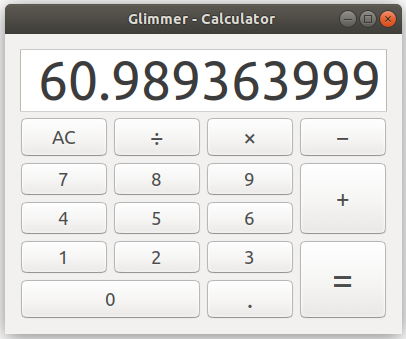
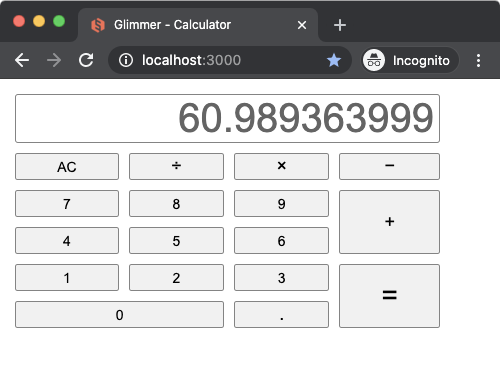
Glimmer app on the web (using glimmer-dsl-opal gem):
Start the Rails server:
rails s
Visit http://localhost:3000
(or visit: http://glimmer-cs-calculator-server.herokuapp.com)
You should see "Glimmer Calculator"
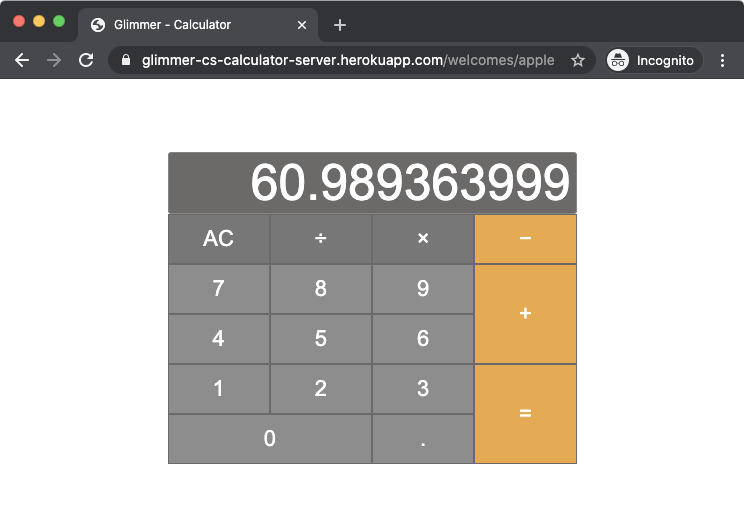
Here is an Apple Calculator CSS themed version (with CSS only, no app code changes):
Visit http://glimmer-cs-calculator-server.herokuapp.com/welcomes/apple
You should see "Apple Calculator Theme"
Glimmer Supporting Libraries
Here is a list of notable 3rd party gems used by Glimmer DSL for Opal:
- glimmer-dsl-xml: Glimmer DSL for XML & HTML in pure Ruby.
- glimmer-dsl-css: Glimmer DSL for CSS (Cascading Style Sheets) in pure Ruby.
- opal-async: Non-blocking tasks and enumerators for Opal.
- to_collection: Treat an array of objects and a singular object uniformly as a collection of objects.
Glimmer Process
Glimmer Process is the lightweight software development process used for building Glimmer libraries and Glimmer apps, which goes beyond Agile, rendering all Agile processes obsolete. Glimmer Process is simply made up of 7 guidelines to pick and choose as necessary until software development needs are satisfied.
Learn more by reading the GPG (Glimmer Process Guidelines)
Help
Issues
You may submit issues on GitHub.
Click here to submit an issue.
Chat
If you need live help, try to
Feature Suggestions
These features have been suggested. You might see them in a future version of Glimmer. You are welcome to contribute more feature suggestions.
Change Log
Contributing
Contributors
- Andy Maleh (Founder)
Click here to view contributor commits.
License
Copyright (c) 2020 - Andy Maleh. See LICENSE.txt for further details.
--
Built for Glimmer (Ruby Desktop Development GUI Library).