ActivityNotification




activity_notification provides integrated user activity notifications for Ruby on Rails. You can easily use it to configure multiple notification targets and make activity notifications with notifiable models, like adding comments, responding etc.
activity_notification supports Rails 5.0 and 4.2+. Currently, it is only supported with ActiveRecord ORM.
About
activity_notification provides following functions:
- Notification API (creating notifications, query for notifications and managing notification parameters)
- Notification controllers (managing open/unopen of notifications, link to notifiable activity page)
- Notification views (presentation of notifications)
- Grouping notifications (grouping like
"Kevin and 7 other users posted comments to this article") - Email notification
- Batch email notification
- Integration with Devise authentication
Notification index
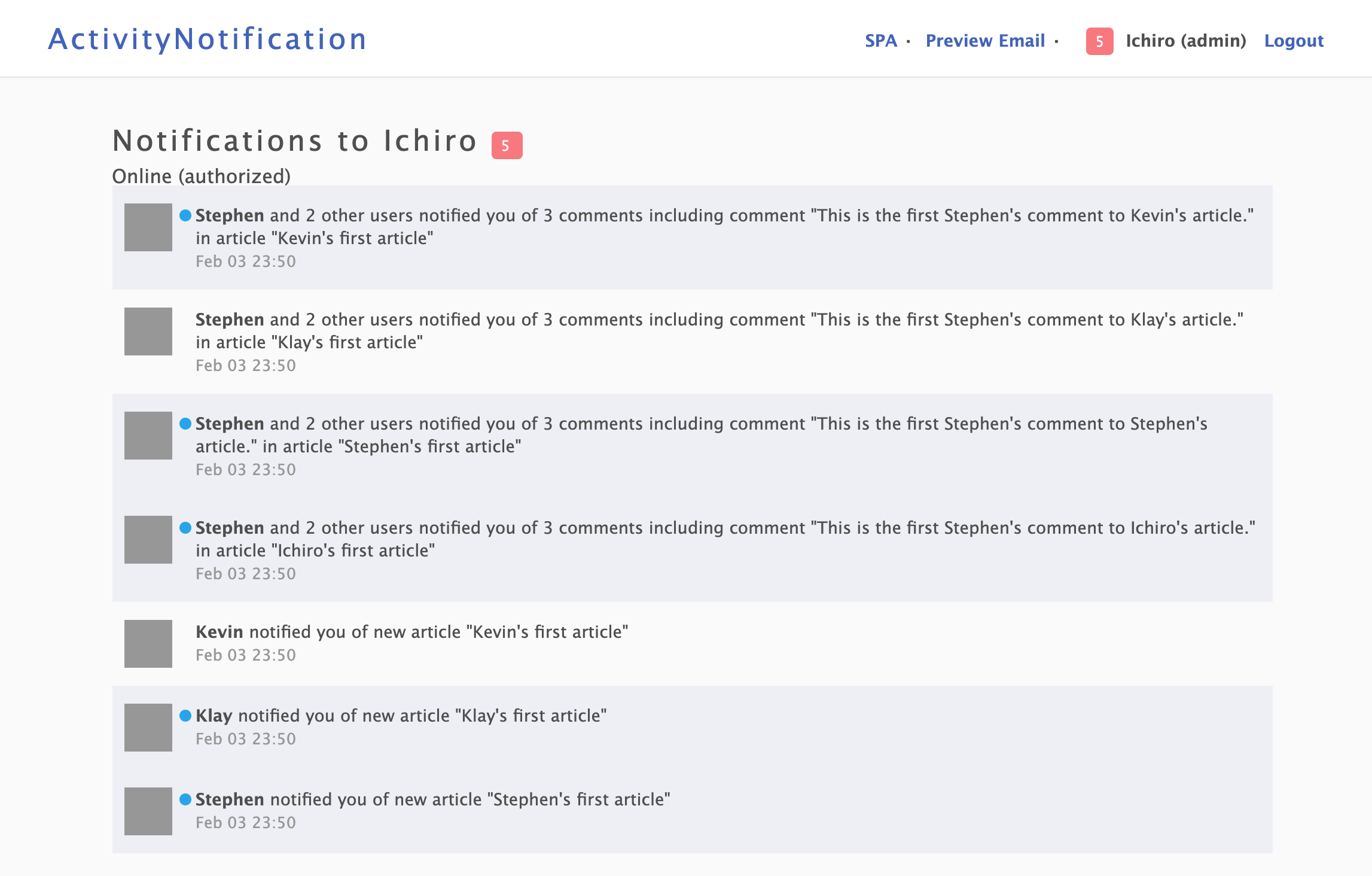
Plugin notifications

activity_notification deeply uses PublicActivity as reference in presentation layer.
Table of contents
- About
- Setup
- Gem installation
- Database setup
- Configuring models
- Configuring target model
- Configuring notifiable model
- Configuring views
- Configuring controllers
- Configuring routes
- Creating notifications
- Displaying notifications
- Preparing target notifications
- Rendering notifications
- Notification views
- i18n for notifications
- Functions
- Testing
- Documentation
- Common examples
Setup
Gem installation
You can install activity_notification as you would any other gem:
$ gem install activity_notification
or in your Gemfile:
gem 'activity_notification'
After you install activity_notification and add it to your Gemfile, you need to run the generator:
$ rails generate activity_notification:install
The generator will install an initializer which describes all configuration options of activity_notification.
It also generates a i18n based translation file which we can configure the presentation of notifications.
Database setup
Currently activity_notification is only supported with ActiveRecord.
Create migration for notifications and migrate the database in your Rails project:
$ rails generate activity_notification:migration
$ rake db:migrate
Configuring models
Configuring target model
Configure your target model (e.g. app/models/user.rb).
Add acts_as_target configuration to your target model to get notifications.
class User < ActiveRecord::Base
  # acts_as_target configures your model as ActivityNotification::Target
  # with parameters as value or custom methods defined in your model as lambda or symbol

  # This is an example without any options (default configuration) as the target
  acts_as_target
end
Note: acts_as_notification_target is an alias for acts_as_target and does the same.
Configuring notifiable model
Configure your notifiable model (e.g. app/models/comment.rb).
Add acts_as_notifiable configuration to your notifiable model representing activity to notify.
You have to define notification targets for all notifications from this notifiable model by :targets option. Other configurations are options. :notifiable_path option is a path to move when the notification will be opened by the target user.
class Article < ActiveRecord::Base
  belongs_to :user
  has_many :comments, dependent: :destroy
  has_many :commented_users, through: :comments, source: :user
end

class Comment < ActiveRecord::Base
  belongs_to :article
  belongs_to :user

  # acts_as_notifiable configures your model as ActivityNotification::Notifiable
  # with parameters as value or custom methods defined in your model as lambda or symbol
  acts_as_notifiable :users,
    # Notification targets as :targets is a necessary option
    # Set to notify to author and users commented to the article, except comment owner self
    targets: ->(comment, key) {
      ([comment.article.user] + comment.article.commented_users.to_a - [comment.user]).uniq
    },
    # Path to move when the notification will be opened by the target user
    # This is a optional since activity_notification uses polymorphic_path as default
    notifiable_path: :article_notifiable_path

  def article_notifiable_path
    article_path(article)
  end
end
Configuring views
activity_notification provides view templates to customize your notification views. The view generator can generate default views for all targets.
$ rails generate activity_notification:views
If you have multiple target models in your application, such as User and Admin, you will be able to have views based on the target like notifications/users/index and notifications/admins/index. If no view is found for the target, activity_notification will use the default view at notifications/default/index. You can also use the generator to generate views for the specified target:
$ rails generate activity_notification:views users
If you would like to generate only a few sets of views, like the ones for the notifications (for notification views) and mailer (for notification email views),
you can pass a list of modules to the generator with the -v flag.
$ rails generate activity_notification:views -v notifications
Configuring controllers
If the customization at the views level is not enough, you can customize each controller by following these steps:
Create your custom controllers using the generator with a target:
$ rails generate activity_notification:controllers usersIf you specify
usersas the target, controllers will be created inapp/controllers/users/. And the notifications controller will look like this:class Users::NotificationsController < ActivityNotification::NotificationsController # GET /:target_type/:target_id/notifcations # def index # super # end # ... # POST /:target_type/:target_id/notifcations/:id/open # def open # super # end # ... endTell the router to use this controller:
notify_to :users, controllers: { notifcations: 'users/notifcations' }Generate views from
activity_notification/notifcations/userstousers/notifcations/users. Since the controller was changed, it won't use the default views located inactivity_notification/notifcations/default.Finally, change or extend the desired controller actions.
You can completely override a controller action
class Users::NotificationsController < ActivityNotification::NotificationsController
  # ...

  # POST /:target_type/:target_id/notifcations/:id/open
  def open
    # Custom code to open notification here

    # super
  end

  # ...
end
Configuring routes
activity_notification also provides routing helper. Add notification routing to config/routes.rb for the target (e.g. :users):
Rails.application.routes.draw do
  notify_to :users
end
Creating notifications
You can trigger notifications by setting all your required parameters and triggering notify
on the notifiable model, like this:
@comment.notify :users, key: "comment.reply"
Or, you can call public API as ActivityNotification::Notification.notify
ActivityNotification::Notification.notify :users, @comment, key: "comment.reply"
Hint: :key is a option. Default key #{notifiable_type}.default which means comment.default will be used without specified key.
Displaying notifications
Preparing target notifications
To display notifications, you can use notifications association of the target model:
# custom_notifications_controller.rb
def index
  @notifications = @target.notifications
end
You can also use several scope to filter notifications. For example, unopened_only to filter them unopened notifications only.
# custom_notifications_controller.rb
def index
  @notifications = @target.notifications.unopened_only
end
Moreover, you can use notification_index or notification_index_with_attributes methods to automatically prepare notification index for the target.
# custom_notifications_controller.rb
def index
  @notifications = @target.notification_index_with_attributes
end
Rendering notifications
You can use render_notifications helper in your views to show the notification index:
<%= render_notifications(@notifications) %>
We can set :target option to specify the target type of notifications:
<%= render_notifications(@notifications, target: :users) %>
Note: render_notifications is an alias for render_notification and does the same.
If you want to set notification index in the common layout, such as common header, you can use render_notifications_of helper like this:
<%= render_notifications_of current_user, index_content: :with_attributes %>
Then, content named :notification_index will be prepared and you can use it in your partial template.
...
<%= yield :notification_index %>
...
Sometimes, it's desirable to pass additional local variables to partials. It can be done this way:
<%= render_notification(@notification, locals: {friends: current_user.friends}) %>
Notification views
activity_notification looks for views in app/views/activity_notification/notifications/:target.
For example, if you have an notification with :key set to "notification.comment.reply" and rendered it with :target set to :users, the gem will look for a partial in app/views/activity_notification/notifications/users/comment/_reply.html.(|erb|haml|slim|something_else).
Hint: the "notification." prefix in :key is completely optional, you can skip it in your projects or use this prefix only to make namespace.
If you would like to fallback to a partial, you can utilize the :fallback parameter to specify the path of a partial to use when one is missing:
<%= render_notification(@notification, target: :users, fallback: :default) %>
When used in this manner, if a partial with the specified :key cannot be located it will use the partial defined in the :fallback instead. In the example above this would resolve to activity_notification/notifications/users/_default.html.(|erb|haml|slim|something_else).
If you do not specify :target option like this,
<%= render_notification(@notification, fallback: :default) %>
the gem will look for a partial in default as the target type which means activity_notification/notifications/default/_default.html.(|erb|haml|slim|something_else).
If a view file does not exist then ActionView::MisingTemplate will be raised. If you wish to fallback to the old behaviour and use an i18n based translation in this situation you can specify a :fallback parameter of :text to fallback to this mechanism like such:
<%= render_notification(@notification, fallback: :text) %>
Finally, default views of activity_notification depends on jQuery and you have to add requirements to application.js in your apps:
//= require jquery
//= require jquery_ujs
i18n for notifications
Translations are used by the #text method, to which you can pass additional options in form of a hash. #render method uses translations when view templates have not been provided. You can render pure i18n strings by passing {i18n: true} to #render_notification or #render.
Translations should be put in your locale .yml files as text field. To render pure strings from I18n example structure:
notification:
  user:
    article:
      create:
        text: 'Article has been created'
      destroy:
        text: 'Some user removed an article!'
    comment:
      post:
        text: "<p>%{notifier_name} posted comments to your article %{article_title}</p>"
      reply:
        text: "<p>%{notifier_name} and %{group_member_count} other users replied for your comments</p>"
  admin:
    article:
      post:
        text: '[Admin] Article has been created'
This structure is valid for notifications with keys "notification.comment.reply" or "comment.reply". As mentioned before, "notification." part of the key is optional. In addition for above example, %{notifier_name} and %{article_title} are used from parameter field in the notification record.
Functions
Email notification
activity_notification provides email notification to the notification targets.
Setup mailer
First, you need to set up the default URL options for the activity_notification mailer in each environment. Here is a possible configuration for config/environments/development.rb:
config.action_mailer. = { host: 'localhost', port: 3000 }
Email notification is disabled as default. You can configure to enable email notification in initializer activity_notification.rb.
config.email_enabled = true
config.mailer_sender = '[email protected]'
You can also configure them for each model by acts_as roles like these.
class User < ActiveRecord::Base
  # Example using confirmed_at of devise field
  # to decide whether activity_notification sends notification email to this user
  acts_as_notification_target email: :email, email_allowed: :confirmed_at
end
class Comment < ActiveRecord::Base
  belongs_to :article
  belongs_to :user

  acts_as_notifiable :users,
    targets: ->(comment, key) {
      ([comment.article.user] + comment.article.commented_users.to_a - [comment.user]).uniq
    },
    # Allow notification email
    email_allowed: true,
    notifiable_path: :article_notifiable_path

  def article_notifiable_path
    article_path(article)
  end
end
Email templates
activity_notification will look for email template in the same way as notification views. For example, if you have an notification with :key set to "notification.comment.reply" and target_type users, the gem will look for a partial in app/views/activity_notification/mailer/users/comment/_reply.html.(|erb|haml|slim|something_else).
If this template is missing, the gem will look for a partial in default as the target type which means activity_notification/mailer/default/_default.html.(|erb|haml|slim|something_else).
i18n for email
The subject of notification email can be put in your locale .yml files as mail_subject field:
notification:
  user:
    comment:
      post:
        text: "<p>Someone posted comments to your article</p>"
        mail_subject: 'New comment to your article'
Batch email notification
activity_notification provides batch email notification to the notification targets. You can send notification email daily, hourly or weekly and so on with a scheduler like whenever.
Setup mailer
First, you need to set up the default URL options for the activity_notification mailer in each environment.
Batch email notification is disabled as default. You can configure to enable email notification in initializer activity_notification.rb like single email notification.
config.email_enabled = true
config.mailer_sender = '[email protected]'
You can also configure them for each target model by acts_as_notification_target role like this.
class User < ActiveRecord::Base
  # Example using confirmed_at of devise field
  # to decide whether activity_notification sends batch notification email to this user
  acts_as_notification_target email: :email, batch_email_allowed: :confirmed_at
end
Then, you can automatically send batch notification email for unopened notifications only to the all specified targets with batch_key.
# Send batch notification email to the users with unopened notifications
User.send_batch_unopened_notification_email(batch_key: 'batch.comment.post')
You can also add conditions to filter notifications, like this:
# Send batch notification email to the users with unopened notifications of specified key in 1 hour
User.send_batch_unopened_notification_email(batch_key: 'batch.comment.post', filtered_by_key: 'comment.post', custom_filter: ["created_at >= ?", time.hour.ago])
Batch email templates
activity_notification will look for batch email template in the same way as email notification using batch_key.
batch_key is specified by :batch_key option. If the option is not specified, The key of the first notification will be used as batch_key.
i18n for batch email
The subject of batch notification email also can be put in your locale .yml files as mail_subject field for batch_key.
notification:
  user:
    batch:
      comment:
        post:
          mail_subject: 'New comments to your article'
Grouping notifications
activity_notification provides the function for automatically grouping notifications. When you created a notification like this, all unopened notifications to the same target will be grouped by article set as :group options:
@comment.notify :users key: 'comment.post', group: @comment.article
When you use default notification view, it is helpful to configure acts_as_notification_group (or acts_as_group) with printable_name option to render group instance.
class Article < ActiveRecord::Base
  belongs_to :user
  acts_as_notification_group printable_name: ->(article) { "article \"#{article.title}\"" }
end
You can use group_owners_only scope to filter owner notifications representing each group:
# custom_notifications_controller.rb
def index
  @notifications = @target.notifications.group_owners_only
end
notification_index and notification_index_with_attributes methods also use group_owners_only scope internally.
And you can render them in a view like this:
<% if notification.group_member_exists? %>
  <%= "#{notification.notifier.name} and #{notification.group_member_count} other users" %>
<% else %>
  <%= "#{notification.notifier.name}" %>
<% end %>
<%= "posted comments to your article \"#{notification.group.title}\"" %>
This presentation will be shown to target users as Kevin and 7 other users posted comments to your article "Let's use Ruby".
You can also use %{group_member_count}, %{group_notification_count}, %{group_member_notifier_count} and %{group_notifier_count} in i18n text as a field:
notification:
  user:
    comment:
      post:
        text: "<p>%{notifier_name} and %{group_member_notifier_count} other users posted %{group_notification_count} comments to your article</p>"
        mail_subject: 'New comment to your article'
Then, you will see Kevin and 7 other users replied 10 comments to your article".
Integration with Devise
activity_notification supports to integrate with devise authentication.
First, add notification routing as integrated with devise to config/routes.rb for the target:
Rails.application.routes.draw do
  devise_for :users
  # Integrated with devise
  notify_to :users, with_devise: :users
end
Then activity_notification will use notifications_with_devise_controller as a notification controller. The controller actions automatically call authenticate_user! and the user will be restricted to access and operate own notifications only, not others'.
Hint: HTTP 403 Forbidden will be returned for unauthorized notifications.
You can also use different model from Devise resource as a target. When you will add this to config/routes.rb:
Rails.application.routes.draw do
  devise_for :users
  # Integrated with devise for different model
  notify_to :admins, with_devise: :users
end
and add devise_resource option to acts_as_target in the target model:
class Admin < ActiveRecord::Base
  belongs_to :user
  acts_as_target devise_resource: :user
end
activity_notification will authenticate :admins notifications with devise authentication for :users.
In this example activity_notification will confirm the user who admin belongs to with authenticated user by devise.
Testing
Testing your application
First, you need to configure ActivityNotification as described above.
Testing notifications with RSpec
Prepare target and notifiable model instances to test generating notifications (e.g. @user and @comment).
Then, you can call notify API and test if notifications of the target are generated.
# Prepare
= create(:user)
@comment = .articles.create.comments.create
expect(.notifications.unopened_only.count).to eq(0)
# Call notify API
@comment.notify :users
# Test generated notifications
expect(.notifications.unopened_only.count).to eq(1)
expect(.notifications.unopened_only.latest.notifiable).to eq(@comment)
Testing email notifications with RSpec
Prepare target and notifiable model instances to test sending notification email. Then, you can call notify API and test if notification email is sent.
# Prepare
= create(:user)
@comment = .articles.create.comments.create
expect(ActivityNotification::Mailer.deliveries.size).to eq(0)
# Call notify API and send email now
@comment.notify :users, send_later: false
# Test sent notification email
expect(ActivityNotification::Mailer.deliveries.size).to eq(1)
expect(ActivityNotification::Mailer.deliveries.first.to[0]).to eq(.email)
Note that notification email will be sent asynchronously without false as send_later option.
# Prepare
include ActiveJob::TestHelper
= create(:user)
@comment = .articles.create.comments.create
expect(ActivityNotification::Mailer.deliveries.size).to eq(0)
# Call notify API and send email asynchronously as default
# Test sent notification email with ActiveJob queue
expect {
perform_enqueued_jobs do
@comment.notify :users
end
}.to change { ActivityNotification::Mailer.deliveries.size }.by(1)
expect(ActivityNotification::Mailer.deliveries.first.to[0]).to eq(.email)
Testing gem alone
Testing with RSpec
Pull git repository and execute RSpec.
$ git pull https://github.com/simukappu/activity_notification.git
$ cd activity_notification
$ bundle install —path vendor/bundle
$ bundle exec rspec
  - or -
$ bundle exec rake
Dummy Rails application
Test module includes dummy Rails application. You can run the dummy application as common Rails application.
$ cd spec/rails_app
$ bin/rake db:migrate
$ bin/rake db:seed
$ bin/rails server
Then, you can access http://localhost:3000 for the dummy application.
Documentation
See API Reference for more details.
RubyDoc.info does not support parsing methods in included and class_methods of ActiveSupport::Concern currently.
To read complete documents, please generate YARD documents on your local environment:
$ git pull https://github.com/simukappu/activity_notification.git
$ cd activity_notification
$ bundle install —path vendor/bundle
$ bundle exec yard doc
$ bundle exec yard server
Then you can see the documents at http://localhost:8808/docs/index.
Common examples
To be prepared. See dummy Rails application in spec/rails_app.
Help
Contact us by email of this repository.
License
activity_notification project rocks and uses MIT License.