TTYHue
Ruby gem for colorizing terminal output, supporting terminal theme colors as well as more fine-grained gui colors palette.
Features
- no runtime dependencies
- easy to use formatting HTML-like syntax
- support for custom styles
Usage
Installation
$ gem install ttyhue
require 'ttyhue'
Terminal theme colors
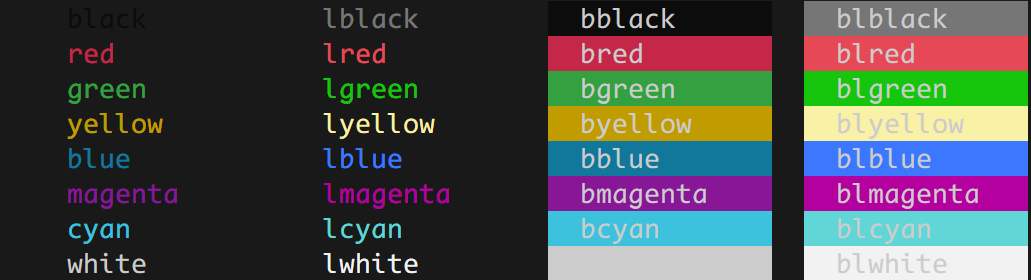
TTYHue supports default formatting for terminal theme colors:
TTYHue.c "This is {red}red{/red} and this is {blue}blue{/blue}"
including color light options
TTYHue.c "This is {lred}light red{/lred} and this is {lblue}light blue{/lblue}"
... or background mode
TTYHue.c "This is {blred}light red background{/blred} and this is {bblue}blue background{/bblue}"
All possible options can be listed by:
TTYHue.preview_termcolors
GUI colors
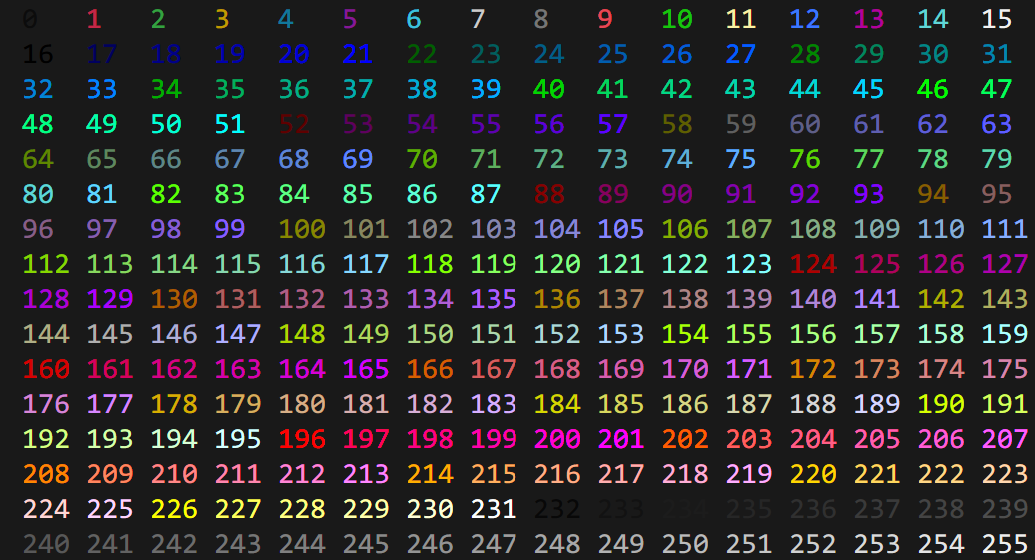
TTYHue also supports term color codes (0-255) directly by prefixing the corresponding code with gui.
TTYHue.c "This is {gui123}foreground{gui123} and {bgui123}background{/bgui123}"
The absolute list of color codes can be previewed by typing:
TTYHue.preview_guicolors
Custom styles
In order to improve readability, color codes can be wrapped into custom styles.
TTYHUe.c(
  "{header}Title{/header}\n{content}Content{/content}\n{footer}Footer{/footer}",
  header: {fg: :blue},
  content: {fg: :lgray, bg: :gui234},
  footer: {fg: :gui252}
)
Custom styles can be set globally as well.
TTYHue.set_style(
  header: {fg: :blue},
  content: {fg: :lgray, bg: :gui234},
  footer: {fg: :gui252}
)

TTYHue.c "{header}Title{/header}\n{content}Content{/content}\n{footer}Footer{/footer}"
Contributing
Workflow
- Fork it ( https://github.com/railis/ttyhue/fork )
- Create your feature branch (
git checkout -b new_feature) - Commit your changes (
git commit -am 'Commit feature') - Push to the branch (
git push origin new_feature) - Create a new Pull Request
Running tests
$ bundle install
$ rake test
Copyright
Copyright (c) 2022 Dominik Sito. See LICENSE for further details.